GA4 Lead Attribution for GCC B2B Sites: Setup
Abidhusain Chidi12 min read
Picture a B2B site in Muscat with an English side and an Arabic side. This month GA4 shows 40 form submits, the CRM holds 31 leads, and the biggest traffic source is “Direct”. Nobody can say which page, or which LinkedIn post, started those 31 conversations. That gap is what GA4 lead attribution has to close, and on a Gulf site it opens wider than usual.
This guide is a setup for a small team with no attribution tool. You will record the lead as a key event, plan your English and Arabic paths before tagging anything, label your links, store one clean page path on every lead, and then read GA4 and the CRM side by side. The numbers in the examples are made up to show the method, not client data.
We build LiftUp, and its Insights tab matches leads to GA4 pages by path. This post is about getting the data right whichever CRM you use, and I’ll mark where LiftUp does part of the work and where it doesn’t.
Why GA4 lead attribution breaks on Gulf B2B sites
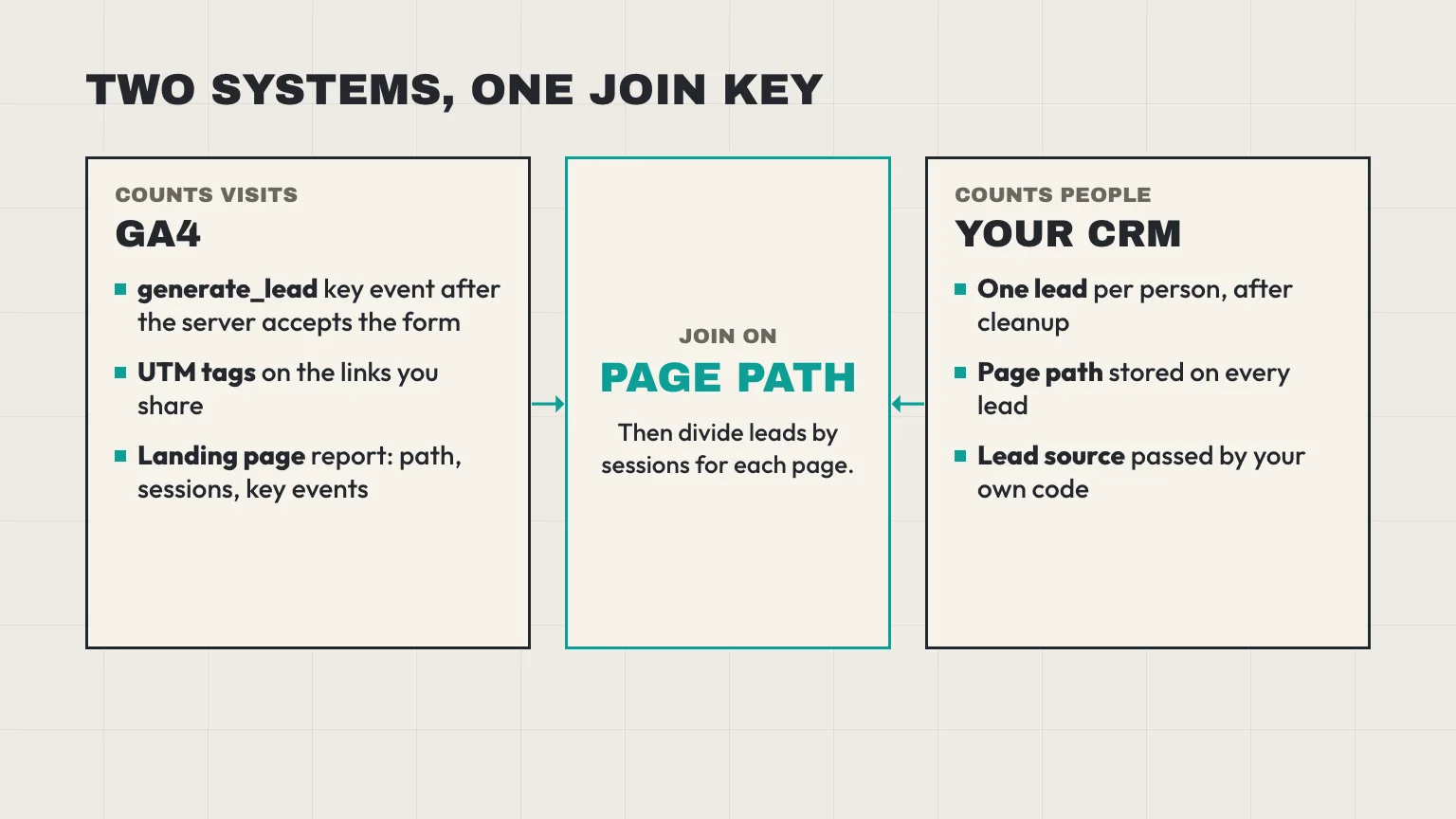
GA4 and your CRM count different things, and a few Gulf-specific habits widen the difference.
- GA4 counts events, the CRM counts people. A buyer who submits the form twice is two events and one lead. A student asking for a free template is one event and zero sales opportunities.
- The landing page belongs to the session. Google defines it as the page path of the first page view in a session. A reader who finds you through an Arabic article on Monday and returns through the homepage on Thursday to book a call gives Thursday’s page the credit.
- Untagged links have no source to read. A link you share in a LinkedIn post or a WhatsApp group carries nothing that tells GA4 where it was clicked. When the app passes no referrer either, the visit lands in “Direct”.
- Visitors who say no to cookies leave gaps. Their form still reaches your CRM, while GA4 may record little or nothing.
So treat the CRM as the count of leads and GA4 as the count of visits. The job is to join them on something both can see, and the only thing both can see on a small site is the page path. If you want the per-post version of that join, with a worked table, we wrote it up in which blog posts generate leads. This post stays on the setup and the Gulf details.
Plan your English and Arabic paths before you tag anything
Paths are your join key, so decide their shape first. Changing them later splits your history in two.
Put each language in its own folder
Use /en/ and /ar/ (or just /ar/ if English sits at the root). Google’s guidance on multi-regional and multilingual sites lists subdirectories as easy to set up and low maintenance, because everything stays on one host, and it does not recommend URL parameters for locale. A folder also gives you a clean way to filter GA4 by language later.
If you are still writing the Arabic and English content itself, our 90-day plan for B2B content marketing in Oman is a good place to settle the page list before you fix the paths.
Keep slugs short and Latin
An Arabic slug works in a browser, but the address your page reports is percent-encoded. I ran one through Node’s URL parser on 11 October 2026:
new URL("https://example.com/ar/blog/مدونة-العملاء/").pathname
// "/ar/blog/%D9%85%D8%AF%D9%88%D9%86%D8%A9-%D8%A7%D9%84%D8%B9%D9%85%D9%84%D8%A7%D8%A1/"
Each Arabic letter turned into six characters. A 25-letter slug becomes 150 characters of percent codes, which is awkward to read in a report and easy to mangle in a spreadsheet. LiftUp’s page field also stops at 500 characters and rejects longer values, so a long encoded slug on a deep path can fail outright.
I did not check whether GA4’s Landing page report shows the decoded or the encoded form, so look at one real Arabic row in your property before you build any join. The safe habit is short Latin slugs, such as /ar/services/crm-setup/, with the Arabic title inside the page.
Pick one trailing-slash rule
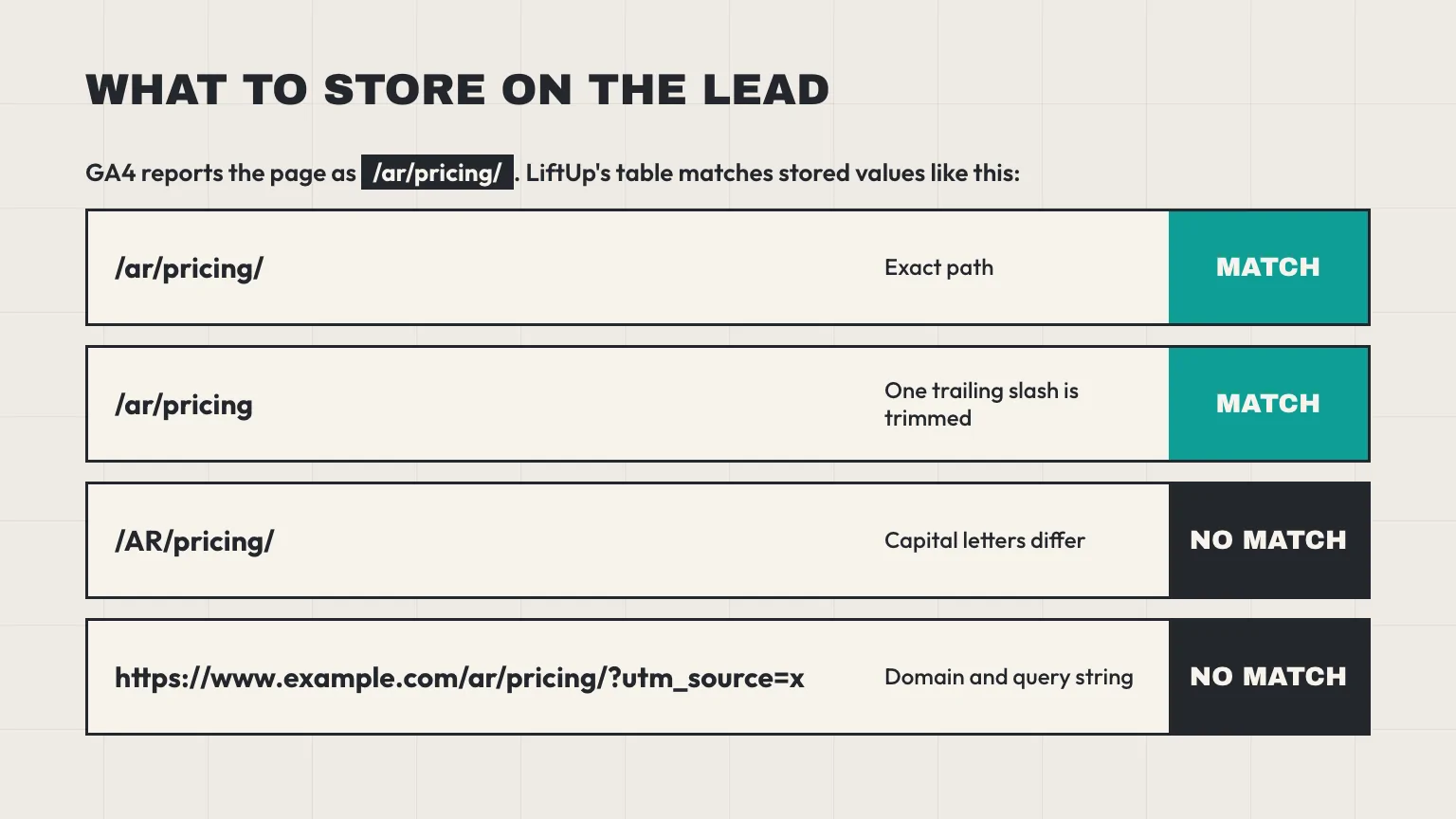
Choose with or without a trailing slash, redirect the other, and keep lowercase letters. Matching tools are picky. LiftUp, for example, trims one trailing slash and nothing else, so /ar/pricing and /ar/pricing/ match each other, but /AR/pricing/ does not match either.
Record the GA4 lead as a key event
Google’s recommended event for a form lead is generate_lead, which it describes as measuring “when a lead has been generated (for example, through a form)”. It accepts currency, value and a lead_source string. Send it after your server accepts the form, not when the button is clicked, so failed and blocked submissions stay out of the count:
// Runs after your server answers 200
gtag('event', 'generate_lead', {
  lead_source: 'website_form',
  form_name: 'demo_request'
});
Then go to Admin, then Data display, then Events, and click the star beside generate_lead to make it a key event. A standard property allows 30 key events, and the change only counts from the day you make it, so do it before you start a campaign, not after. To see lead_source or form_name as a column in reports, register each as a custom dimension, because Google only uses extra event parameters in reports once you do.
Keep two things out of the event. First, never send an email address or phone number to GA4, in a parameter or in the URL. Second, keep clicks on a phone number or chat link as their own events with their own names. A click is not a lead, and mixing the two inflates the figure you report to your board. If your form posts through your own server, the Next.js contact form to CRM guide shows the route handler, and that is the natural place to decide when to fire the event.
Tag your links so GA4 lead attribution has a source
GA4 reads the source of a visit from UTM tags on the link. Google’s UTM help says to always include the three tags utm_source, utm_medium and utm_campaign, that values are case sensitive (google and Google are different sources), and that lowercase is the safe choice. Missing parameters show as “(not set)”.
Write the convention down once and share it with everyone who posts a link. A simple one for a Gulf B2B team:
| Where the link lives | Source value | Medium value | Campaign value (example) |
|---|---|---|---|
| LinkedIn ad | paid_social | 2026q4_oman_hr_demo | |
| LinkedIn company post | organic_social | 2026q4_launch | |
| Email newsletter | newsletter | oct_2026_issue | |
| Partner or event page | partner_name | referral | expo_2026 |
Be clear about where these tags end up. They live in the link and in GA4. A CRM only gets what your form code sends it, and LiftUp does not read UTM tags, so if you want the source on the lead, pass it yourself (the next section does).
LinkedIn lead forms never touch your site
If you run LinkedIn Lead Gen Forms, the person fills and sends the form inside LinkedIn. They never reach your site, so a tag on the link has nothing to attach to and GA4 sees nothing. Treat those leads as their own channel. Export them and import them into the CRM with a Source column such as “linkedin-lead-form”. In LiftUp, CSV import takes up to 2,000 rows and maps that column to the lead’s source.
Imported leads have no landing page, so they will not appear in the path join later. Count them separately and do not read their absence as a weak website.
For ads that do send people to your site, open one live ad in Campaign Manager and check that its final link carries your tags before you spend anything.
Store one clean path on every lead
This is the step that makes GA4 lead attribution possible without a tool. Put a hidden field on every form and fill it with the page path only: no domain, no query string, no tracking tags, language folder included. The path is what GA4 shows in its Landing page report, which is why it matches. A field holding https://www.example.com/ar/pricing/?utm_source=x never will.
Because GA4’s landing page is the first page of the visit, store the page where the visit began, not the page the form sits on. Grab the utm_source on that first page too, since the tag is gone from the address once the reader clicks through:
<input type="hidden" name="landing_path">
<input type="hidden" name="utm_source">
<script>
  (function () {
    var first = {
      landing_path: location.pathname,
      utm_source: new URLSearchParams(location.search).get('utm_source') || 'untagged'
    };
    try {
      var saved = sessionStorage.getItem('first_touch');
      if (saved) first = JSON.parse(saved);
      else sessionStorage.setItem('first_touch', JSON.stringify(first));
    } catch (e) {}
    Object.keys(first).forEach(function (name) {
      document.querySelectorAll('input[name="' + name + '"]').forEach(function (el) {
        el.value = first[name];
      });
    });
  })();
</script>
A browser tab and a GA4 session do not end at exactly the same moment, so a few leads will carry a slightly different page. That is close enough for a table of pages.
Then send both from your server with the lead: the path as the page and the stored utm_source as the lead source. The LiftUp lead API calls them source_page (up to 500 characters) and lead_source (up to 200). If you leave source_page out, the API falls back to a page_url field and then to the Referer header, and both are often a full address that will not match a GA4 path. LiftUp’s embedded forms send the full address of the page they sit on, so those leads show up as their own rows, domain included. For clean matching, post through the API with the path.
Consent and the Gulf data laws
This section is general information, not legal advice. Ask counsel what your banner and form text need.
The laws point the same way: ask first. The UAE government’s data protection page says Federal Decree-Law 45 of 2021 prohibits processing personal data without the owner’s consent, with listed exceptions (u.ae, checked 11 October 2026). Oman’s law came from Royal Decree 6/2022, and the law firm CMS reports that its compliance grace period ended on 5 February 2026. Saudi Arabia has its own law, overseen by SDAIA.
What matters for GA4 lead attribution is what a “no” does to your numbers. Google’s behavioural modelling fills gaps for visitors who deny consent, but only for properties that clear a threshold: at least 1,000 events a day with analytics storage denied for 7 days, and at least 1,000 daily users sending events with consent granted on 7 of the previous 28 days. Eligibility is not guaranteed even then. A small B2B site will probably miss that bar, so expect GA4 to show fewer form events than your CRM shows leads, and trust the CRM for the lead count.
LiftUp does not add consent capture to your forms, so that stays with your banner and your form wording.
Join GA4 sessions to leads by landing page
Once the key event, the paths and the stored field are in place, the monthly read for GA4 lead attribution takes about 20 minutes.
- Set one date range. Use the last 90 days in both systems. Check your GA4 property’s reporting time zone too: Google says changing it only affects data from then on, so choose it once (Oman and the UAE both sit at UTC+4) and leave it.
- Export GA4 sessions by landing page. In Reports, open Engagement, then Landing page, and export the path, sessions and key events.
- Export CRM leads by page. Count unique leads per stored path. Remove duplicates and spam first, using our CRM data cleanup checklist, or your busiest form will look better than it is.
- Join on the path. Match the two lists in a spreadsheet and divide leads by sessions.
If you keep English and Arabic paths separate, the folder lets you answer a question most GA4 guides skip: do your Arabic pages bring leads at a different rate from your English ones, or do they bring traffic only? Compare the two folders as groups, not page by page, so small counts do not mislead you.
What LiftUp shows for GA4 lead attribution
On Growth, Insights has an Attribution tab with a table called “Landing pages: traffic against leads”. It lists up to 15 pages with sessions, leads and lead rate, and tags the page with the best rate. Starter’s Lead intelligence tab also lists pages with their leads and sessions. The Attribution table matches on the path with one trailing slash trimmed. Its Sessions column comes from GA4’s page path data, not the Landing page report, so it counts every session that viewed the page and its rates will run a little lower than your own spreadsheet join. LiftUp reads your GA4 data with read-only access and refreshes it daily.
The table has no revenue column, no UTM columns and no ad-spend panels. It tells you which pages turn visits into leads, which is the question this setup answers. Our Insights page shows the other reports.
Keep GA4 lead attribution honest with small numbers
If your site gets a few dozen leads a month, one buyer can reorder the whole table. Keep these habits.
- Do not rank a page on one or two leads. Wait for a longer window.
- Expect GA4 key events and CRM leads to disagree. Duplicates, spam, blocked scripts and consent all push the numbers apart.
- Look at speed too. A page that brings leads you answer in an hour is worth more than one whose leads wait three days, and our guide to a lead response SLA by lead score covers that side.
- Change your plans each quarter, not each week.
Who LiftUp isn’t for
LiftUp isn’t the right fit if you need revenue credited to each page, UTM campaign reports or ad-cost panels. It stores one page and one source per lead and reads neither tags nor ad spend. A suite built around campaign and revenue reporting, such as HubSpot, may suit you better, and our HubSpot comparison lays out where the two differ.
Next step
This week, do three things: fire generate_lead after the server accepts the form, fix your English and Arabic path rules, and add the hidden path field to every form. Leave them running for a month, then run the 20-minute join once. If you would like to see the landing-page table built from your own GA4 data, book a 30-minute LiftUp demo.
Frequently asked questions
How do you track leads in GA4?
Send the generate_lead event from your code after the server accepts the form, then mark it as a key event from the Events list in Admin. It counts only from the day you mark it. Keep email addresses and phone numbers out of the event.
Why does my GA4 lead count not match my CRM?
GA4 counts each submission, so one person sending a form twice counts twice, while the CRM shows one lead. Visitors who decline cookies, or block scripts, may be missing from GA4 and still reach the CRM. Spam can inflate either side, so clean the CRM first.
Should Arabic page paths use Arabic letters in the slug?
Short Latin slugs inside an /ar/ folder are safer. A browser reports an Arabic slug percent-encoded, at six characters per letter, which is hard to read in reports and long for any field with a length limit. Whichever you choose, compare one real row in GA4 with the path you store.
Does GA4 track LinkedIn Lead Gen Form leads?
No. The person fills the form inside LinkedIn and does not visit your site, so GA4 and UTM tags cannot see it. Export those leads and import them into your CRM with a Source label, then count them separately from website leads.
Do I need cookie consent for GA4 in the Gulf?
The UAE, Oman and Saudi Arabia all have personal data laws that centre on consent, so ask counsel what your banner and forms need. Google's consent mode is a tool that adjusts tags after a choice; it is not a banner. This is information, not legal advice.
Does LiftUp read UTM tags?
No. LiftUp stores the page and a source label for each lead that you send, and on Growth it matches pages by path against your GA4 sessions. UTM tags stay in the link and in GA4, so pass the source from your own form code if you want it on the lead.
How do I join GA4 sessions to CRM leads without a tool?
Export GA4 sessions by landing page and CRM leads by stored page path for the same 90 days. Remove duplicates and spam, join the two lists on the path in a spreadsheet, and divide leads by sessions. Treat pages with one or two leads as too early to call.

Abidhusain Chidi
Founder & CEO, QalbIT Infotech
Abidhusain Chidi is the founder and CEO of QalbIT Infotech, a software agency in Ahmedabad building web and SaaS products since 2018. He's also CTO at Seekly, an Australian revenue intelligence platform, and is building LiftUp. He writes about CRM, SaaS operations, and shipping multiple products as a small team.
See it live
Watch LiftUp run your whole growth stack
One console for CRM, content, AI editorial and insights — book a 30-minute walkthrough tailored to your team.
Book a demo