Google Search Console Country Data: India vs US
Abidhusain Chidi12 min read
Say a SaaS site shows 6,000 clicks in Search Console this month, and the founder reads it as proof that US interest is growing. Then someone opens the Countries tab and finds that India sends most of those clicks. The US buyers the company actually sells to are a thin slice. Nothing was wrong with the data. It was read without a Google Search Console country filter.
This guide uses Google Search Console country data to split India from the US, then checks whether either market produces leads. It is written for a small team that sells abroad from India, and it takes about an hour. We build LiftUp, a CRM with Search Console and GA4 views, so I’ll also say plainly what our product does here and what it doesn’t. All Google details below were checked on 11 October 2026.
What the Google Search Console country data measures
Before you filter anything, it helps to know what a “country” is in each tool. Mixing the two definitions is a common reason people decide the numbers are broken.
Search Console country is where the searcher was
The Performance report counts clicks and impressions from Google Search only. Google’s help page says search results are specific to the time, place, device and recent history of the person searching. So the country on a row is the place the search came from, not where your company is, and not where the buyer works. An Indian developer on a US client’s project is an Indian searcher.
The report also has a Countries tab next to Queries, Pages, Devices and Dates. Data grouped by country is added up for the whole property, so it covers every page on the site.
The international targeting report is gone
If you search for this topic, many results still describe a setting where you pick a target country for your site. Ignore them. Google’s own page says the International Targeting report is deprecated, because country targeting was found to have little value and is no longer supported. The page gives no date, and press coverage dates the removal to 2022. What Google still supports is hreflang, for language and region versions of a page.
That has one practical result. You cannot tell Google “this site is for the US”. You can only see which countries it already reaches, which is what the rest of this guide uses.
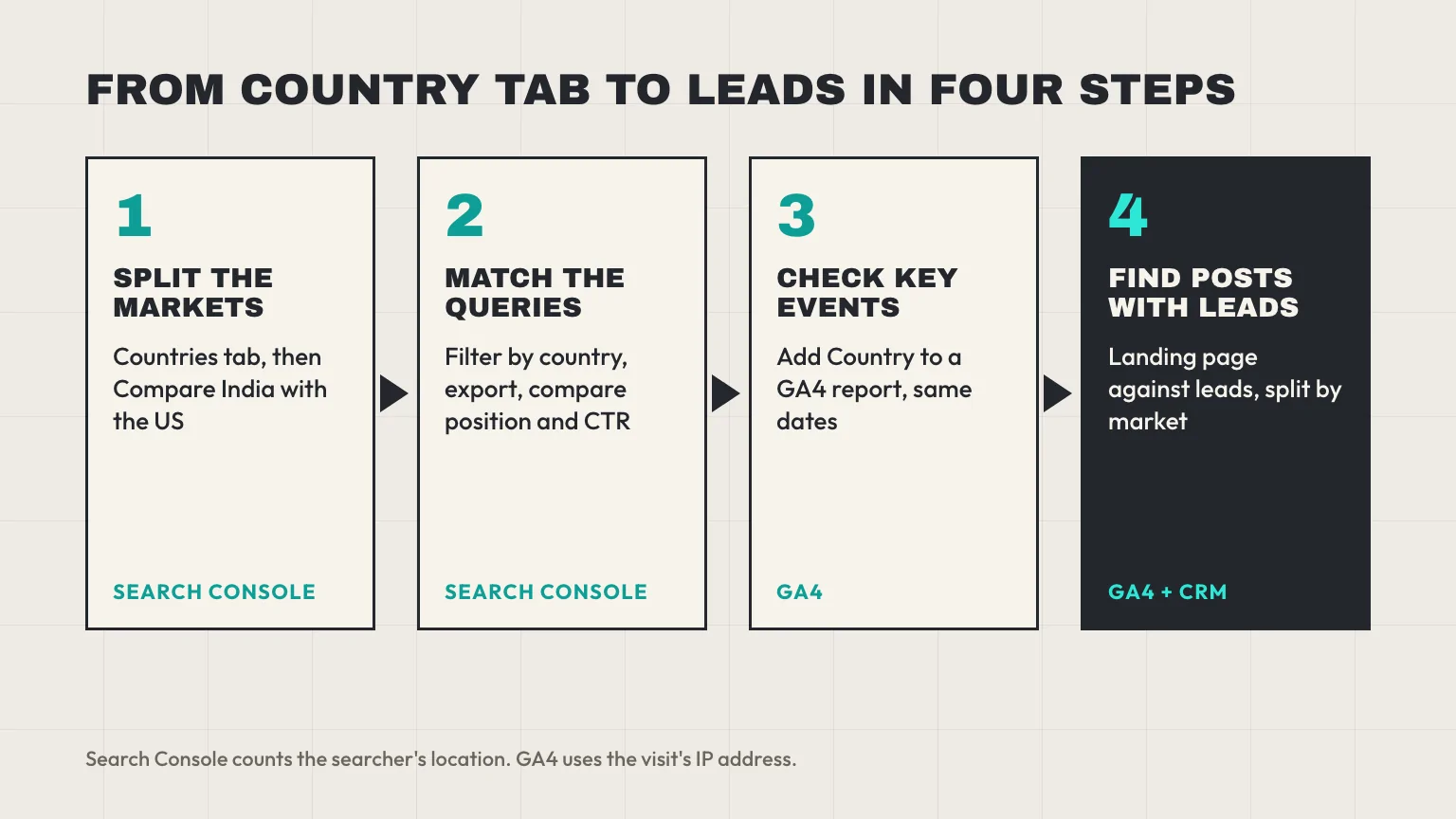
Step 1: Split India from the US with Search Console country data
The aim of this step is a side-by-side of the two markets, with clicks, impressions, CTR and average position for each.
Start with the Google Search Console country tab
Open the Performance report, set the date range, and click the Countries tab. You get one row per country. Look at two things first: how much of your total clicks and impressions India holds, and where the US sits. Impressions tell you how often you are shown, and clicks tell you how often that turns into a visit, so a market with big impressions and few clicks is a different problem from one with few impressions.
Write down both rows. You will want them later, because the date range shifts as you work.
Use Compare for a side-by-side
Counting rows by eye gets old fast. Instead, click Add filter, choose Country, then choose Compare in the filter dialog. Add India and the US and apply it. Per Google’s filtering and comparison page, a comparison takes two values only, one comparison is active at a time (starting a new one replaces the old one), and the table gains a Difference column.
The Difference column is the useful part. It answers “how much bigger is India than the US” in one number per metric, for the whole property or for any tab you switch to. Rows with very rare values may show “~” instead of a figure, so expect gaps for niche queries.
What the new multi-country filter does, and doesn’t
On 6 October 2026, Google announced that the country filter can take several countries at once, and Google’s filtering help page now describes it. Nothing in this guide depends on it.
Be careful with what it returns: one combined total. It adds India and the US together, so it cannot show how the two differ. It is handy for a region, such as the Gulf states, but for India against the US you still want Compare.
Step 2: Compare queries by Search Console country
Knowing India’s share of your clicks is only half of the picture. The more useful question is whether Indian and US searchers find you through the same queries, and whether you rank equally well for them.
Add a Country filter for India alone, open the Queries tab, and export the table. Then switch the filter to the US and export again. Put the two exports in one sheet and match them on the query. Each query now has a position, a CTR and impressions in both markets. Position and CTR are the two to read, because they are rates rather than counts, so a smaller market doesn’t look weak just for being smaller.
Here is a made-up example, to show the pattern rather than a benchmark:
| Query (example) | India impressions | India position | India CTR | US impressions | US position | US CTR |
|---|---|---|---|---|---|---|
| lead scoring template | 4,000 | 8.2 | 3.1% | 1,200 | 14.6 | 0.9% |
| crm lead response time | 600 | 11.0 | 1.5% | 2,500 | 6.4 | 4.8% |
| best crm for small business | 900 | 35.0 | 0.1% | 5,000 | 41.0 | 0.1% |
Each row tells a different story. The first query is a ranking gap: you sit on page one in India and on page two in the US, so the US searcher barely sees you. The second is a query where the US already likes you, so it deserves a better follow-up page. The third is not a country issue at all. Neither market finds you, and the fix is the page itself.
Two reading tips
First, high impressions with a low CTR in one market, at a decent position, usually means the title or snippet doesn’t match what that market expects. Currency, spelling and examples all send signals. Second, treat a handful of impressions as noise. A position of 3.0 from 12 impressions says very little.
Step 3: Check GA4 key events by country
Clicks are not leads. To see whether either country produces leads, move to GA4 and look at key events, which are the actions you have marked as important to your business, such as a demo request.
Why GA4 will not match Search Console by country
The two tools define a country differently, so the totals will not match, and that is not a bug. Search Console uses the place of the searcher. GA4 approximates geography from the IP address of the visit. A visitor on a VPN or a company network shows up in the country of that connection.
For the wider reason clicks and sessions diverge, such as consent banners and redirects, see our guide to Search Console against GA4. Here the point is narrower: expect country-level gaps, and judge shares rather than raw counts.
Reading key events by country
In any GA4 report that lists key events, add Country as a secondary dimension, or build a comparison with India and the US as two segments. Menu labels change between GA4 releases, so I won’t give click paths. What you want is a small table with sessions, key events and a rate for each country, for the same dates you used in Search Console.
GA4’s Queries report can also show Search Console queries next to Analytics data. It needs a Search Console link on the property, and Google’s GA4 help lists Country as one of the Analytics dimensions that work with it. Search Console keeps 16 months of data, and that Queries report holds no more, so export a copy each quarter if you want year-on-year comparisons.
Now compare the shares. Suppose India is 70% of Search Console clicks and 65% of GA4 sessions, which is close enough to trust. If India is only 20% of your key events, you have your first real finding: the traffic is not the audience. Sessions from India can still be valuable, but they are not paying for the content.
Step 4: Find the posts that bring leads, not clicks
The last step goes from a market to a page. A country can send you lots of clicks to one post and zero demo requests, while a small market lands on a different post and fills your form. Only the post-level view shows that.
The method has two parts. Count key events per landing page in GA4, and store the page against each lead in your CRM so the lead count is not a session estimate. We wrote the full routine in Which Blog Posts Generate Leads? A GA4 + CRM Method, and the key-event setup for GCC sites in GA4 Lead Attribution for GCC B2B Sites. Run those, then split the result by the markets from Step 1.
This is where LiftUp fits, and where it stops. Insights puts GA4 sessions, channels and landing pages next to Search Console queries, pages and daily clicks, from the Starter plan up. The “Landing pages: traffic against leads” table, which matches pages to leads by path, is on Growth. GA4’s “Top countries” card in Insights shows visitors by country with their share of sessions. But the Search Console view has no country split, and LiftUp leads have no built-in country field. So do Steps 1 and 2 in Search Console itself, and use LiftUp for the page-to-lead join.
How to read the Google Search Console country split
With the four views side by side, most sites land in one of five patterns. Treat the table as a starting rule set, not a law.
| What you see | Likely meaning | What to do |
|---|---|---|
| Most clicks from India, most leads from the US | Indian readers like the content, US buyers use a small part of it | Write for the US queries that already produce leads, and stop judging posts by total clicks |
| US impressions are high, US CTR is low | You appear, but the title or snippet doesn’t fit | Rewrite titles and descriptions with US spelling and examples, then recheck in a month |
| US position is far worse than India for the same query | The page ranks locally but isn’t competitive in the US | Improve the page or write a more specific one for that query |
| India sends leads, but they are small accounts | The market is real but isn’t your target | Decide on purpose whether to serve it, and don’t let it set the content plan by accident |
| Both markets send clicks and no leads | The problem is the page or the offer, not the country | Fix the call to action on the top landing pages first |
Say India sends 70% of clicks and the US sends 90% of leads. The plain reading is that the US queries are worth more per click, even though they are fewer. Spend the next month of writing there, and check the Indian share again at the end.
One India-to-US detail people miss: a US lead sent in the American afternoon lands in the middle of the Indian night. If that’s your pattern, set a clear reply deadline, as in Lead Response SLA: How to Set One by Lead Score.
Traps that skew Google Search Console country numbers
These five mistakes show up often in country reports.
Small samples and anonymised queries
Some countries produce only a few searches, so their CTR and position jump around. Wait for a few hundred impressions before you draw conclusions. Search Console also leaves anonymised queries out of query-level tables, so a country’s query list may add up to less than its total clicks.
The combined CTR trap
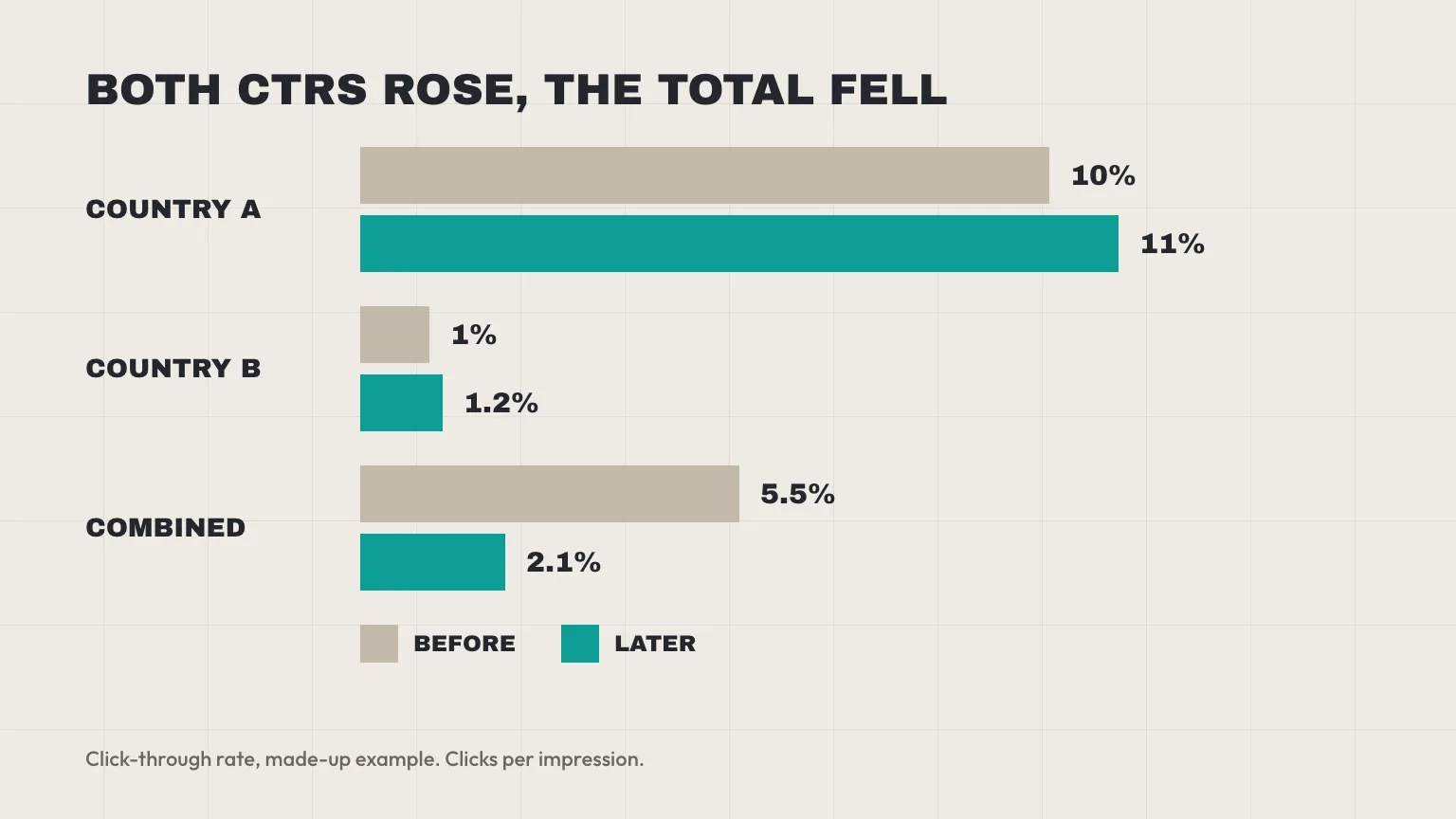
A combined CTR can fall while CTR improves in every country, because the mix of impressions changed. Take two markets. Before: country A has 1,000 impressions and 100 clicks (10%), country B has 1,000 impressions and 10 clicks (1%), so the total is 110 clicks from 2,000 impressions, or 5.5%. Later, A has 200 impressions and 22 clicks (11%), and B has 2,000 impressions and 24 clicks (1.2%). Both CTRs rose, but the total is 46 clicks from 2,200 impressions, or 2.1%. Always read CTR per country before you read it combined.
Average position blends markets
An average position for an unfiltered query mixes every country. A query can be third in one market and tenth in another and show up as a middling number. This is why Step 2 filters first and averages second.
VPNs, fresh data and the 16-month window
VPN traffic moves visits between countries in GA4. In Search Console, the most recent days are preliminary (the chart draws them as a dotted line), so compare full weeks, not single days. Remember that only 16 months are kept, so a seasonal pattern, such as Diwali or a US budget quarter, needs your own saved export to compare.
Other search engines
Search Console reports Google Search only. If part of your audience uses Bing or another engine, that traffic is missing from the country split, and you need that engine’s own webmaster tool.
Who LiftUp isn’t for
Teams that want a country report inside their CRM won’t find one in LiftUp. Its Search Console view has queries, pages and daily trends but no country split, and its leads have no built-in country field. If you need leads by country in one table, build it from GA4 and your own export, or use a tool with that report built in.
Next step
This week, open the Countries tab, run the India against US Compare, and export the queries for both markets. Next, add the GA4 key-event view by country and keep the sheet for your monthly review. If you’d like to see Search Console, GA4 and your leads side by side for one site, book a 30-minute LiftUp demo, and read how Insights joins them first.
Frequently asked questions
How do I see country-wise traffic in Google Search Console?
Open the Performance report, pick a date range and click the Countries tab. It lists clicks, impressions, CTR and average position for each country. Add a Country filter if you want to see the Queries or Pages tabs for one market.
Can I compare two countries in Search Console?
Yes. Add a Country filter, choose Compare in the dialog and pick two countries. Google allows two values and one comparison at a time, and the table gains a Difference column.
Can I select multiple countries in Search Console?
Yes. Google announced on 6 October 2026 that the country filter can take several countries, and its filtering help page now describes the combined view. It adds the countries together, so use Compare when you need India and the US side by side.
Where is the international targeting report in Search Console?
It has been deprecated. Google's help page says country targeting had little value and is no longer supported, so you cannot set a target country. Google says it still supports hreflang tags for language and region versions of a page.
Why is my Search Console country data different from Google Analytics?
Search Console reports the country of the searcher, while GA4 approximates geography from the IP address of the visit. VPNs and company networks move visits between countries in GA4. Compare each country's share rather than raw counts.
Does Search Console show where my leads come from?
No. It shows Google Search clicks and impressions only, not form submissions. To see leads by country, mark your form submit as a key event in GA4 and view it by country, then check your CRM for the real lead count.
Does LiftUp show Search Console data by country?
No. LiftUp's Search Console view shows queries, pages and daily trends, and leads have no built-in country field. Its GA4 view has a Top countries card with sessions and share. Use Search Console itself for the country split.

Abidhusain Chidi
Founder & CEO, QalbIT Infotech
Abidhusain Chidi is the founder and CEO of QalbIT Infotech, a software agency in Ahmedabad building web and SaaS products since 2018. He's also CTO at Seekly, an Australian revenue intelligence platform, and is building LiftUp. He writes about CRM, SaaS operations, and shipping multiple products as a small team.
See it live
Watch LiftUp run your whole growth stack
One console for CRM, content, AI editorial and insights — book a 30-minute walkthrough tailored to your team.
Book a demo