Enquiry Follow Up Excel Format: Free Template
Abidhusain Chidi12 min read
On a Friday evening, a buyer fills in your contact form asking for a quote for 20 users. Someone copies the enquiry into the team spreadsheet, types “will call” in the notes, and goes home. Nine days later the row still says “will call”, and nobody can say whose job it was. A basic enquiry follow up Excel format will not prevent that, because most of them are blank grids with a follow-up date you type by hand.
This guide gives you a better one: a free tracker where the reply-by time is a formula based on the enquiry’s score, overdue rows turn red by themselves, and a row with no owner is flagged. The file works in Excel and, with one extra check, in Google Sheets.
We build LiftUp, a CRM with reply deadlines built in, and this sheet borrows the product’s band rules. It is a good stopgap for a small team. It is not a CRM, and the last sections say where the line is.
The enquiry follow up Excel format: 12 columns that matter
The lead tracker templates from HubSpot and Spreadsheet Daddy list a name, a source, a stage and a follow-up date. That is the right skeleton. What neither has is a received time, a score or an owner, the three things that decide how quickly a reply should go out and who sends it. Here is the enquiry follow up Excel format we use in the download:
| Column | What goes in it | Typed or formula |
|---|---|---|
| A. Received | Date and time the enquiry arrived | Typed |
| B to D. Name, Phone, Email | Contact details; email is your duplicate check | Typed |
| E. Source | Website form, phone call, WhatsApp, referral, walk-in | Drop-down |
| F. Enquiry | What they asked for, in one line | Typed |
| G. Score | 0 to 100, from the points table below | Typed |
| H. Band | Hot, Warm or Standard | Formula |
| I. Owner | The one person who replies | Drop-down |
| J. Reply by | Received time plus the band’s hours | Formula |
| K. Status | New, Contacted, Qualified, Won or Lost | Drop-down |
| L. Next action | The next step and its date | Typed |
Two choices here are deliberate. Received is a date and a time, because “reply within 4 hours” means nothing without the hour. And Status is a short fixed list, because free-text status (“called, will revert”, “pending??”) cannot be counted or filtered.
How to score an enquiry from 0 to 100
The sheet needs one number per enquiry. Keep the scoring crude enough to do in ten seconds. This points table is our suggestion, not a standard:
| Signal | Points |
|---|---|
| Asked for a quote, price or demo | 30 |
| Describes a real project, with numbers or dates | 25 |
| Came from a referral or a search for your name | 20 |
| Gave a company name and a business email | 15 |
| Gave a phone number | 10 |
A referral asking for a quote for 20 users, with a company email, scores 90. A one-line “send details” from a personal address scores 0 to 10. If you want a fuller model with negative points and decay, see our 0 to 100 lead scoring model example.
Score bands in the enquiry follow up Excel format
The bands in the sheet follow the ones LiftUp uses for its own reply deadlines. A score of 70 or more is Hot and gets 4 hours. A score of 40 to 69 is Warm and gets 12 hours. Everything below that gets 24 hours. If you need to justify the numbers to a partner, our guide to setting a lead response SLA explains how to pick them and what counts as a first reply.
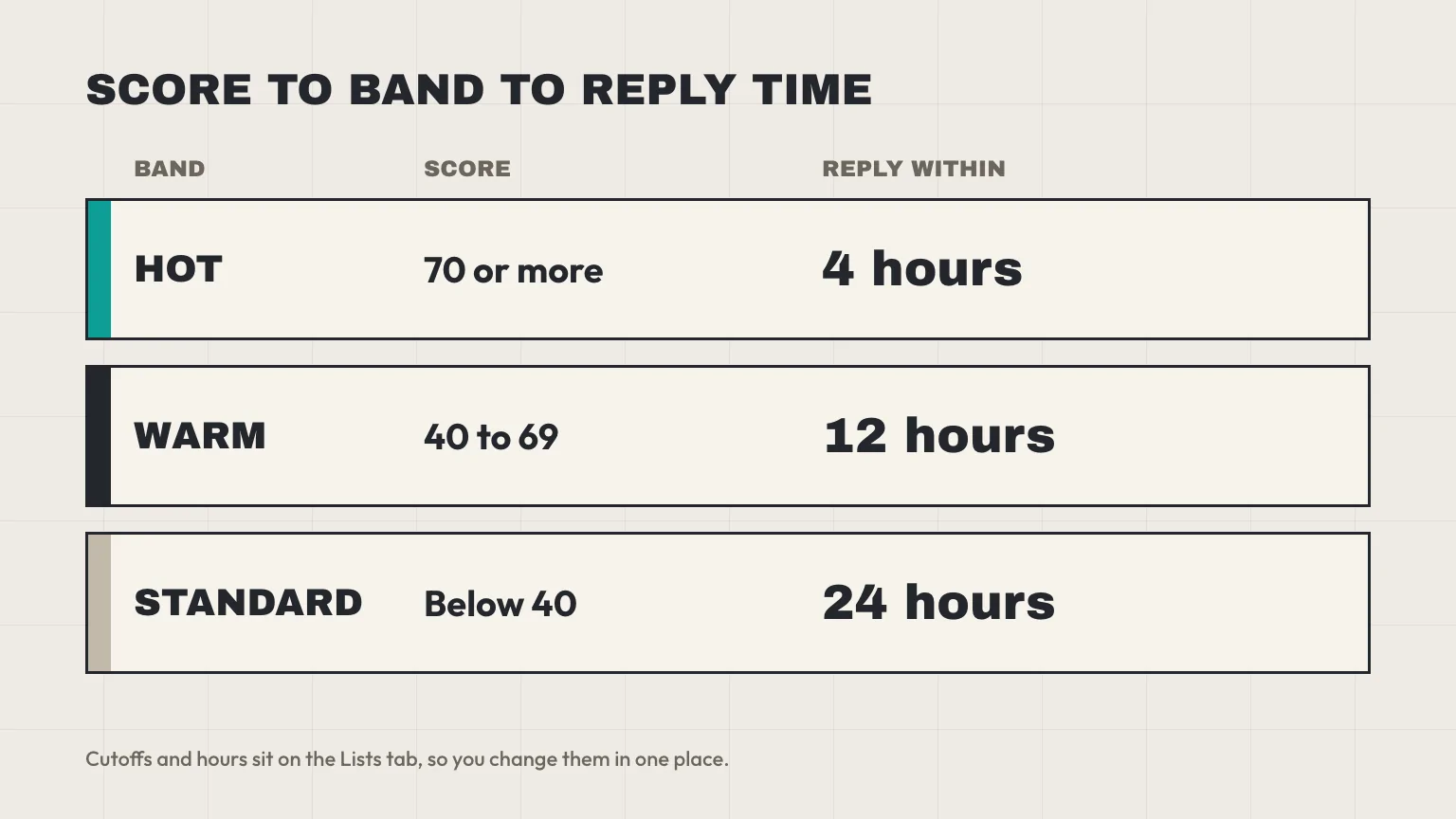
The cutoffs and hours live on a Lists tab, not inside the formulas. Change 70 to 60, or 4 to 2, in one place and every row follows.
Download the enquiry follow up Excel format
Download the enquiry follow-up tracker (.xlsx). It has four tabs: Enquiries (rows 2 to 501 are ready), Lists (bands, statuses, owners and sources), Summary (open and overdue counts per owner) and a short Read me. Four sample rows are included, and their names start with “Sample”. Clear them before you start, but leave columns H and J alone, because those hold the formulas.
In Excel
Open the file, go to the Lists tab, and type your team’s names into the Owner column. That is the whole setup. We built and checked the formulas in desktop Excel for Mac.
In Google Sheets
Open a Sheet, choose File, then Import, and pick the .xlsx file from the Upload tab. Google’s import help (checked 11 October 2026) then has you choose where the data goes, such as “Create new spreadsheet” or “Insert new sheets”. Google’s page lists .xlsx among the supported types, but it does not say whether formulas, drop-downs and conditional formatting survive the trip. So check each one after importing:
- Type a score into a blank row and confirm that Band and Reply by fill in.
- Click a Status cell and confirm the drop-down appears. If not, use Data, then Data validation, and point the list at the Lists tab.
- Set a past received time with Status “New” and confirm that the row turns red. If not, rebuild the rule from the next section using Format, then Conditional formatting.
If one piece does not carry over, the formulas below are short enough to retype.
The reply-by formula in the enquiry follow up Excel format
Excel stores a date and time as one number: the whole part is the day, the fraction the time, so noon is 0.5. Microsoft’s NOW function page describes the same serial-number system. That makes hours easy: one hour is 1/24, so adding 4 hours means adding 4/24. Here is the formula in column J of row 2:
=IF(OR(A2="",G2=""),"",A2+IF(G2>=Lists!$B$2,Lists!$C$2,IF(G2>=Lists!$B$3,Lists!$C$3,Lists!$C$4))/24)Read it from the outside in. If the received time or the score is missing, show nothing, so a half-filled row does not display a date in January 1900. Otherwise, take the received time, find the band by comparing the score with the cutoffs on the Lists tab, pick that band’s hours, divide by 24, and add. The Band in column H uses the same comparison and returns the band’s name.
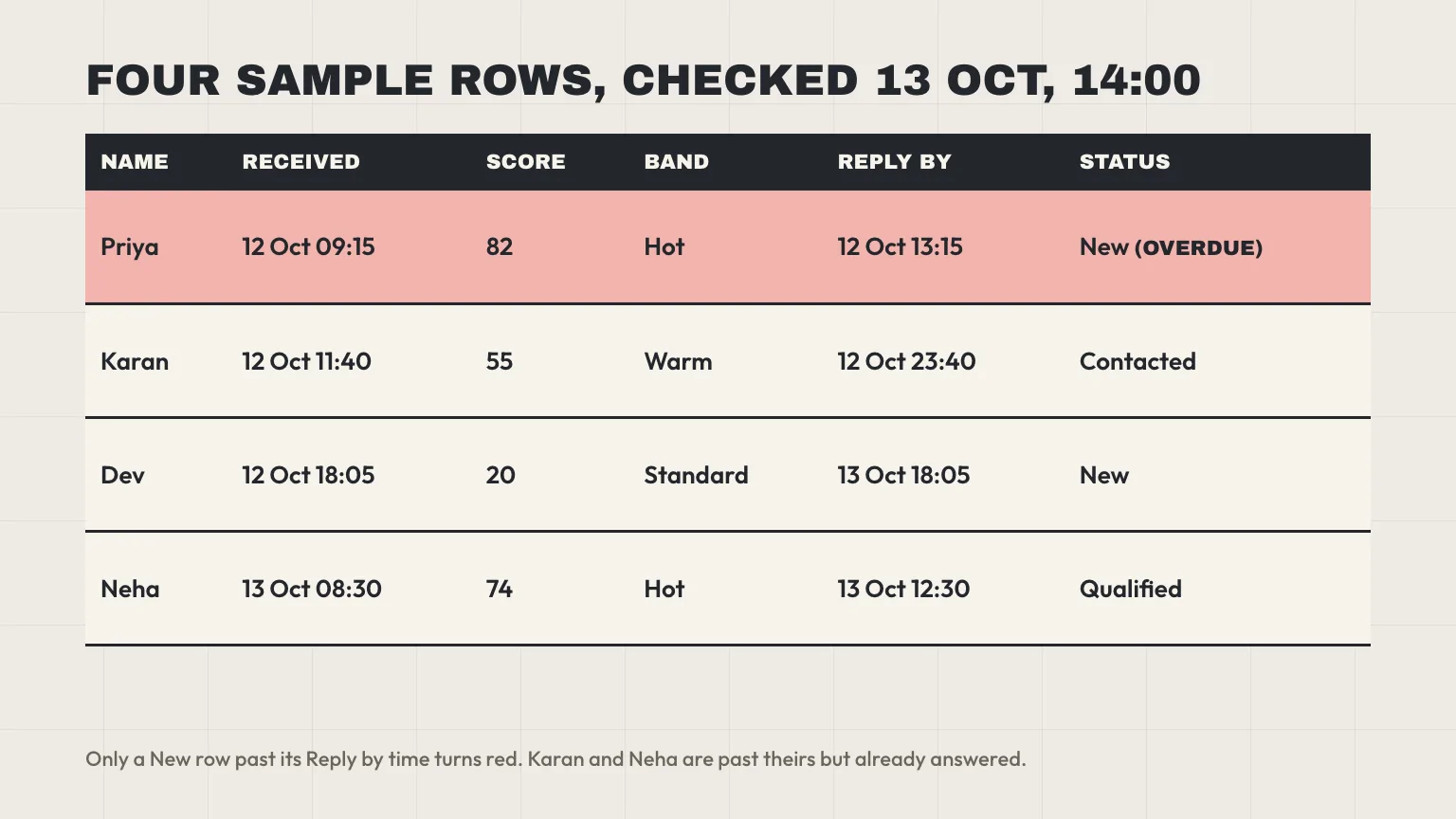
We used nested IF rather than IFS so that the file also works in Excel 2016 and older, where IFS may be missing. Format columns A and J as dd mmm yyyy hh:mm, otherwise Excel may show only the date.
Conditional formatting that flags overdue enquiries
A row is overdue when its status is still New and the reply-by time has passed. The status test matters: it makes the red flag clear itself once someone moves the row to Contacted, which is how people actually work. Select A2:L501 and add this rule:
=AND($K2="New",$J2<>"",NOW()>$J2)In Excel, choose Home, then Conditional Formatting, then New Rule, then “Use a formula to determine which cells to format”, per Microsoft’s conditional formatting help. In Google Sheets, choose Format, then Conditional formatting, then “Custom formula is”, and paste the same formula. The dollar signs lock the columns, so the whole row follows the test in K and J.
Why not TODAY() plus a number?
Many templates compute a due date as TODAY()+2. That date moves forward every morning, so a row never becomes overdue. Our reply-by time is anchored to the received time and fixed once the score is typed. The only live part of the rule is NOW(), which Excel refreshes on recalculation, such as when you open the file or edit a cell. It is not a ticking clock, so reopen the file or press F9 to refresh it.
Two more flags
We added two amber rules. The Owner cell turns amber when an enquiry has been received, has no owner and is still New. The Score cell turns amber when a row has a received time but no score, which is the quiet failure: with no score there is no reply-by time, so the row can never go red. Won and Lost rows turn grey.
Enquiry follow up Excel format: make the owner column work
The nine-day “will call” row in the opening failed for one reason: nobody’s name was on it. In a shared sheet, the rule that fixes this is one owner per row, picked from a drop-down, never “Sales team” and never two names.
The drop-down reads from the Lists tab, so type your team there once. Microsoft’s data validation help covers the steps if you want to add another list: Data, Data Validation, Allow: List, and point the Source box at the cells.
The Summary tab counts, per owner, the open enquiries (New, Contacted or Qualified), the ones still New, and the ones New and overdue. It also shows how many New enquiries have no owner at all. Check the sheet once at the start of each day: if the no-owner count is above zero, assign those first.
Agree one more rule in writing: who covers when the owner is on leave. Before leave starts, the owner reassigns their open rows by changing column I.
A 10-minute daily routine for the sheet
- Log new enquiries. Paste in the day’s form submissions, calls and walk-ins. Type the received time as it actually happened, not the time you entered it.
- Score and assign. Fill in the score, then pick the owner. Band and Reply by appear.
- Sort by Reply by. Filter Status to New and sort the Reply by column from oldest to newest. The top rows are the ones to answer first.
- Reply, then change the status. The sheet cannot see your inbox or your phone. Change Status to Contacted when you reply, or the row stays red.
- Write the next action. One line, with a date.
To stamp the time of a reply into a note, use Ctrl+; for the date and Ctrl+Shift+: for the time in Excel for Windows, or Control+; and Command+; on a Mac, per Microsoft’s Excel keyboard shortcuts. Those shortcuts type a fixed value, unlike NOW(), which changes.
Four ways an enquiry follow up Excel format fails
- Copies per person. Once two people each keep their own version of the file, neither shows the truth. Keep one file in a shared drive, and let only one person edit a row at a time.
- Rows without a received time. No time, no reply-by, no flag. The sheet then looks tidy while the oldest enquiry quietly goes cold.
- Status as free text. “Called”, “called back” and “Called – no answer” count as three different things. Use the drop-down.
- Editing the formula cells. Someone types a time over a Reply by cell, and now that row follows a different rule. Copy the formula back down from a row above. Excel’s Protect Sheet would stop the overwrite, but it also blocks sorting rows that hold locked cells, and the daily routine needs that sort.
There is a fifth weakness that no setting will fix: the sheet does not know when someone replied by email or phone. Its clock stops only when a person updates Status. In LiftUp, an email sent from the lead’s page through a connected Gmail account stops the clock, and so does moving the lead out of New. A sheet relies on someone remembering.
When to stop using an enquiry follow up Excel sheet
Five signs the sheet has had its day
- More than one person replies to enquiries. HubSpot’s lead tracker page names a second salesperson as a reason to switch, and Close says a Google Sheet suits a business with “one or two junior salespeople”. Both are vendor views.
- Enquiries arrive from your website while nobody is at a desk. Copied in by hand later, the received time ends up wrong or missing.
- You add more than about 10 new enquiries a week. This is HubSpot’s rule of thumb, not a law. Past that, the daily routine stops fitting in ten minutes.
- You want a reminder without opening the file. A sheet cannot send one.
- You need first-reply time per person. You can calculate it with a second timestamp column, but nobody keeps that column filled in for long.
Two of these five, and it is time to move. One is a warning.
Free CRMs to try before you pay
Switching does not have to cost anything. As of 11 October 2026, Zoho CRM’s pricing page offers a free edition for up to 3 users, and HubSpot’s free CRM page says up to two users and 1,000 contacts, with no expiration date. Our LiftUp and Zoho comparison sets out where the paid plans differ, and our guide to CRM prices in India works out costs at 5, 10 and 20 users in rupees.
Moving your enquiry follow up Excel format into LiftUp
LiftUp’s CRM imports a CSV file, not an .xlsx one, so use File, then Save As, then CSV in Excel first. The import takes up to 2,000 rows a file and suggests a match for each column from its header, which you can change before importing. Name, Email, Phone, Status and Source match as they are. Rename Enquiry to Message so the request comes across. Score, Band, Owner and Reply by have no built-in field to land in.
A few details save a bad afternoon. A Status value has to be new, contacted, qualified, won, lost or spam, or LiftUp skips the row and tells you why, which is why the tracker’s drop-down uses the same words. Rows with an email address that is already in LiftUp are skipped as duplicates, and a row needs an email or a phone number. Imported rows also count toward the plan’s monthly lead limit (100 on Free, 1,000 on Starter), and rows past it are skipped.
Imported leads arrive without a score and without a reply deadline, so the clock starts for new enquiries after the move, not for old ones. Clean the file first: our CRM data cleanup checklist covers duplicates, blank fields and inconsistent names, and doing it before import is far easier than after. Then see how the LiftUp CRM handles scoring and reply deadlines, and how LiftUp bills in rupees.
Who LiftUp isn’t for
LiftUp suits enquiries that arrive through website forms and email. It has no WhatsApp, SMS or calling. If your team sells mostly on phone calls and WhatsApp chats, the tracker above, with a Source column marked WhatsApp, may fit you better than a form-led CRM, or you may want a CRM built around those channels.
Next step
Download the enquiry follow up Excel format, clear the four sample rows, and run it for two weeks. Count how many rows went red, and write down who was usually late. If the number climbs, or a second person starts replying, book a 30-minute LiftUp demo and we’ll show you the same bands, owners and overdue list running without the spreadsheet.
Frequently asked questions
What should an enquiry follow-up sheet include?
At minimum: the date and time the enquiry arrived, name, phone, email, source, what they asked for, a score, one owner, a reply-by time, a status and a next action. The received time and the owner are the two columns most templates leave out. Without them you cannot tell who is late or by how long.
How do I highlight overdue follow-ups in Excel?
Select the data rows, choose Home, then Conditional Formatting, then New Rule, and pick the option to use a formula. Enter =AND($K2="New",$J2<>"",NOW()>$J2), where K is Status and J is Reply by, and choose a red fill. Because the rule tests the status, the colour clears once a row is no longer New.
How do I set an automatic reply deadline in Excel?
Add the hours to the received time as a fraction of a day. Excel stores time as a fraction, so 4 hours is 4/24. A nested IF can pick 4, 12 or 24 depending on the score, and the result goes in a Reply by column formatted as date and time.
Can I use this tracker in Google Sheets?
Yes, with a check. Use File, then Import, then Upload and pick the .xlsx file. Google's help page doesn't say whether formulas, drop-downs and conditional formatting carry over, so test each one after importing and rebuild any that are missing.
How many enquiries can Excel handle before I need a CRM?
The file itself holds far more rows than you will use. The limit is people and routine, not rows. HubSpot's own rule of thumb is more than about 10 new enquiries a week, or more than one person replying, and that matches the signs listed in this guide.
Can I import my Excel enquiry list into a CRM?
Most CRMs import CSV, so save the sheet as CSV first. In LiftUp, the import takes CSV only, up to 2,000 rows a file, and skips rows whose email is already in the CRM. Imported rows arrive without a score or reply deadline.
Is there a free CRM for a small Indian team?
Zoho CRM has a free edition for up to 3 users, and HubSpot's free CRM allows up to two users and 1,000 contacts, per their pricing pages checked on 11 October 2026. LiftUp has a Free plan too, with 2 users and 100 leads a month.

Abidhusain Chidi
Founder & CEO, QalbIT Infotech
Abidhusain Chidi is the founder and CEO of QalbIT Infotech, a software agency in Ahmedabad building web and SaaS products since 2018. He's also CTO at Seekly, an Australian revenue intelligence platform, and is building LiftUp. He writes about CRM, SaaS operations, and shipping multiple products as a small team.
See it live
Watch LiftUp run your whole growth stack
One console for CRM, content, AI editorial and insights — book a 30-minute walkthrough tailored to your team.
Book a demo