Search Console vs Google Analytics: Why They Differ
Abidhusain Chidi7 min read
Say Search Console shows 1,000 clicks to your blog last month and GA4 shows 800 organic sessions. Someone on the team asks which one is wrong. Neither is. When you set Search Console vs Google Analytics side by side, you are comparing two tools that count different events under different rules, and Google itself says their data “won’t match completely”. What helps is knowing which way your gap runs, because each direction has its own short list of causes.
We build LiftUp, a CRM whose Insights screen puts GA4 sessions next to Search Console clicks, so we had to pin down why they disagree before we could label them. Everything below comes from Google’s own documentation, which I rechecked on 11 October 2026.
Search Console vs Google Analytics: clicks and sessions
A Search Console click is a visitor leaving Google’s results for your page. Google’s definition says that, for most result types, any click that sends the user to a page outside Google Search, Discover or News counts. If someone clicks a result, goes back and clicks the same link again, that is still one click. The click is also credited to the canonical URL of the result, even if your site redirects the visitor afterwards.
A GA4 session is something else. Google says a session starts when a person views a page or screen and no session is active. It ends after 30 minutes of inactivity by default. GA4 can only count what its tag reports, so a visit it never sees is a visit it never counts.
Google’s advice is practical: general trends should follow the same pattern, a small gap can be ignored, and a big one deserves a look at the causes below.
Why Search Console shows more than Google Analytics
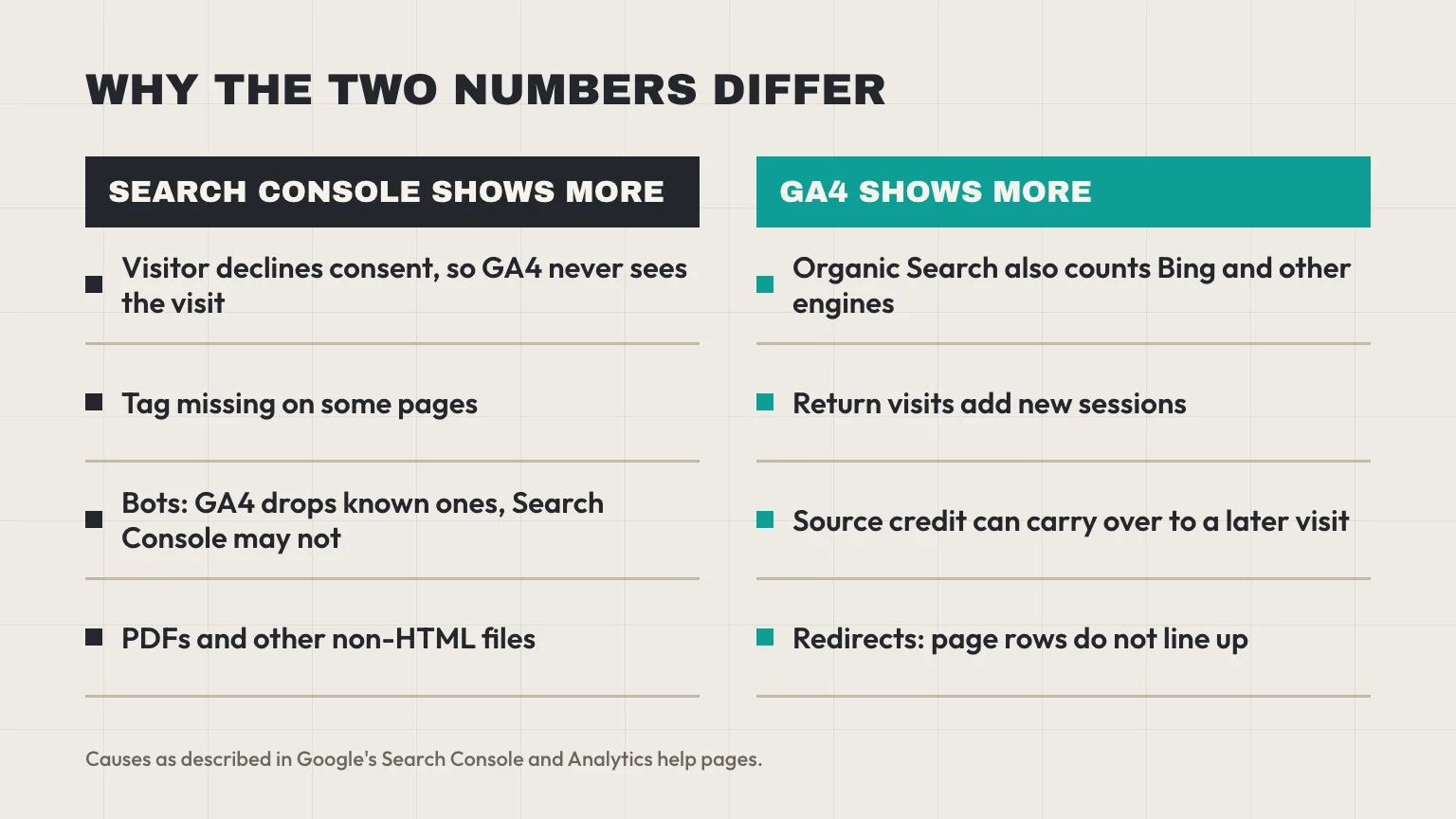
Most of the causes on Google’s list push in this direction. Search Console data is processed the same way for every property, while GA4 depends on a browser running your tag.
Consent and missing tags in Google Analytics
The first cause Google names is a missing tag. Some pages on a site simply lack it, and Search Console still counts their clicks. The second is consent: if your site asks for tracking consent and a visitor says no, that visit can drop out of GA4 and stay in Search Console. Consent mode narrows the hole, since Google can fill some gaps with modeling, but how much depends on your setup.
Bots and JavaScript
Google Analytics excludes known bots and spiders automatically, and you cannot switch that off. Google’s comparison guide says Search Console doesn’t necessarily filter them out. Its own help page, though, says it removes some robot visits during processing, so don’t expect bots to explain a large gap by themselves. The same page notes that some tools, Google Analytics among them, track only visitors who have JavaScript enabled.
Non-HTML pages
A PDF can rank and earn clicks in Search Console. GA4 may not measure it at all, and Google’s suggested starting point is turning on enhanced measurement events. If your gap is concentrated on a few URLs, check the file types first.
When Google Analytics shows more than Search Console
This direction surprises people, because GA4 is usually the tool that loses data. Four causes can push it this way.
- The channel is wider than Google. GA4’s Organic Search channel covers non-ad links in organic search results, including Google’s AI Overviews and AI Mode. It is not limited to Google, so Bing and other engines land in the same bucket, and Search Console never sees them.
- Source credit can carry over. Google’s attribution help says sessions that start with a direct visit take the user’s earlier source. So a person who found you through Google and later types your address can be counted as organic again. You will still see Direct sessions in your reports, so treat this as a possible cause, not a rule.
- Return visits. Search Console counts a repeat click on the same result once. GA4 starts a new session after 30 minutes of inactivity, so a reader who leaves the tab and clicks through again later can add a second session.
- Redirects. Search Console keeps the click on the URL shown in the results. GA4 records the page where the visitor finally landed, so page rows will not line up.
One more: Search Console reports the canonical URL only, while Google Analytics reports any URL that carries the tag. That affects page tables more than site totals.
Dates, time zones and data lag
Some gaps are only a reporting artifact. GA4 reports in the time zone set on the property, while Search Console uses Pacific Time and doesn’t let you change it. A visit at 9 am in Muscat is logged on the previous day in Pacific Time, so daily rows drift apart even when nothing is wrong.
Search Console data also arrives late, usually within two to three days, and the newest points can be preliminary. Its query tables leave out rare queries and ones with personal or sensitive terms, so they can sum to less than the chart total.
Four checks for Search Console vs Google Analytics gaps
Run these in order. Each one removes a fixable cause, so what remains is the gap you should expect between the two tools.
- Filter GA4 to the same traffic. Google’s own dashboard compares Search Console with GA4 data where session source is google and session medium is organic. An all-channels session total next to Google clicks will never match.
- Match the dates. Use the same days in both tools and leave out the last three days, because Search Console is still catching up.
- Compare per page, not per site. In GA4, use landing page, which is the first page of a session, rather than any page viewed. Then strip query strings and trailing slashes from both sides before you join the tables.
- Compare the shape. Put both lines on one chart. If they rise and fall together, the tools agree where it matters. If one drops and the other doesn’t, look at tags and consent first.
Blending the two in Looker Studio has its own trap. In one Stack Overflow question, a join by page showed 38,330 sessions for a page that GA4 alone put at 34,091. Total each tool by page first, then join.
Which number to report from Google Analytics or Search Console
Don’t try to make the two match. Use each for the question it answers.
- Search Console for search demand: which queries and pages earn clicks and impressions on Google.
- GA4 for what visitors do after arriving: engagement, key events and pages viewed.
- Your CRM for leads, because it counts people, not events. Our guide on which blog posts generate leads shows the page-by-page join, and GA4 lead attribution for GCC B2B sites covers the source side. If you store the page on each lead, the Next.js form to CRM guide shows how.
In LiftUp, the Insights overview, available from Starter, shows GA4 sessions next to Search Console organic clicks on one chart. The sessions figure covers all channels, so it is not the same thing as the clicks line, and we label each one by its source. The page table asks GA4 for the page path, meaning any page visited, not the landing page. On Growth, the Insights view called “Landing pages: traffic against leads” sets traffic against leads by page path, with the trailing slash trimmed. It reads summaries from both tools. It doesn’t reconcile them for you.
Who LiftUp isn’t for
If you need row-level joins of both tools, skip us. Google suggests exporting both to BigQuery to get the most details and minimize data discrepancies, and LiftUp doesn’t do that. It shows GA4 and Search Console summaries next to your leads.
Next step
Run the four checks on one month of data and write down the gap that is left. That number is your normal, and any change in it is worth investigating. If you would like to see GA4, Search Console and your leads in one place, book a 30-minute LiftUp demo.
Frequently asked questions
Why do my Search Console and GA4 numbers disagree?
The tools count different events. Search Console counts clicks from Google results, while GA4 counts sessions that its tag records. Google says the data won't match completely, so compare trends instead of totals.
Why is organic traffic lower in GA4 than in Search Console?
Common causes are visitors who decline tracking, pages without the tag, known bots that GA4 excludes, and non-HTML files such as PDFs. Search Console processes every property the same way, whether a tag ran or not.
Why is organic traffic higher in GA4 than in Search Console?
GA4's Organic Search channel includes other search engines, not only Google. Return visits and source carry-over can also add sessions that never came from a fresh Google click.
Which is more accurate, Search Console or GA4?
Neither is wrong, because they measure different things. Use Search Console for search demand and GA4 for what visitors do on your site. For leads, trust your CRM, which counts people.
How do I compare Search Console clicks with GA4 sessions?
Filter GA4 to session source google and medium organic, use the same dates and leave out the last three days. Then compare per landing page after removing query strings and trailing slashes.
Do time zones affect the numbers?
Yes. Search Console uses Pacific Time and you can't change it, while GA4 uses the time zone set on your property. Late-day clicks can fall on different dates in each tool.
Does LiftUp reconcile Search Console and GA4?
No. LiftUp's Insights shows GA4 sessions next to Search Console organic clicks and labels each by source. It reads summaries from both and doesn't correct one against the other.

Abidhusain Chidi
Founder & CEO, QalbIT Infotech
Abidhusain Chidi is the founder and CEO of QalbIT Infotech, a software agency in Ahmedabad building web and SaaS products since 2018. He's also CTO at Seekly, an Australian revenue intelligence platform, and is building LiftUp. He writes about CRM, SaaS operations, and shipping multiple products as a small team.
See it live
Watch LiftUp run your whole growth stack
One console for CRM, content, AI editorial and insights — book a 30-minute walkthrough tailored to your team.
Book a demo