
Next.js Contact Form to CRM: A Route Handler Guide
Abidhusain Chidi18 min read
A Next.js contact form can fail to deliver leads to your CRM for months without showing a single error. The visitor clicks Send, reads “Thanks, we’ll be in touch”, and the lead is lost because the API rejected it, timed out, or sent back something your code mistook for success. You find out when a prospect emails to ask why nobody replied.
Most tutorials on sending a Next.js contact form to a CRM stop at “call the API and return 200”. This one is about what comes after: a Route Handler (plus a Server Action version) that keeps the CRM key on the server, checks input against the CRM’s own rules, retries only the failures worth retrying, and still has the lead when the CRM is down. It follows the same pattern as the forms on liftup.sh, a Next.js 16 site. It posts to LiftUp, the CRM we build, but nothing in it is specific to us. Point it at any CRM with a REST endpoint and an API key.
How a Next.js contact form reaches the CRM
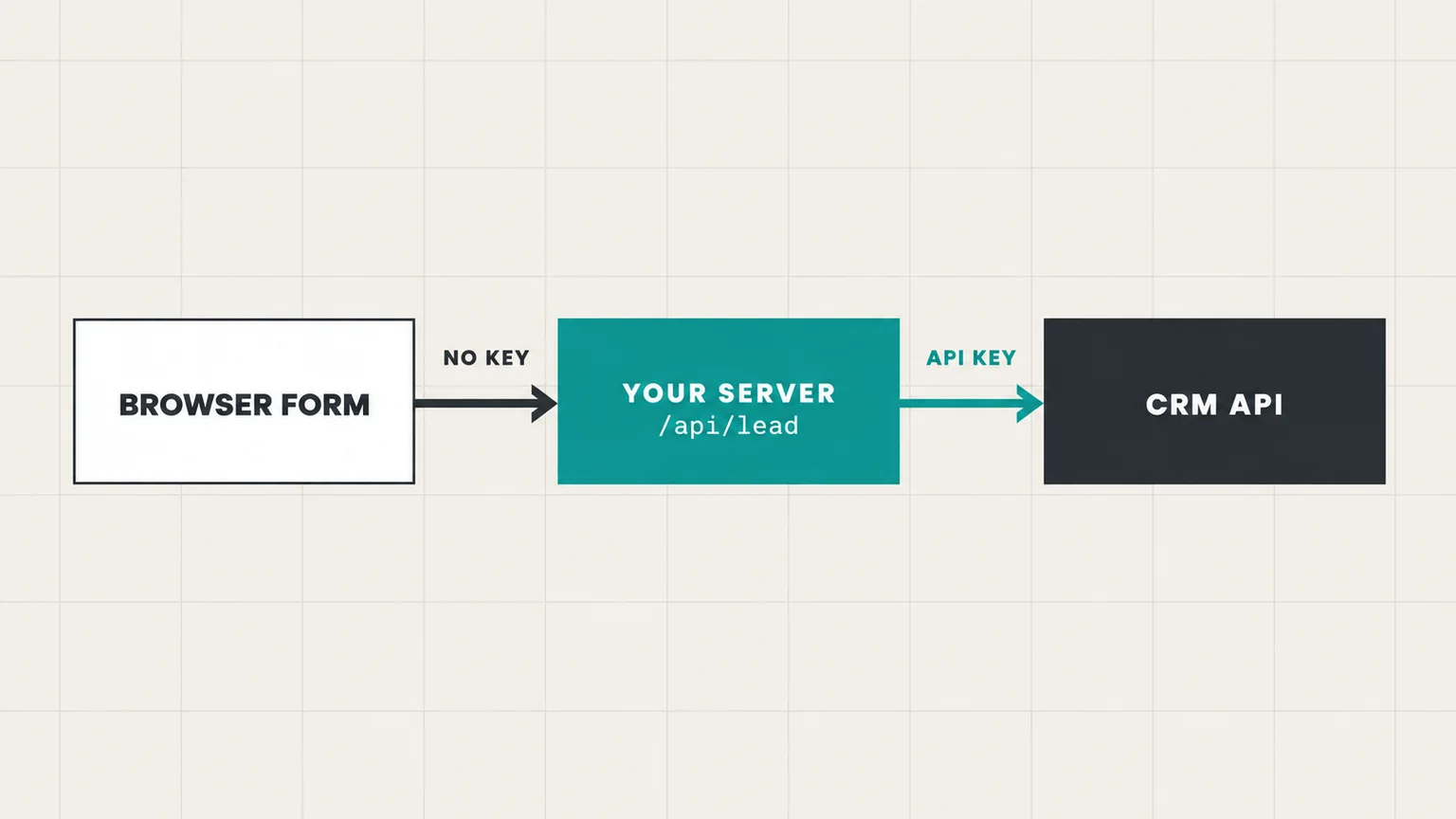
The browser never talks to the CRM. It posts to an endpoint on your own site, and your server calls the CRM with a key kept in an environment variable. That middle hop has five jobs:
- Keep the API key out of the JavaScript bundle.
- Turn away junk: posts from other sites, oversized bodies, bots, and floods from one IP.
- Check the fields against the limits the CRM enforces, so the CRM can’t reject what your form accepted.
- Call the CRM with a timeout, and retry only the failures a retry can fix.
- Hold on to the lead, or at least raise an alarm, when the CRM can’t take it.
You need the App Router (Next.js 15 or 16), the Node.js runtime and an API key from your CRM. We ran everything below on Next.js 16.2 and React 19 against a mock CRM that fails in each of the ways covered in the testing section.
Route Handler or Server Action for a Next.js contact form?
Both send a Next.js contact form to the CRM from the server, and both keep the key private. Where they differ only shows up once the site is live:
| Route Handler | Server Action | |
|---|---|---|
| A tab opened before your latest deploy | Still works. The URL doesn’t change. | Can fail with “Failed to find Server Action” |
| Protection against posts from other sites | You add an Origin check | Built in |
| Works with JavaScript turned off | Not with a fetch-based form | Yes |
| Callable from other pages, tools or apps | Yes, it’s a normal URL | No |
| Code to write | A little more | A little less |
The first row is the one that bites marketing sites. A Server Action is called by an ID tied to a build. New deploys usually get new IDs, and the Next.js docs say the IDs also rotate periodically even when the code hasn’t changed. Someone who opens your pricing page in the morning and submits the form after your afternoon deploy sends an ID the server no longer knows. We reproduced it on 16.2: an unknown action ID gets an HTTP 404 and a “Failed to find Server Action” error instead of a thank-you. People keep marketing pages open in tabs for hours, which is why the contact, demo and enterprise forms on liftup.sh use Route Handlers.
A Server Action is still the shorter path for a form inside an app where people reload often, or a form that has to work without JavaScript. The Server Action version below covers that. Steps 1 to 3 are shared by both.
Step 1: Keep the key on the server
Add three variables to .env.local, and the same three to your host’s environment settings:
# No NEXT_PUBLIC_ prefix, so none of these reach the browser bundle
CRM_LEADS_URL=https://app.liftup.sh/api/v1/leads
CRM_API_KEY=your-product-api-key
SITE_ORIGIN=https://www.example.com
Anything prefixed NEXT_PUBLIC_ is copied into the client JavaScript at build time, where anyone can read it with view-source. Leave the prefix off and the variable exists only on the server.
Two habits help. Start every server-side module with import 'server-only', so an accidental import from a client component breaks the build instead of shipping your key. And send the key in a header, never in the URL, because query strings end up in access logs and proxy logs. HubSpot’s old hapikey parameter worked that way, and HubSpot retired those keys in November 2022 in favor of tokens sent in the Authorization header. Older tutorials that still use it won’t work.
Use a separate key for staging. In LiftUp every product has an optional sandbox key for this. Sandbox leads skip scoring, reply deadlines, alerts and webhooks, so a test run won’t ping your sales team.
Step 2: A CRM client that fails loudly
Put the CRM call in one module that the Route Handler and the Server Action both import. It returns a result instead of throwing, so the caller always decides what the visitor sees. Create lib/crm.ts:
import 'server-only'

export type Lead = {
  name: string
  email: string
  message: string
  source_page?: string
  lead_source?: string
}

export type SendResult =
  | { ok: true; data: Record<string, unknown> }
  | { ok: false; retry: boolean; status: number; detail: string; waitMs?: number }

const TIMEOUT_MS = 3000
const ATTEMPTS = 3
const MAX_WAIT_MS = 2000 // the visitor is waiting, so never sleep longer than this

export async function sendLead(lead: Lead): Promise<SendResult> {
  if (!process.env.CRM_LEADS_URL || !process.env.CRM_API_KEY) {
    return { ok: false, retry: false, status: 0, detail: 'CRM env vars are not set' }
  }
  for (let attempt = 1; ; attempt++) {
    const result = await postOnce(lead)
    if (result.ok || !result.retry || attempt === ATTEMPTS) return result

    const wait = result.waitMs ?? 500 * attempt
    if (wait > MAX_WAIT_MS) return result
    await new Promise((resolve) => setTimeout(resolve, wait))
  }
}

async function postOnce(lead: Lead): Promise<SendResult> {
  let res: Response
  try {
    res = await fetch(process.env.CRM_LEADS_URL!, {
      method: 'POST',
      headers: {
        Authorization: `Bearer ${process.env.CRM_API_KEY}`,
        'Content-Type': 'application/json',
        Accept: 'application/json',
      },
      body: JSON.stringify(lead),
      redirect: 'manual',
      signal: AbortSignal.timeout(TIMEOUT_MS),
    })
  } catch (err) {
    // Timeout or network error. The CRM may still have saved the lead.
    return { ok: false, retry: true, status: 0, detail: String(err) }
  }

  const isJson = res.headers.get('content-type')?.includes('application/json')
  if (res.ok && isJson) return { ok: true, data: await res.json() }

  const retryAfter = Number(res.headers.get('retry-after'))
  return {
    ok: false,
    retry: res.status === 408 || res.status === 429 || res.status >= 500,
    status: res.status,
    detail: (await res.text()).slice(0, 300),
    waitMs: retryAfter > 0 ? retryAfter * 1000 : undefined,
  }
}
Ask for JSON and refuse redirects
The Accept header and redirect: 'manual' look like decoration. They’re the two most important lines in the file.
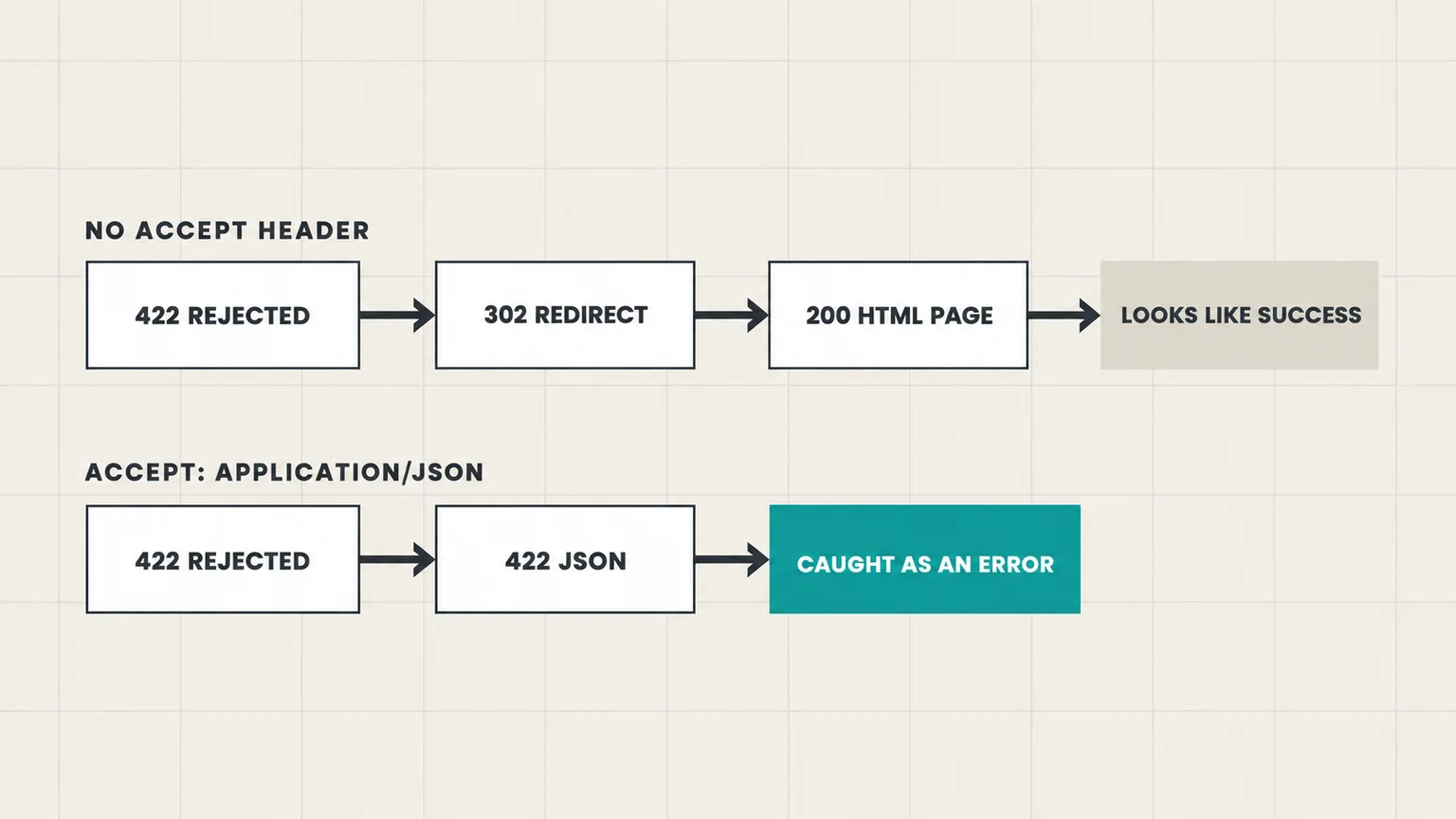
Plenty of APIs, including any Laravel app on default settings, pick the error format from the request’s Accept header. Ask for JSON and a validation failure comes back as a 422 with a JSON body. Don’t ask, and the framework treats your server like a browser and answers with a 302 redirect. fetch follows redirects by default, lands on an HTML page with a 200 status, and res.ok is true. Your code logs a success for a lead that was never saved.
We found this while reading the framework code behind our own API, then reproduced it against a mock. The same rejected submission, sent without the header, came back with ok: true, redirected: true and the HTML of a sign-in page. So the client asks for JSON, refuses redirects, and counts a 2xx as success only when the body really is JSON.
Retry only what a second try can fix
Retrying a 422 gets you the same 422 three times. The client sorts failures into two groups:
- Retry: timeouts, network errors, 408, 429 and any 5xx. The CRM was busy or briefly down.
- Don’t retry: 400, 401, 403, 404, 422, redirects, and a 2xx that isn’t JSON. The request, the key or the URL is wrong, and a person has to fix it.
On a 429 the client honors Retry-After, but only for waits of 2 seconds or less. The visitor is watching a spinner. If the CRM asks for a minute, the request fails straight away and goes down the fallback path. At worst, a dead CRM holds the request for about 10 seconds: three 3-second timeouts plus 1.5 seconds of waiting. Lower the numbers if that’s too long for your form.
Timeouts carry one more risk. The CRM may have saved the lead just before your side gave up, so a retry can create a duplicate. Check how your CRM handles repeats. Some accept an idempotency key. LiftUp treats the same email, message and sending IP within five minutes as one lead and returns the original, so retries from your server don’t pile up.
Step 3: Validate against the CRM’s rules
Your form’s rules and your CRM’s rules drift apart without anyone noticing. If the form accepts a one-letter name and the CRM wants two letters, that lead fails at the API after the visitor has already left. Copy the CRM’s limits into one server-side function. The numbers below match LiftUp’s API (name 2 to 200 characters, email up to 200, message up to 5,000). Swap in your own CRM’s. Create lib/lead-input.ts:
import 'server-only'

import type { Lead } from '@/lib/crm'

const EMAIL = /^[^\s@]+@[^\s@]+\.[^\s@]{2,}$/

/** Check the fields against the same limits your CRM enforces. */
export function readLead(input: Record<string, unknown>): { lead: Lead } | { error: string } {
  const text = (key: string) => (typeof input[key] === 'string' ? input[key].trim() : '')
  const name = text('name')
  const email = text('email')
  const message = text('message')

  if (name.length < 2 || name.length > 200) return { error: 'Please enter your name.' }
  if (email.length > 200 || !EMAIL.test(email)) return { error: 'Please enter a valid email address.' }
  if (!message || message.length > 5000) return { error: 'Please add a message (up to 5,000 characters).' }

  return { lead: { name, email, message, source_page: text('page').slice(0, 500) || undefined } }
}

/** Per-IP limit held in memory: fine on one long-running Node process, not on serverless. */
const hits = new Map<string, number[]>()

export function tooMany(ip: string, max = 5, windowMs = 10 * 60_000): boolean {
  const now = Date.now()
  if (hits.size > 10_000) hits.clear()
  const recent = (hits.get(ip) ?? []).filter((t) => now - t < windowMs)
  recent.push(now)
  hits.set(ip, recent)
  return recent.length > max
}
The rate limiter stops one visitor, or one script, from burning through your CRM quota. That quota is shared, because every submission from your site goes out on the same key. LiftUp, for example, accepts 30 lead requests a minute per key.
Two caveats. The in-memory Map works on a single long-running Node process. On serverless hosts each instance has its own memory, so use Redis or your platform’s firewall rules instead. And only trust the client-IP header that your host or CDN sets, because anyone can send their own X-Forwarded-For.
Step 4: The Route Handler
Create app/api/lead/route.ts:
import { after } from 'next/server'

import { notifyTeam } from '@/lib/alerts'
import { sendLead } from '@/lib/crm'
import { readLead, tooMany } from '@/lib/lead-input'

export async function POST(req: Request) {
  // Browsers send Origin on POST. Refuse forms posted from other sites.
  const origin = req.headers.get('origin')
  if (origin && origin !== process.env.SITE_ORIGIN) {
    return Response.json({ error: 'Forbidden.' }, { status: 403 })
  }

  const ip = req.headers.get('x-forwarded-for')?.split(',')[0].trim() ?? 'unknown'
  if (tooMany(ip)) {
    return Response.json({ error: 'Too many requests. Try again in a few minutes.' }, { status: 429 })
  }

  const raw = await req.text()
  if (raw.length > 10_000) return Response.json({ error: 'Request too large.' }, { status: 413 })

  let body: Record<string, unknown>
  try {
    body = JSON.parse(raw)
  } catch {
    return Response.json({ error: 'Invalid request.' }, { status: 400 })
  }

  // Honeypot filled in: answer like a success so the bot moves on.
  if (body.website) return Response.json({ ok: true })

  const parsed = readLead(body)
  if ('error' in parsed) return Response.json({ error: parsed.error }, { status: 422 })

  const result = await sendLead({ ...parsed.lead, lead_source: 'contact-form' })
  if (!result.ok) {
    console.error('[lead] CRM failed', result.status, result.detail)
    after(() => notifyTeam(parsed.lead, result.detail))
    return Response.json(
      { error: 'We couldn’t send that. Please email [email protected].' },
      { status: 502 },
    )
  }

  return Response.json({ ok: true })
}
Details worth keeping:
- Server Actions check the
Originheader for you. Route Handlers don’t, so the first lines do it. SetSITE_ORIGINto your exact origin, includingwwwif you use it. - The body is read as text and capped before
JSON.parse, so nobody can post a 50 MB payload. - A filled honeypot gets an ordinary success reply. A bot that sees an error tends to try again with changes.
notifyTeam()is yours to write: an email through your mail provider, or a Slack message with the lead in it.after()runs it once the response has gone, so the visitor doesn’t wait for it.
Step 5: The Next.js contact form
The Next.js contact form is a client component that posts JSON to your route, never straight to the CRM, and shows the route’s own error message. Create components/ContactForm.tsx:
'use client'

import { useState } from 'react'

export function ContactForm() {
  const [status, setStatus] = useState<'idle' | 'sending' | 'sent' | 'error'>('idle')
  const [error, setError] = useState('')

  async function onSubmit(e: React.FormEvent<HTMLFormElement>) {
    e.preventDefault()
    if (status === 'sending') return
    setStatus('sending')

    const fields = Object.fromEntries(new FormData(e.currentTarget))
    const res = await fetch('/api/lead', {
      method: 'POST',
      headers: { 'Content-Type': 'application/json' },
      // The page URL, UTM tags included. Your server's call to the CRM has no Referer.
      body: JSON.stringify({ ...fields, page: window.location.href }),
    }).catch(() => null)

    if (res?.ok) return setStatus('sent')
    const data = await res?.json().catch(() => null)
    setError(data?.error ?? 'Something went wrong. Please try again.')
    setStatus('error')
  }

  if (status === 'sent') return <p role="status">Thanks. We’ll be in touch soon.</p>

  return (
    <form onSubmit={onSubmit}>
      <label>Name <input name="name" required minLength={2} autoComplete="name" /></label>
      <label>Email <input name="email" type="email" required autoComplete="email" /></label>
      <label>Message <textarea name="message" required maxLength={5000} /></label>

      {/* Honeypot: off-screen and hidden from screen readers. People leave it empty. */}
      <div aria-hidden="true" style={{ position: 'absolute', left: '-10000px' }}>
        <label>Website <input name="website" tabIndex={-1} autoComplete="off" /></label>
      </div>

      <button disabled={status === 'sending'}>{status === 'sending' ? 'Sending…' : 'Send message'}</button>
      {status === 'error' && <p role="alert">{error}</p>}
    </form>
  )
}
The honeypot sits off-screen rather than using type="hidden", because a hidden input is the first thing a smarter bot learns to skip. aria-hidden and tabIndex={-1} keep screen reader and keyboard users out of it, and autoComplete="off" discourages browsers from filling it in for real people.
The page URL goes along with the lead because your server’s request to the CRM carries no Referer. Without it, every lead’s source page would be blank, and the UTM tags in that URL would go with it.
Option B: The Next.js contact form as a Server Action
If you’d rather use a Server Action, lib/crm.ts and lib/lead-input.ts stay exactly as they are. Create app/contact/actions.ts:
'use server'

import { headers } from 'next/headers'

import { sendLead } from '@/lib/crm'
import { readLead, tooMany } from '@/lib/lead-input'

export type FormState = { ok: boolean; error?: string; values?: Record<string, string> }

export async function submitLead(_prev: FormState, formData: FormData): Promise<FormState> {
  const h = await headers()
  const values = {
    name: String(formData.get('name') ?? ''),
    email: String(formData.get('email') ?? ''),
    message: String(formData.get('message') ?? ''),
  }

  if (formData.get('website')) return { ok: true } // honeypot
  if (tooMany(h.get('x-forwarded-for')?.split(',')[0].trim() ?? 'unknown')) {
    return { ok: false, error: 'Too many requests. Try again in a few minutes.', values }
  }

  // A Server Action is a POST from the page itself, so Referer is the page URL.
  const parsed = readLead({ ...values, page: h.get('referer') ?? '' })
  if ('error' in parsed) return { ok: false, error: parsed.error, values }

  const result = await sendLead({ ...parsed.lead, lead_source: 'contact-form' })
  if (!result.ok) {
    console.error('[lead] CRM failed', result.status, result.detail)
    return { ok: false, error: 'We couldn’t send that. Please email [email protected].', values }
  }
  return { ok: true }
}
Then the form, as a client component with useActionState:
'use client'

import { useActionState } from 'react'

import { submitLead, type FormState } from './actions'

export function ContactFormAction() {
  const [state, action, pending] = useActionState<FormState, FormData>(submitLead, { ok: false })
  if (state.ok) return <p role="status">Thanks. We’ll be in touch soon.</p>

  // React resets the form after every action, so refill it from the returned values.
  const v = state.values ?? {}
  return (
    <form action={action}>
      <label>Name <input name="name" defaultValue={v.name} required minLength={2} /></label>
      <label>Email <input name="email" type="email" defaultValue={v.email} required /></label>
      <label>Message <textarea name="message" defaultValue={v.message} required /></label>
      {/* ...same honeypot as the fetch version... */}
      <button disabled={pending}>{pending ? 'Sending…' : 'Send message'}</button>
      {state.error && <p role="alert">{state.error}</p>}
    </form>
  )
}
Three things differ from the Route Handler version:
- React 19 resets a form after every action, including one that returns an error. Without the returned
valuesand thedefaultValueprops, a visitor who mistypes their email loses the whole message. The long-running React issue about opting out of the reset has the background. - The
Refererheader is the page URL, so the source page arrives without the browser sending it. - The form works with JavaScript turned off. We checked by posting it as a plain HTML form: bad input came back with the error message and the fields refilled.
Add an error.tsx next to the page with a “Reload and try again” button, so someone whose tab predates your last deploy gets a way out instead of a broken form.
When the CRM is down, keep the lead
Your fallback decides what the visitor should see:
- If the fallback is durable, such as a row in your own database or an email that actually sent, the lead is safe. Thank the visitor as normal and replay the lead into the CRM later.
- If the fallback is only a log line, be honest. Show an error with a real email address, as the route above does. The forms on liftup.sh do the same: when our lead API can’t be reached, they ask people to email us.
Either way, alert a person. A CRM outage on a Friday evening is exactly when leads pile up with nobody watching.
Test your contact form against CRM failures before launch
Happy-path tests pass on day one. These are the ones that catch lost leads. Each is a case we ran against the mock CRM, with the result you want to see:
- A valid lead: 200 for the visitor, and the CRM receives the source page with its UTM tags intact.
- Honeypot filled in: 200 for the visitor, and nothing reaches the CRM.
- A post from another origin: 403.
- A one-letter name or broken JSON: 422 or 400, with a message the form can show.
- The CRM answers 422: no retry, a 502 with your email address, and an alert to your team.
- The CRM answers 503: three attempts in about 1.5 seconds, then the same error and alert.
- The CRM hangs: the request gives up after about 10 seconds instead of spinning forever.
- A sixth submission from one IP within 10 minutes: 429.
Run them again whenever the form or the CRM field mapping changes. Number 5 matters most in practice, because one changed field rule on the CRM side can reject every lead from that moment on.
Using LiftUp as the CRM
If LiftUp is the CRM behind your Next.js contact form, the endpoint is POST /api/v1/leads, with the product’s key as a Bearer token (an X-Api-Key header works too). The lead API is on every plan, Free included, and Free covers one product and 100 leads a month. The developer docs show the request format. A successful call returns 201:
{
  "success": true,
  "lead_id": 1834,
  "score": 72,
  "sla_deadline": "2026-10-01T14:30:00+00:00"
}
score is the lead’s 0 to 100 rating from your scoring rules. sla_deadline is when someone should have replied, by default 4, 12 or 24 hours after the lead arrives, depending on the score. Our guide to setting a lead response SLA by lead score explains how to choose those windows. Your route can also branch on the score, for example to show high scorers a link to book a call on the thank-you screen.
A few protections are built into the API, so your route doesn’t have to repeat them. A filled website field is answered with success and never saved. The same email, message and IP within five minutes returns the original lead. An optional recaptcha_token counts toward the lead’s score rather than blocking it. Limits are 30 requests a minute, 200 an hour and 1,000 a day per key.
Who this setup isn’t for
- Sites built with
output: 'export'. A static export has no server, so neither the Route Handler nor the Server Action has anywhere to run. Use a hosted form endpoint, or a function on another platform. - Teams whose leads mostly arrive on WhatsApp or by phone. A web-form pipeline won’t catch them, and LiftUp in particular has no WhatsApp, SMS or calling.
Next step
Copy the four files into your Next.js project, point CRM_LEADS_URL at your CRM, and run the eight tests above before the contact form goes live. If you’d like to see what arrives on the other side, start on the Free plan and send a test lead with a sandbox key, or book a 30-minute demo and ask us to send one through the API while you watch.
Frequently asked questions
Should I use a Route Handler or a Server Action for a Next.js contact form?
Both keep the CRM key on the server. A Route Handler has a URL that stays the same across deploys, so a form in a tab opened before your last deploy still works, and other tools can call it. A Server Action is less code, checks the Origin header for you and works with JavaScript turned off, but an old tab can fail with "Failed to find Server Action" after a deploy. For marketing sites, a Route Handler is the safer default.
Is it safe to put a CRM API key in a NEXT_PUBLIC_ variable?
No. Next.js copies every NEXT_PUBLIC_ variable into the JavaScript it sends to the browser at build time, so anyone can read the key. Keep the key in a variable without the prefix, read it only in server code, and add import 'server-only' to the modules that use it.
Can the browser post straight to the CRM's API?
Not with a secret API key, because the key would be visible to every visitor. Some CRMs offer a form endpoint designed to be called from the browser with no secret; check your CRM's documentation. Otherwise, post to your own server and let it call the CRM.
Why does my contact form show success when the lead never reaches the CRM?
Common causes are a missing API key in the production environment, code that doesn't check the CRM's response status, and redirects. Some APIs, including Laravel apps on default settings, answer a validation error with a redirect unless the request sends Accept: application/json. fetch follows the redirect and gets a 200 HTML page, which looks like success. Send the Accept header, set redirect to 'manual' and treat only a JSON 2xx as success.
How do I stop spam on a Next.js contact form without a CAPTCHA?
Combine a hidden honeypot field that people never fill in, an Origin check that rejects posts from other sites, a size limit on the request body and a per-IP rate limit. Answer honeypot hits with a normal success reply so bots don't retry. Add reCAPTCHA or Turnstile only if spam still gets through.
What does "Failed to find Server Action" mean?
The browser sent a Server Action ID that the server doesn't recognize, usually because the page was loaded before a new deploy. Next.js answers with an HTTP 404. Add an error page with a reload button so the visitor can recover, or use a Route Handler for forms on pages people keep open for a long time.
Does this work with output: 'export'?
No. A static export has no server, so there is nowhere for a Route Handler or a Server Action to run. Use a hosted form endpoint or a serverless function on another platform, and keep the CRM key there.
Is LiftUp's lead API available on the Free plan?
Yes. The lead API is on every LiftUp plan, including Free, which covers one product and 100 leads a month. Each product has its own API key, and each key can make 30 lead requests a minute, 200 an hour and 1,000 a day.

Abidhusain Chidi
Founder & CEO, QalbIT Infotech
Abidhusain Chidi is the founder and CEO of QalbIT Infotech, a software agency in Ahmedabad building web and SaaS products since 2018. He's also CTO at Seekly, an Australian revenue intelligence platform, and is building LiftUp. He writes about CRM, SaaS operations, and shipping multiple products as a small team.
See it live
Watch LiftUp run your whole growth stack
One console for CRM, content, AI editorial and insights — book a 30-minute walkthrough tailored to your team.
Book a demo