HubSpot Credits Explained: What a 5-Seat Team Pays
Abidhusain Chidi10 min read
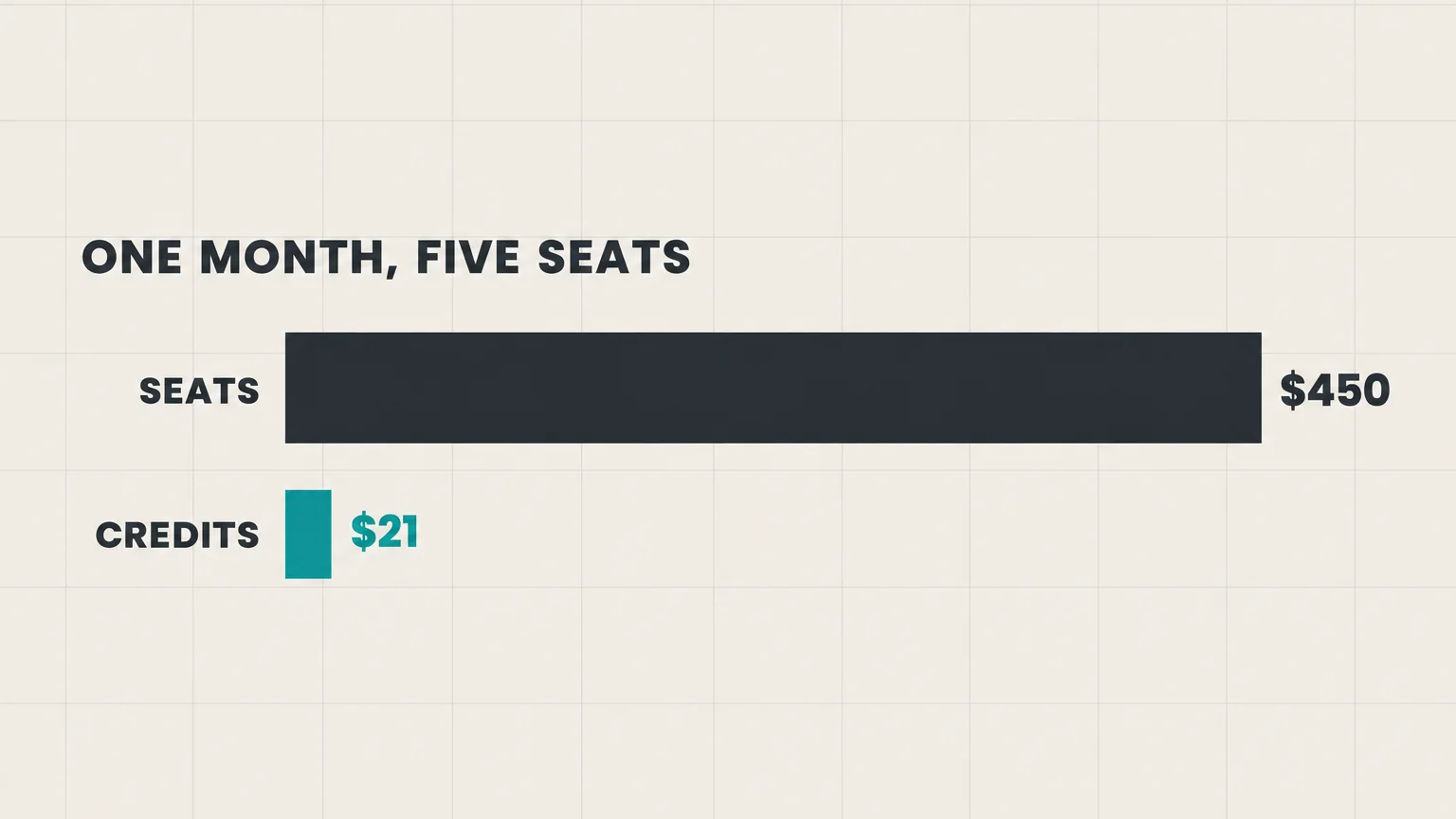
A HubSpot credit costs one cent, and for a five-seat team that price is the least important thing about HubSpot credits. In the month I costed below, credits add between $0 and $30 to a bill that is already $450 in seats.
What changes the month is what happens when the allowance runs out. By default, HubSpot’s AI agents simply stop until the next month. And if your account bought extra credits before 16 September 2026, one busy month can raise your bill for the rest of the contract. This guide takes one team through a real month: the included credits, what burns them, and all three ways the month can end.
Every rate below comes from HubSpot’s Product & Services Catalog and knowledge base, checked on 28 September 2026. We build LiftUp, a CRM with flat pricing and its own AI caps, so I’ll show those too, including where HubSpot is the better buy.
What HubSpot credits are
HubSpot uses credits to meter its AI agents and some of its automation. Each paid plan includes a monthly allowance that resets every month, so unused credits don’t roll over.
| Included credits a month | Starter | Professional | Enterprise |
|---|---|---|---|
| Most single hubs (Sales, Marketing, Service, Content, Revenue) and Smart CRM | 500 | 3,000 | 5,000 |
| Data Hub, or everything bundled as Customer Platform | 500 | 5,000 | 10,000 |
Two rules catch people out. First, allowances aren’t added up across hubs. Own Sales Hub Professional and Marketing Hub Professional together and you still get 3,000 credits, not 6,000, because HubSpot grants the allowance of your highest edition. Second, HubSpot’s pricing page lists included credits for paid plans only.
Timing matters as well. HubSpot’s page on controlling agent credit usage notes that since 23 July 2026 all agents consume credits, so agents your team tried earlier in the year may now draw on the allowance.
What HubSpot credits buy: the rate sheet
HubSpot publishes a rate for each action. These are the ones a small sales team is most likely to touch:
| Feature | One unit is | Credits |
|---|---|---|
| Customer agent | Each chat or email conversation it resolves | 50 |
| Customer agent, voice (beta) | Each minute on a voice call | 50 |
| Prospecting agent | Each lead it plans outreach for | 100 |
| Data agent | Each answer, per record | 10 |
| Workflow AI action | Each AI step a workflow runs | 10 |
| Nurture agent (beta) | Each email it personalizes | 10 |
| Knowledge base agent (beta) | Each help article it writes | 200 |
| Revenue agent (beta) | Each invoice it chases for payment | 500 |
| Content agent (beta) | Each piece of content it creates | 1,000 |
| Intent signals | Each company watched for a month | 10 |
Read the unit column before the credits column. The Data agent looks cheap at 10 credits, but it charges per record. Ask it one question about each of 400 companies and you’ve spent 4,000 credits, more than a Professional plan’s whole month. HubSpot’s catalog itself warns that automated and bulk features use credits faster, and per-record pricing is the reason.
The Customer agent is gentler than it looks. According to HubSpot’s customer agent guide, it charges when it resolves a conversation, not for every message, and a first-time setup can opt in to 14 days of free use.
Which agents each plan can use
- Any paid edition, Starter included: the Data agent, the Prospecting agent, custom agents (beta) and the Revenue agent (beta).
- Professional or Enterprise of most hubs: the Customer agent.
- Marketing Hub Professional or Enterprise: the Content, Nurture and Campaign agents, all in beta.
- Service Hub Professional or Enterprise: the Knowledge base agent (beta).
Several of these are still in beta, and HubSpot’s pricing documents say beta rates can change. So recheck the rate sheet before you budget a quarter around one of them.
A five-seat team’s month on Sales Hub Professional
Here is the team: a founder, two salespeople, a marketer and one person handling support. They’re on Sales Hub Professional with five Sales seats, billed annually at $90 a seat. That’s $450 a month, plus the $1,500 onboarding fee HubSpot charges once. The plan includes 3,000 credits.
In a normal month they use four features:
| Activity | Count | Rate | Credits |
|---|---|---|---|
| Prospecting agent researches new inbound leads | 20 leads | 100 | 2,000 |
| Customer agent resolves website chats | 30 chats | 50 | 1,500 |
| Data agent answers one question about each new company | 60 records | 10 | 600 |
| A workflow AI action summarizes each form lead | 100 leads | 10 | 1,000 |
| Total | 5,100 |
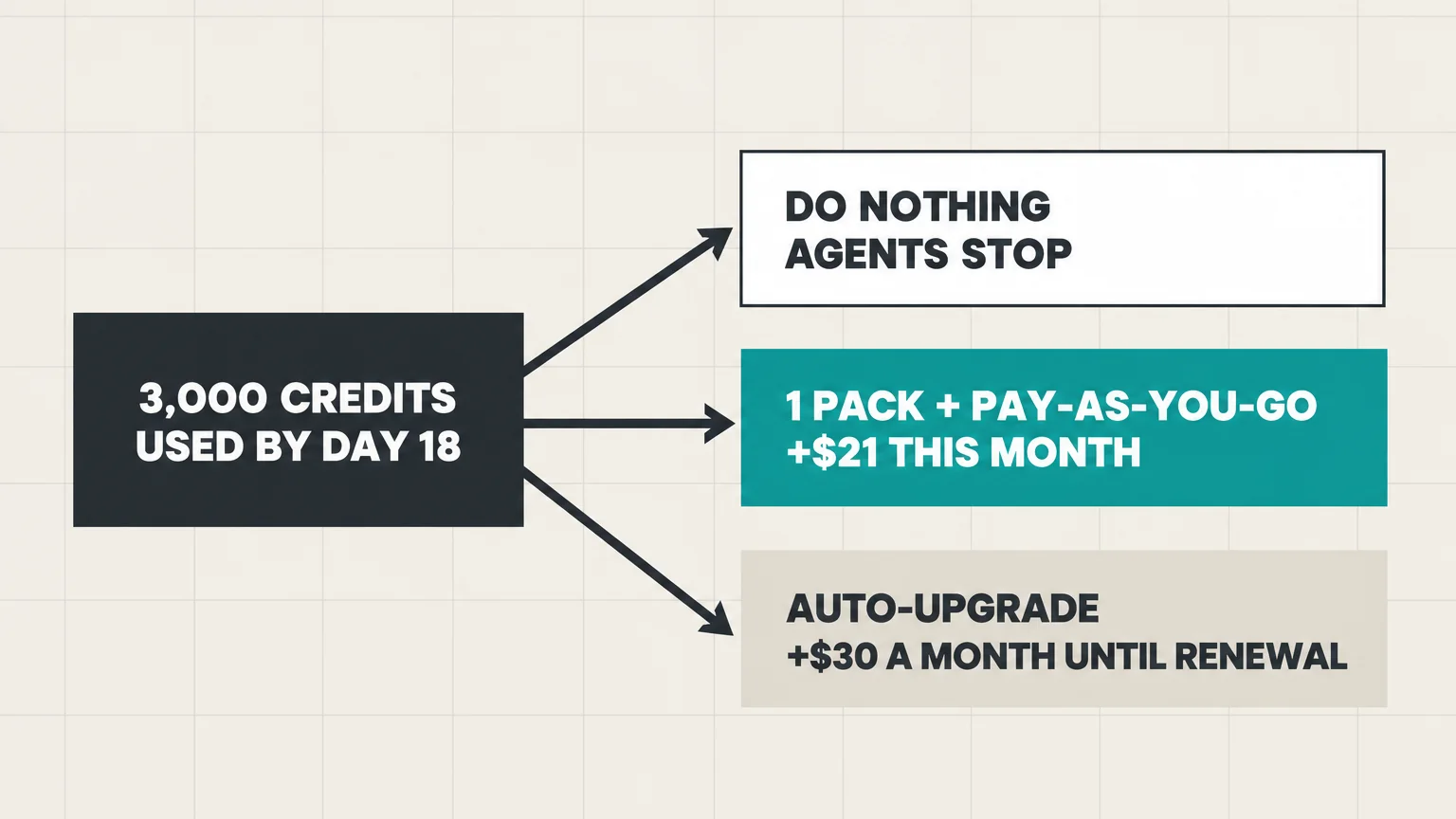
So that’s 2,100 credits over the allowance. At an even pace of 170 credits a day, the included 3,000 are gone around day 18. What happens next, though, depends on a setting most teams never open.
Outcome 1: do nothing, and the agents stop
If you’ve never bought extra credits, HubSpot pauses every credit-based feature once the allowance is used up, and nothing resumes until the next reset date. The Customer agent stops being assigned new conversations on every channel, so for the last 12 days of the month your website chat falls back to people, or to nobody. The bill stays at $450, so the real cost is whatever the leads arriving in those 12 days were worth.
Outcome 2: one pack plus pay-as-you-go
You can’t switch on pay-as-you-go by itself. HubSpot’s billing guide says you must first buy extra credits, and those come as capacity packs: each adds 1,000 credits a month and costs $10. If you buy one pack, your limit becomes 4,000. With pay-as-you-go as your overage setting, the remaining 1,100 credits are invoiced at $0.010 each, in steps of 10 credits. That’s $11, so this month’s credits cost $21 in total.
Two details matter here. The pack is a commitment: it renews every month for the rest of your term, and HubSpot only lets you cancel or downgrade packs when the term ends. And because a pack costs exactly what pay-as-you-go costs, one cent a credit, one pack is enough. Holding more only prepays credits that expire if a month is quiet.
Buying a pack also switches on an account spend limit, set by default at 50% above your total monthly credits. Here that’s 6,000, so this month runs to the end. HubSpot also warns your Super Admins and Billing Admins by email as usage passes 75%, then 85%, then 90% of that limit.
Outcome 3: auto-upgrade raises the rest of your term
The other overage setting is auto-upgrade. Instead of billing the excess once, HubSpot moves your account to a capacity pack that covers the month’s usage and keeps it there for the rest of the commitment term. In this example one pack becomes three, so $10 a month becomes $30 a month until renewal. With nine months left on an annual term, that busy month adds $180 to the year, against an $11 overage under pay-as-you-go.
Which setting do you have? It depends on when you bought extra credits. For credits bought on or after 16 September 2026, the default switched to pay-as-you-go. Anything bought before that date defaults to auto-upgrade, and it stays that way until someone changes it.
The whole bill: seats, onboarding and HubSpot credits
| Do nothing | One pack + pay-as-you-go | Auto-upgrade | |
|---|---|---|---|
| Seats (5 × $90) | $450 | $450 | $450 |
| Credit packs and overage this month | $0 | $21 | $30 (three packs) |
| Agents running all month? | No, they stop around day 18 | Yes | Yes |
| Credits in later months | $0 | $10 plus any overage | $30 until renewal |
| Onboarding, first month only | $1,500 | $1,500 | $1,500 |
Next to the seats, HubSpot credits are small money for a five-seat team: under 7% of this month. The seats and the onboarding fee are where the budget goes, and on monthly billing the seats rise to $100 each, or $500. Credits matter for a different reason. They decide whether your agents work all month, and one setting decides whether a busy month costs $11 or $180.
The same team on Starter: 500 HubSpot credits
On Sales Hub Starter the seats cost $7 each a month on annual billing, or $20 on monthly billing, so $35 or $100 for five people. The plan includes 500 credits, but it can’t run the Customer agent at all.
What it can run is the Prospecting agent and the Data agent. Five prospect researches use up the whole month’s allowance, and so do 50 Data agent answers. On Starter, then, credits don’t threaten the bill. They cap how much of the AI you can try, and the same pause applies when they run out.
Five settings that keep HubSpot credits predictable
- Check your overage setting. If you bought credits before 16 September 2026, you’re probably on auto-upgrade. If so, switch it to pay-as-you-go in your account’s billing settings.
- Lower the account spend limit. The automatic ceiling is 50% above your monthly credits. Set it to the most you’re willing to pay in a bad month instead.
- Set feature-level limits. A cap on the Data agent or on workflow AI actions stops one runaway automation from eating the credits your Customer agent needs. These limits cap spending, but they don’t reserve credits.
- Simulate before you switch an agent on. HubSpot can run test simulations without charging credits and shows the estimated cost per run. Then give the agent a monthly run limit.
- Make sure someone reads the alerts. Usage emails go to Super Admins and Billing Admins, so on a small team check that at least one of them actually reads billing mail.
One more check if your contract is unusual. HubSpot runs a limited-release flexible seats-and-credits plan in which HubSpot-sent emails, workflow actions and e-signatures also draw credits. If your order form mentions it, budget with that supplement rather than the standard catalog.
A quick HubSpot credits calculator
You don’t need a spreadsheet template, because four lines on paper will do:
- List each credit-based feature you plan to use, with a monthly count.
- Multiply each count by its rate from the table above, then add the lines up.
- Subtract your included credits: 500, 3,000 or 5,000 for most hubs.
- If anything is left, price it at about a cent a credit: $10 for the first 1,000 (the pack you need before overages are allowed), then $0.01 for each credit after that.
For example, our team’s 5,100 minus 3,000 leaves 2,100, which works out to $21. If your number is small next to your seat bill, stop worrying about the cent and spend your attention on the pause and the upgrade setting.
Where a flat-price CRM fits, and where it doesn’t
LiftUp is our product, so weigh this section accordingly. It has no AI agents, and nothing in it is billed in credits. Its AI drafts blog posts, summarizes a lead’s history, suggests replies and comments on your pipeline report, all from one monthly token allowance: 50,000 tokens on Starter and 500,000 on Growth. When the allowance is used up, the AI features stop until the next calendar month or until you upgrade. Unlike HubSpot, there’s no overage invoice.
Lead scoring and reply deadlines use rules, not AI, so they keep running whatever your token balance. Our guide to setting a lead response SLA by lead score shows how those deadlines work. Pricing is flat per organization: Starter is $49 a month for up to five users, and Growth is $149 for up to 20.
For five people, HubSpot Starter on annual billing ($35) costs less than LiftUp Starter ($49). Where LiftUp pulls ahead on price is the jump HubSpot makes at Professional: $450 a month for five Sales seats plus $1,500 onboarding, against $149 for Growth with no required onboarding fee. The LiftUp vs HubSpot comparison covers the features behind those prices.
Who LiftUp isn’t for: if you want an agent that researches prospects or answers website chats around the clock, LiftUp doesn’t do that, and HubSpot Professional is built for it. The same goes if your team sells by phone, SMS or WhatsApp, because LiftUp has none of those.
Next step
Open the credit usage page in your HubSpot account and check three things today: which features used credits last month, your overage setting and your account spend limit. If the numbers above made you question the seat bill more than the credits, compare LiftUp’s flat plans, or book a 30-minute demo and bring last month’s HubSpot invoice.
Frequently asked questions
What are HubSpot credits?
They're how HubSpot meters its AI agents and some automation, such as the Customer agent, the Prospecting agent, the Data agent and AI steps in workflows. Every paid plan comes with a monthly allowance, and whatever you don't use expires at the monthly reset.
How many HubSpot credits are included in each plan?
Starter plans get 500 credits a month. Professional plans of most hubs, and of Smart CRM, get 3,000, and Enterprise plans get 5,000. Data Hub and the Customer Platform bundle are more generous at the top, with 5,000 credits on Professional and 10,000 on Enterprise. Owning several hubs doesn't stack them; your highest edition sets the allowance.
How much do extra HubSpot credits cost?
HubSpot's catalog prices extra credits at one cent each ($0.010). Each capacity pack adds 1,000 credits a month for $10, and you keep it until your term ends. Pay-as-you-go overages are invoiced monthly in blocks of 10 credits, and they're only possible once you've bought at least one pack.
What happens when HubSpot credits run out?
Without any purchased capacity packs, everything that runs on credits stops until the allowance resets next month. The Customer agent, for example, stops picking up new conversations. With packs, HubSpot either invoices the extra credits at pay-as-you-go rates or auto-upgrades your packs until the contract term ends, depending on your overage setting.
Do HubSpot credits roll over?
No. Whatever you don't use in a month expires when the allowance resets, and that applies to the credits in capacity packs as well.
How is auto-upgrade different from pay-as-you-go?
Auto-upgrade answers a busy month by adding capacity packs, and you keep paying for them until your contract term ends. Pay-as-you-go invoices each extra credit once, and your limit goes back to normal at the next reset. Since 16 September 2026, new credit purchases start on pay-as-you-go.
How can I stop HubSpot credits from running out?
Set an account-level spend limit, add feature-level limits for tools such as the Data agent or workflow AI actions, simulate agent runs (which don't consume credits) to estimate costs, and give each agent a monthly run limit. Also check which overage setting your account uses.
Does LiftUp use credits?
No. LiftUp has no AI agents and bills no credits. Its AI features share a monthly token allowance of 50,000 tokens on Starter and 500,000 on Growth, and they stop at the limit until the next month or an upgrade, with no overage charge. Lead scoring and reply deadlines are rule-based and don't use tokens.

Abidhusain Chidi
Founder & CEO, QalbIT Infotech
Abidhusain Chidi is the founder and CEO of QalbIT Infotech, a software agency in Ahmedabad building web and SaaS products since 2018. He's also CTO at Seekly, an Australian revenue intelligence platform, and is building LiftUp. He writes about CRM, SaaS operations, and shipping multiple products as a small team.
See it live
Watch LiftUp run your whole growth stack
One console for CRM, content, AI editorial and insights — book a 30-minute walkthrough tailored to your team.
Book a demo