CRM Data Cleanup Checklist: 12 Fixes Before 2027
Abidhusain Chidi9 min read
Most CRM cleanup guides start with duplicates. This CRM data cleanup checklist starts somewhere else: with the leads nobody owns, the replies nobody sent and the deals whose close date passed in August. Those are the records that quietly distort a 2027 forecast, and every one of them can be found with a filter you run in a few minutes.
I wrote the 12 fixes below for a sales team of three to ten people, with no data team and no budget for a cleanup tool. Each fix names the filter, what to do with what it finds, and the trap to avoid. Do them in order, because the order matters more than most guides admit.
We build LiftUp, a CRM for inbound leads, so near the end I show which of these filters LiftUp has built in and which it doesn’t. Every other step works in any CRM.
Why run a CRM data cleanup checklist in Q4
Q4 began on 1 October, and the numbers in your CRM are about to become next year’s plan. Pipeline value, win rates and lead volume by source all feed the 2027 targets you’ll set in December. If a third of the open deals are dead, those targets start wrong.
The cost shows up in surveys too. In Validity’s State of CRM Data Management 2026, 62% of organizations said they lose revenue directly because of poor CRM data, and nearly a third of teams spend six or more hours a week fixing it. That survey covered 500 marketers in five countries, and Validity sells data-quality software, so treat it as a signal rather than a benchmark.
You’ll also meet a Gartner cost figure in most cleanup articles. Gartner’s own page puts the yearly average at $12.9 million or more, based on its research from 2020. It describes large enterprises, though, and tells a five-person team very little. The useful number is the one your own filters return.
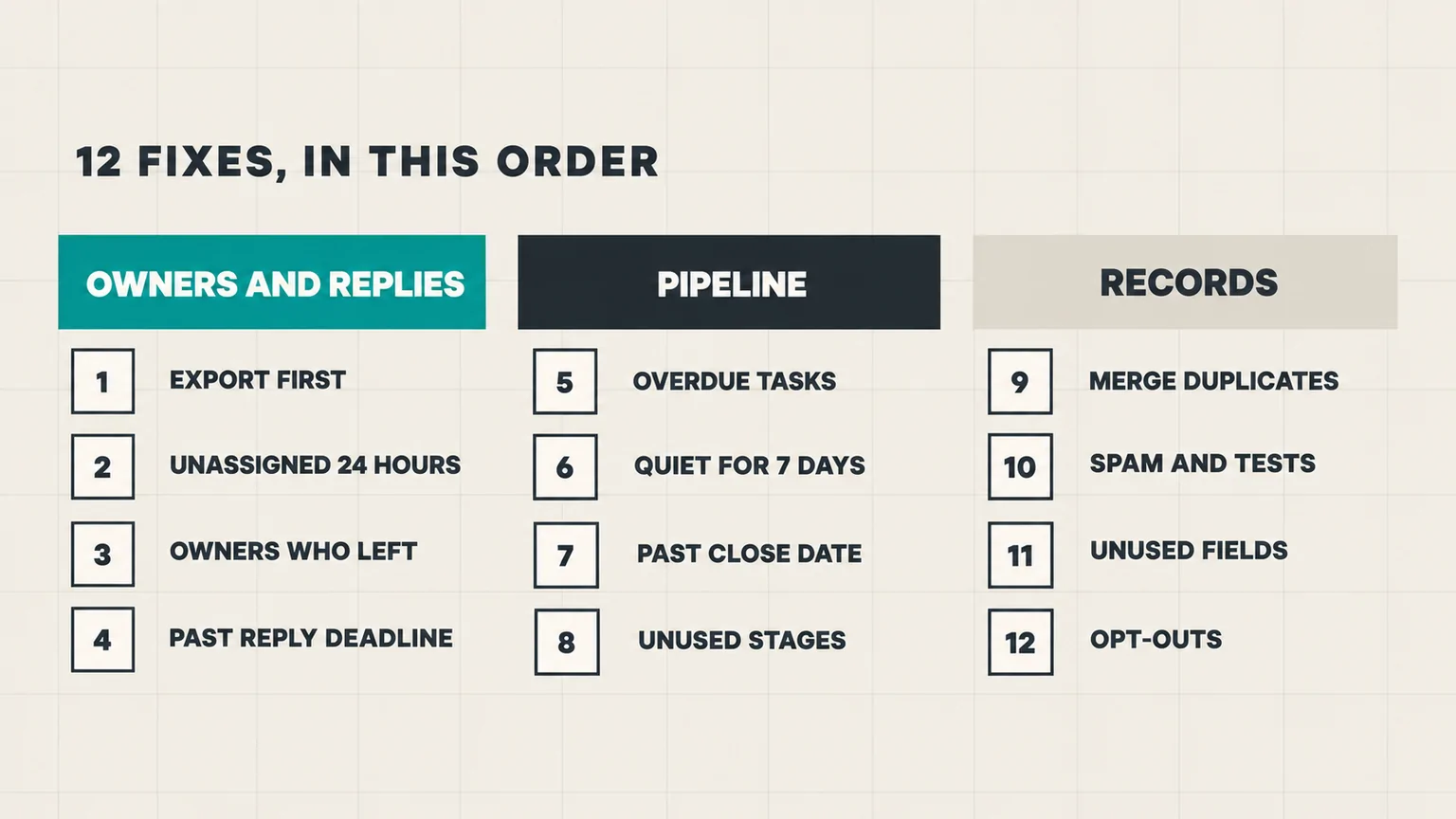
CRM data cleanup, part 1: owners and replies
Start with ownership, because every later fix needs someone to act on it. One r/CRM thread put the reason well: “If you dedup first, you end up with tidier bad data.”
1. Export your CRM data before the cleanup
Download a full export of contacts, companies and deals before you change anything, and store it somewhere outside the CRM. Bulk edits and imports can overwrite fields with blanks, and you’ll want a way back.
Also check how long your CRM keeps deleted records, because it varies a lot:
| CRM | How long you can restore deleted records | Merges |
|---|---|---|
| HubSpot | 90 days | Can’t be reverted |
| Zoho CRM | 60 days, from the recycle bin | Can’t be reverted |
| Pipedrive | 30 days, by an admin | Can’t be un-merged |
| Salesforce | 15 days, from the Recycle Bin | Not checked |
The export is your only undo for a merge, so keep it until the next quarter’s cleanup.
2. Assign leads with no owner after 24 hours
Filter: open leads with no owner, created more than 24 hours ago. These are leads that arrived, got seen by nobody in particular, and are now aging. Assign each one to a person today, then fix the cause: a form that doesn’t route, a source that isn’t mapped, or an assignment rule that only covers business hours.
3. Reassign records owned by people who left
Filter: open leads and deals whose owner is a deactivated user or someone who changed role. They look owned, so no unassigned view will ever show them. Move them to a current owner, and if there are too many to work, close the oldest ones with a reason rather than letting them sit.
4. Answer leads past their reply deadline
Filter: new leads that have had no first reply and are past your response deadline. This is the most expensive filter on the list, because these people asked you something and are still waiting. Reply to every one today, even late, before you touch anything cosmetic. If you don’t have reply deadlines yet, our guide to setting a lead response SLA by lead score gives a starting set.
CRM data cleanup, part 2: the pipeline
These four fixes decide whether your pipeline total means anything in December.
5. Clear overdue tasks
Filter: open tasks with a due date in the past. Each one is either a follow-up that never happened or a reminder that no longer matters. Do it, reschedule it with a real date, or delete it. A list of 40 overdue tasks trains a team to ignore the list.
6. Restart or close leads quiet for 7 days
Filter: leads you’ve contacted with no real conversation in the last 7 days. Use the last meaningful contact, not the last activity: an automated email or a field update counts as activity but isn’t a conversation. For each lead, either book a specific next step or close it as lost and record why. The reason matters more than the closing, because it’s what you’ll read in January.
7. Fix deals with a close date in the past
Filter: open deals whose expected close date has already passed. Every deal on this list is forecasting money that didn’t arrive. Give each one a new date with a next step, or close it. Pushing the date by a month without a next step just moves the problem into November.
8. Retire pipeline stages nobody uses
Filter: deal or lead counts by stage, plus how long records sit in each one. A stage that holds nothing, or holds records that never move, is left over from an old sales process. Move its records to a stage you actually use, then remove or rename it. Fewer stages make the next three filters faster.
CRM data cleanup, part 3: duplicates, junk and fields
Only now, with owners and stages fixed, is merging safe.
9. Merge duplicates after owners are fixed
Filter: records that share an email address, a phone number, or a company name with small spelling differences. Exact email matches are the easy part; HubSpot already deduplicates contacts by email address automatically, though its tool for reviewing duplicate pairs needs a Professional or Enterprise subscription. The costly duplicates are the near-misses, where two reps work “Acme Ltd” and “ACME Limited” for weeks without knowing it.
Before each merge, decide which record survives and who owns it. Merges are permanent in most CRMs, so when in doubt, leave the pair and note it for review.
10. Clear spam and test leads
Filter: leads with no company, throwaway email domains, gibberish messages, or your own team’s test submissions. Mark them as spam or delete them so they stop inflating lead counts by source. Look at where they came from, too: a single form producing most of the junk needs a spam check, not a monthly cleanup.
11. Cut fields nobody fills, carefully
Filter: custom fields that are empty on most records created this year. Unused fields slow down every form your team fills in, and a long list of required fields gets filled with guesses. But check before you delete one. Some automations and reports only run once a quarter or once a year, so a field that looks dead in October can break a year-end workflow. Hide it first, and delete it in January if nothing complained.
12. Stop marketing to contacts who opted out
Filter: contacts who unsubscribed, bounced, or asked not to be contacted. Under the US CAN-SPAM Act, the FTC’s compliance guide says you must honor an opt-out within 10 business days, so make sure every list and sequence excludes them.
On HubSpot, this fix also saves money. Only marketing contacts count toward your contact tier, so setting unsubscribed and bounced contacts to non-marketing lowers your count. The change takes effect on the next monthly update date, which is the first of the month on yearly plans. However, HubSpot only moves you to a lower tier at renewal, and Starter accounts must email support at least five business days before it. So if your renewal falls in Q1, this is the quarter to do it.
Keep the CRM data cleanup going after Q4
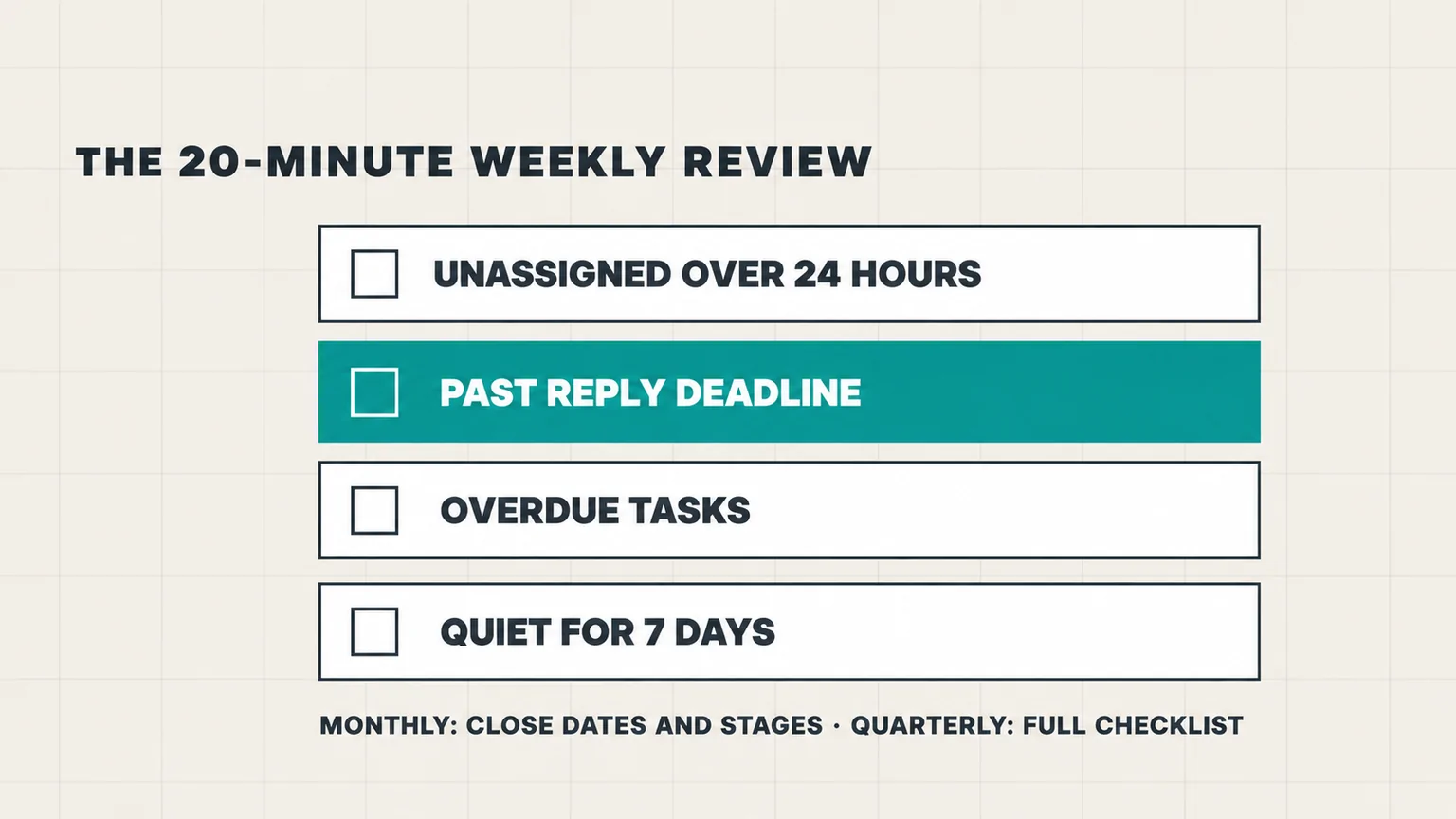
A one-off cleanup decays. HubSpot, citing MarketingSherpa research, estimates that email databases degrade by about 22.5% a year, and new mess arrives every week. So run this CRM data cleanup checklist in full once a quarter, and in between, keep a 20-minute weekly review:
- Save fixes 2, 4, 5 and 6 as views, so the review is four clicks, not four searches.
- Give one person the review, with a backup for holidays.
- Run fixes 7 and 8 monthly, and the rest once a quarter.
- Keep this quarter’s export until next quarter’s is done.
If the weekly lists stay short, the forecast you present in January will be one you can defend. Clean records also let you see which blog posts generate leads, because duplicates and spam no longer inflate the counts per page.
Running the CRM data cleanup checklist in LiftUp
LiftUp is our product, so here is exactly what it covers. Its “Needs attention” view, on Starter and above, has three of these filters as ready-made reasons: “Unassigned >24h”, “Stale contact >7d” and “Overdue task”. The same view flags leads that have missed their reply deadline as “SLA breached”. So fixes 2, 4, 5 and 6 come down to one tab.
For the rest:
- Export: leads download as CSV or Excel on every plan, with presets such as “Unassigned” and “Needs attention”.
- Duplicates: each lead page shows possible duplicates with the same email or phone, and “Merge in” moves their notes, tasks and files across. LiftUp then deletes the duplicate for good, one merge at a time.
- Spam: spam and deleted leads sit in an archive until you restore them or delete them forever.
- Stages: a stage report shows how many records have sat in each stage for more than 7 days.
There are also gaps you should know about. The quiet-lead filter uses a fixed 7 days and only covers contacted leads, there’s no filter for deals past their close date, and leads have no tags. Bulk assignment needs the Growth plan. Our CRM features page lists what each plan includes.
Who LiftUp isn’t for: teams whose cleanup is mainly enrichment and email verification, which LiftUp doesn’t do, or teams that sell by phone or WhatsApp, because LiftUp has no calling, SMS or WhatsApp. If you’re on HubSpot and weighing a move, our LiftUp vs HubSpot comparison sets out the differences.
Next step
Block two hours this week and run fixes 1 to 4 of this CRM data cleanup checklist. Note how many records each filter returns, because those four numbers are your baseline for the quarter. If the reply-deadline filter came back long, that’s where to look first. And if you’d like to see the attention view running on your own leads, book a 30-minute LiftUp demo.
Frequently asked questions
How often should you clean CRM data?
Run a full cleanup once a quarter and a short review every week. The weekly review covers unowned leads, missed reply deadlines, overdue tasks and quiet leads, and takes about 20 minutes once those filters are saved as views. Pipeline dates and stages are worth a monthly check.
What should I clean first in my CRM?
Start with an export, then fix ownership and unanswered leads. Duplicates come later: merging records before owners and stages are right only gives you tidier bad data, and most CRMs can't undo a merge.
Should I delete or archive old CRM records?
Close stale leads and deals with a lost reason rather than deleting them, so your win-rate history stays intact. Delete only spam, tests and true duplicates, and export first. Deleted records can be restored for 90 days in HubSpot, 60 in Zoho CRM, 30 in Pipedrive and 15 in Salesforce.
How do you find duplicate records in a CRM?
Filter for records that share an email address or phone number, then look for company names with small spelling differences, which automatic matching often misses. Decide which record survives and who owns it before each merge, because merges are permanent in most CRMs.
Does cleaning up contacts lower my HubSpot bill?
It can. Only marketing contacts count toward your HubSpot contact tier, so setting unsubscribed and bounced contacts to non-marketing reduces your count from the next monthly update date. A lower tier only applies at renewal, and Starter accounts must email support at least five business days before it.
How quickly do I have to honor an unsubscribe request in the US?
The FTC's CAN-SPAM compliance guide says you must honor an opt-out request within 10 business days. Check that every list, sequence and workflow excludes contacts who opted out.
Does LiftUp have CRM cleanup filters built in?
Yes, three of them. On Starter and above, LiftUp's Needs attention view lists leads unassigned for over 24 hours, contacted leads with no change in 7 days and leads with overdue tasks, and it flags leads past their reply deadline. Leads export as CSV or Excel, and a lead page can merge in a duplicate with the same email or phone. LiftUp has no tags on leads and no filter for deals past their close date.

Abidhusain Chidi
Founder & CEO, QalbIT Infotech
Abidhusain Chidi is the founder and CEO of QalbIT Infotech, a software agency in Ahmedabad building web and SaaS products since 2018. He's also CTO at Seekly, an Australian revenue intelligence platform, and is building LiftUp. He writes about CRM, SaaS operations, and shipping multiple products as a small team.
See it live
Watch LiftUp run your whole growth stack
One console for CRM, content, AI editorial and insights — book a 30-minute walkthrough tailored to your team.
Book a demo