CRM for Group of Companies: A Setup Guide for Oman
Abidhusain Chidi9 min read
Suhail Bahwan Group, one of Oman’s best-known family groups, runs more than 15 businesses and 100 global brands, according to Forbes Middle East. Most family groups are far smaller: a car dealership, a travel agency and a trading company under one owner and one marketing team. Yet they all reach the same question when choosing a CRM for group of companies. Should it be one system for everything, or one per business?
The honest answer depends on two things: whether your companies share customers, and whether their teams must be kept out of each other’s data. This guide sets out the three ways to set it up, what each costs, and a one-week rollout for the middle route, which suits most Omani groups.
We build LiftUp, which takes that middle route by giving each brand its own space inside one account. I’ll be specific about what it keeps separate and what it shares, because the shared part is where groups get surprised.
Why a CRM for group of companies matters in Oman
Family groups carry much of Oman’s private economy. A 2023 chapter by Sultan Qaboos University researchers, published by Springer, describes the overwhelming majority of Oman’s privately owned businesses as family-owned, with a combined contribution of over 60% of GDP.
Those groups are also putting digital work first. In PwC’s 2023 Middle East family business survey, 57% of respondents in the region named improving their digital capabilities as their top priority, against 44% of family businesses globally. The Middle East sample was 46 businesses, so read it as a direction rather than a precise figure.
The practical problem is usually less grand. Each company grew its own way of tracking leads: a spreadsheet at the dealership, a booking tool at the travel agency, and an inbox at head office. So the owner can’t see the group’s pipeline. And a customer who buys from two companies is a stranger to both.
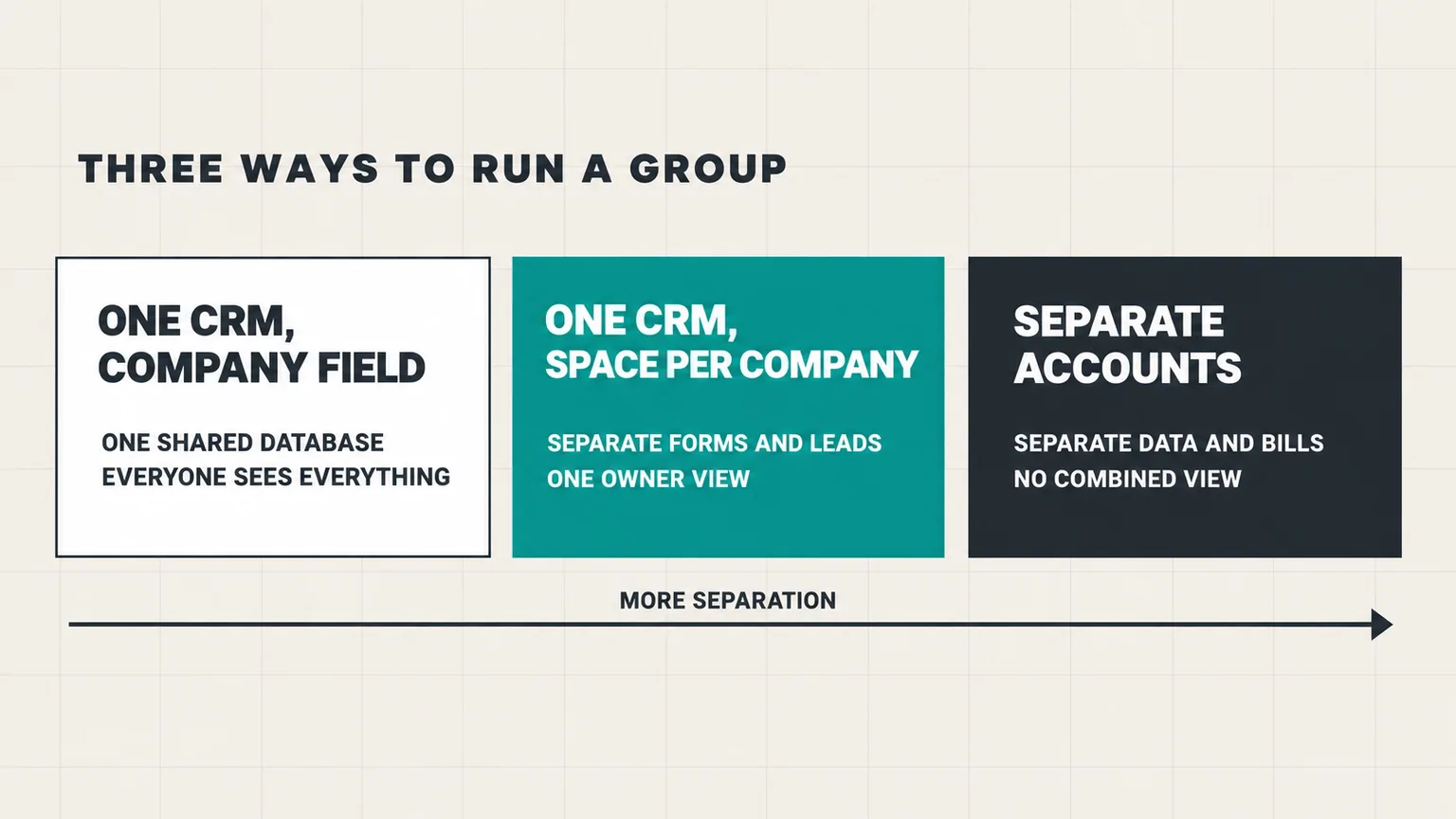
Three ways to set up a CRM for a group of companies
1. One CRM for all companies, with a company field
Every lead from every company goes into one CRM, tagged with a “company” field, and lists and reports filter on it. It’s the cheapest route and gives you one customer record across the group. It’s also the weakest. Everyone sees everything, and one set of forms and settings serves every brand. A mistyped field also puts a lead in the wrong company’s list.
2. One CRM with a space per company
Each company gets its own space inside one account, with its own forms, inbox and settings. Meanwhile, the owner can still see the whole group. Most CRMs offer some version of this:
- HubSpot sells a Brands add-on, which requires Marketing Hub Enterprise. HubSpot’s product catalog lists it at $1,000 a month for each extra brand, and our guide to running multiple brands in HubSpot works through the full cost.
- Odoo supports several companies in one database. Turning that on moves a Standard subscription to the Custom plan, though the free one-app plan allows it too.
- LiftUp gives each company its own product, covered in detail below.
3. Separate accounts per company
Each company runs its own CRM account, with its own users, data and bill. This is the hard wall. HubSpot’s own comparison on its Brands page lists strict data separation and separate bills as things the Brands add-on doesn’t give you, which is exactly what separate accounts do.
Zoho CRM makes this route easier to manage: its comparison page says a super admin can create up to 5 organizations, and one person can belong to as many as 10, all under one sign-in. Zoho’s help pages add that the organizations don’t sync any data with each other. The cost is that the owner sees no combined view, and a customer of two companies is two separate records.
Two questions that pick the route
| Your group | Best route |
|---|---|
| Companies share many customers, and one team sells for all of them | One CRM with a company field |
| Companies have their own websites, leads and staff, but the owner wants one view | One CRM with a space per company |
| Companies have different owners or partners, or might be sold | Separate accounts |
| Brand teams must never see each other’s leads | Separate accounts |
If your group looks like the example at the top, you’re probably in the second row: the companies sell different things to mostly different customers, each has its own website, and the same owner and marketing lead want to see what’s coming in across the group.
What the owner should check each week
A group CRM is only worth it if someone looks at the whole picture. Give the owner, or the group marketing lead, a 15-minute review each Sunday with four numbers per company:
- New leads last week, with the main source for each company.
- Leads still waiting for a first reply, because a slow company drags the whole group’s reputation.
- Deals won and lost, with the most common reason for losing.
- Customers shared between companies, as a count, so you know whether cross-selling is worth organizing.
The first three come straight from the CRM. The fourth is a quick check of the same email or phone number across companies, and it’s the number that tells you whether your group should move toward one shared customer view over time.
Setting up a CRM for group of companies, one product per brand
Here’s how the middle route works in LiftUp, step by step. Each step needs a few minutes per company.
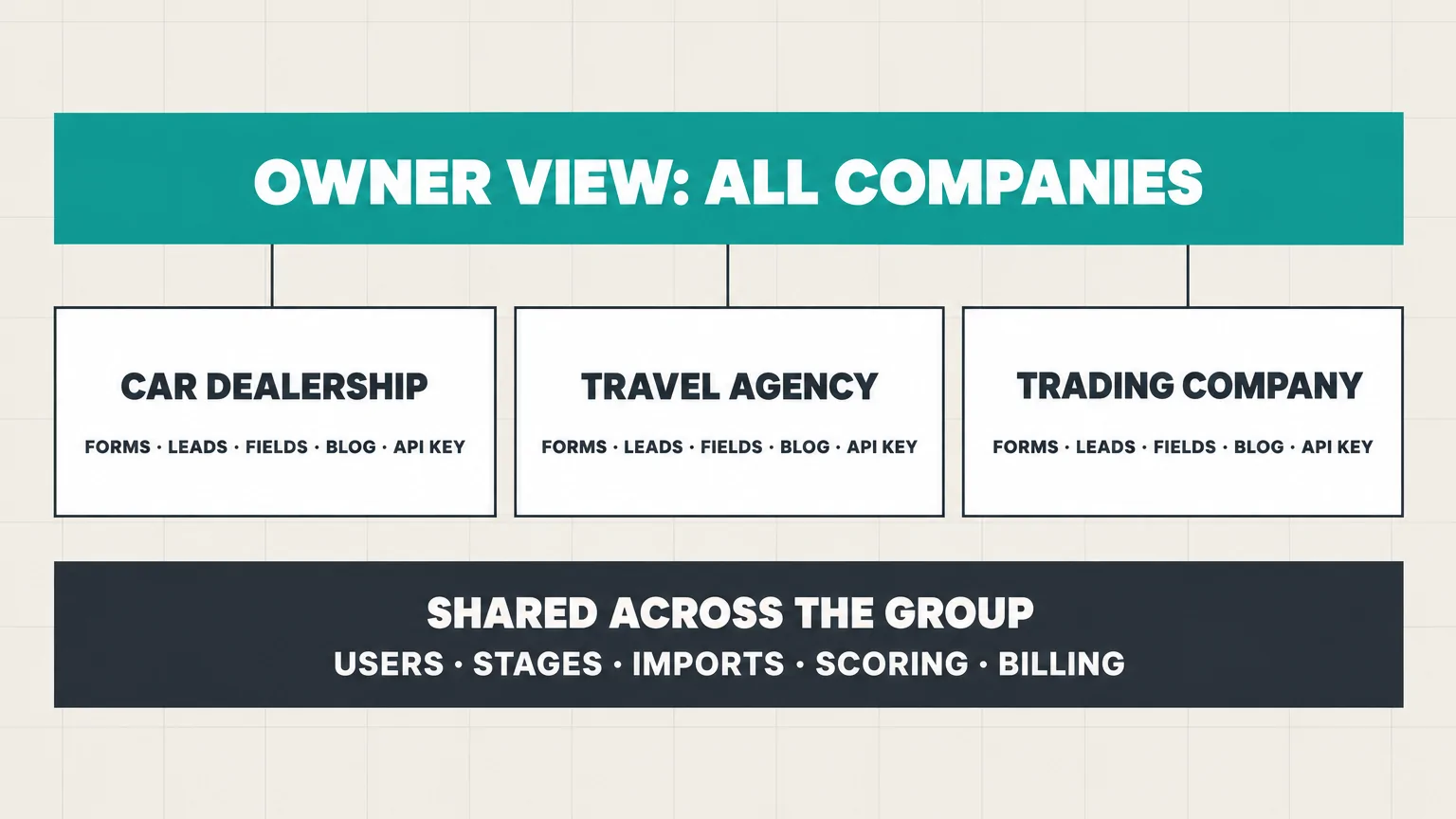
- Create one product per company. Starter covers 3 products and Growth covers 10, so a group with four companies needs Growth. You switch between companies from the top bar.
- Connect each website. Every product has its own lead forms and its own API key, so the dealership’s site sends its leads to the dealership only. Our multi-product setup page shows how the products sit side by side.
- Add fields per company. Custom fields belong to one product, so the dealership can ask for a car model and the travel agency for a destination, without cluttering each other’s forms.
- Route leads to the right team. Assignment rules can match on product, so each company’s leads go to its own salespeople.
- Give each company its own blog. Each product has its own blog, which its website pulls in through that product’s API key.
- Set up the group view. The Insights section has an “All products” view, from Starter up, so the owner can see leads and traffic for the whole group in one place.
What stays shared across the group’s companies
This is the part to read before you buy, because it decides whether the middle route is enough for you.
- Users can see every company. Anyone on the team can switch to any product, and there’s no setting that limits a person to one company. Sales roles can be limited to the leads assigned to them, which helps, but it isn’t a wall between companies.
- Pipeline stages are shared. Every company uses the same stages, so name them in terms that fit all of them, such as “visit booked” rather than “test drive booked”. Institutes with several campuses run into the same rule, as our CRM guide for training institutes shows.
- Imports check the whole group. When you import a spreadsheet, LiftUp skips any lead whose email already exists anywhere in the account. If your companies share customers, import each company’s list in priority order, or add those customers by hand.
- Leads can’t move between companies. A lead that arrived at the wrong company has to be recreated in the right one.
- Some settings cover the whole account. Scoring weights, the monthly lead allowance, branding and billing apply to every company together.
When you need a hard wall: two workspaces
If some companies must be kept apart completely, for example because one has a partner who shouldn’t see the others’ leads, use separate LiftUp workspaces instead. Each workspace has its own plan and its own bill, and nothing is shared between them.
There’s one catch. A LiftUp login belongs to exactly one workspace, so a person who works in both needs a separate email address for each. For an owner who only wants reports, that’s manageable. For a team that works across both every day, it’s a reason to stay with one workspace and accept the shared parts.
A one-week CRM rollout for a group of companies
- Sunday: list every company, its website, its lead sources and who sells for it. Decide the route with the table above.
- Monday: create the products, agree on shared stage names, and add each company’s custom fields.
- Tuesday: connect each website’s forms, then send a test lead from each and check where it lands.
- Wednesday: set the assignment rules, invite each company’s team, and import existing leads in priority order.
- Thursday: review the “All products” view with the owner, and agree on who checks it each week.
If you’re still comparing tools for the group, our LiftUp vs Zoho CRM comparison covers the closest alternative.
Where LiftUp fits, and where it doesn’t
LiftUp fits English-first groups whose companies each have a website, take leads through forms, and want one owner’s view across the group. A group of four to ten companies needs Growth, which covers ten companies and up to 20 users.
Who LiftUp isn’t for: groups whose companies must be fully separated but managed by the same people every day, because of the one-login-per-workspace rule. It also isn’t for companies whose customers enquire mainly by WhatsApp or phone, since LiftUp has no WhatsApp inbox, calling or SMS, or for teams who need an Arabic interface. And if what you really need is group accounting or stock across companies, that’s an ERP, not a CRM.
Next step
Answer the two questions first: do your companies share customers, and must their teams be kept apart? Then list your companies, their websites and their lead sources on one page. If the middle route fits, book a 30-minute LiftUp demo and bring that list, and we’ll show you how your companies map to products.
Frequently asked questions
Can one CRM manage multiple companies?
Yes. Most CRMs offer a way to keep each company's leads apart inside one account, such as HubSpot's Brands add-on, Odoo's multi-company setting or LiftUp's products. If the companies must be fully separated, use separate accounts instead, which Zoho CRM makes easier with up to 5 organizations per super admin under one sign-in.
Should a family group use one CRM or one per company?
Use one CRM with a space per company when the owner wants a single view and the companies don't need to hide data from each other. Use separate accounts when companies have different partners, might be sold, or their teams must never see each other's leads.
How much does HubSpot charge for multiple brands?
HubSpot's product catalog lists the Brands add-on at $1,000 a month for each extra brand, and it requires Marketing Hub Enterprise. HubSpot's own comparison says Brands doesn't provide strict data separation or separate bills.
How many organizations can I have in Zoho CRM?
Zoho's comparison page says a super admin can create up to 5 organizations, and one person can belong to as many as 10. Zoho's help pages note that the organizations don't sync data with each other, so each one is a separate CRM.
Can I stop a salesperson seeing another company's leads in LiftUp?
Not by company. Everyone on a LiftUp team can switch to every product, though sales roles can be limited to the leads assigned to them. For a hard wall, use a separate workspace, which has its own plan and bill and needs its own login.
How many companies can one LiftUp account hold?
Each company is a product. Starter covers 3 products and 5 users, and Growth covers 10 products and 20 users. Every product has its own lead forms, inbox, custom fields, blog and API key.

Abidhusain Chidi
Founder & CEO, QalbIT Infotech
Abidhusain Chidi is the founder and CEO of QalbIT Infotech, a software agency in Ahmedabad building web and SaaS products since 2018. He's also CTO at Seekly, an Australian revenue intelligence platform, and is building LiftUp. He writes about CRM, SaaS operations, and shipping multiple products as a small team.
See it live
Watch LiftUp run your whole growth stack
One console for CRM, content, AI editorial and insights — book a 30-minute walkthrough tailored to your team.
Book a demo