HubSpot Multiple Brands: Do You Need Enterprise?
Abidhusain Chidi9 min read
Do you need Enterprise for HubSpot multiple brands? For HubSpot’s own feature, yes. HubSpot Brands runs only on Marketing Hub Enterprise, and every brand after your first is a $1,000-a-month add-on. Three brands come to $5,600 a month before extra seats, or $74,200 in the first year once the required onboarding fee is added.
That money buys something specific: one shared CRM with a separate logo, domain, email preferences and reports for each brand. If what you really need is separate lead lists, separate bills or a small budget, there are cheaper ways to set this up, and HubSpot’s own Brands page points to some of them. I priced all four routes from HubSpot’s product catalog, pricing pages and knowledge base as they stood on 30 September 2026, and the post ends with a decision table by number of brands.
We build LiftUp, a CRM that keeps each brand’s leads and blog apart inside one account, so one of the four routes is ours. I’ll be specific about what it leaves out.
What HubSpot Brands does, and what it shares
Brands used to be called Business Units, and the old help links now redirect to the new name. HubSpot’s Brands article, updated on 28 September 2026, lists the feature for Marketing Hub Enterprise accounts that have bought the Brands add-on. Each add-on gives you one brand on top of the one your account already has, and you can stack them up to 100 brands.
For each brand, you get:
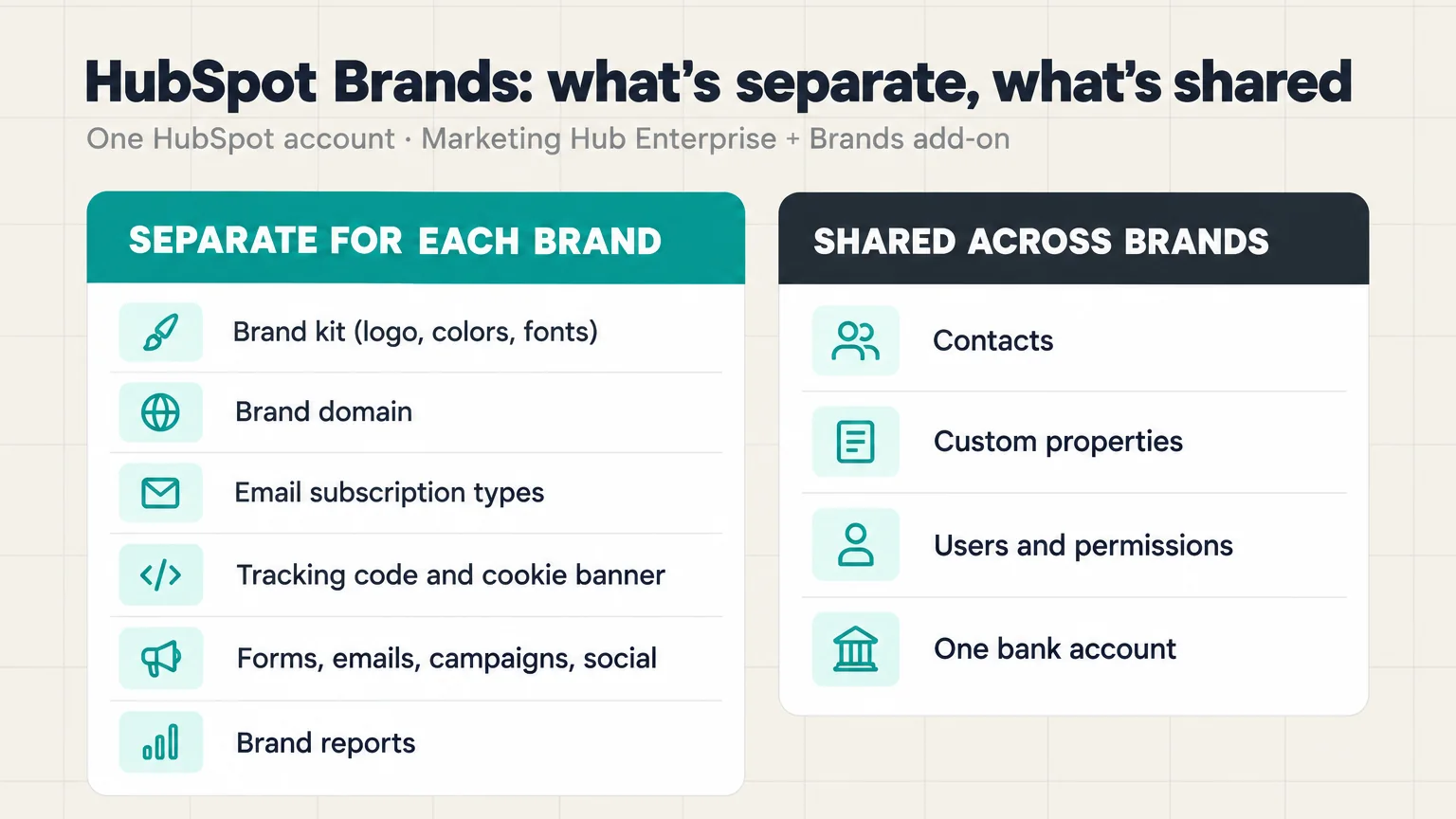
- its own brand kit, with a logo, colors and fonts
- one extra brand domain for its pages
- its own email subscription types, so a contact can unsubscribe from one brand and stay subscribed to another
- a separate tracking code, which lets each brand show its own cookie banner
- forms, marketing emails, campaigns, social accounts and workflows tagged to that brand
- brand reports on your dashboards
What stays shared
What stays shared matters just as much. There is one contact database, and HubSpot says one contact can belong to several brands, so a customer of two brands is one record. A custom property created for one brand also shows up on every contact. Your users are shared too. Brands has no permissions of its own, and a request for per-brand permissions has sat in HubSpot’s Ideas forum since 2021. Limiting who sees what falls to teams and HubSpot’s access controls, where Super Admins still see everything.
Two rules are worth knowing before you buy. Emails, forms and campaigns take their brand when they’re created, and HubSpot’s asset article says they can’t be reassigned afterwards. And Brands can’t be turned off. The only way out is a cancellation request through your Customer Success Manager.
HubSpot is also candid about the limits. The comparison chart on its Brands page lists strict data separation, separate bills, separate CRMs and legal boundaries between brands as things one account with Brands doesn’t give you.
What HubSpot multiple brands cost on Enterprise
HubSpot’s Product & Services Catalog lists Marketing Hub Enterprise from $3,600 a month with five core seats, billed annually, plus a required one-time onboarding fee of $7,000. If you need more people, extra core seats are $75 a month each. The Brands add-on is $1,000 a month, and each one adds a root domain, 100 active segments, 100 static segments and 100 workflows to your limits.
Because your account already counts as one brand, N brands need N minus one add-ons. At least one agency guide multiplies $1,000 by every brand, which overstates the bill. Here is the math for five seats:
| Brands | Add-ons | Per month | Per year | First year, with onboarding |
|---|---|---|---|---|
| 2 | 1 | $4,600 | $55,200 | $62,200 |
| 3 | 2 | $5,600 | $67,200 | $74,200 |
| 5 | 4 | $7,600 | $91,200 | $98,200 |
| 10 | 9 | $12,600 | $151,200 | $158,200 |
These totals assume each add-on runs for all twelve months of the Enterprise term. HubSpot lists the add-on per month and doesn’t say whether it can be bought for part of a term, so ask for that in writing. The catalog also lists a paid Brands onboarding service without a public price. Enterprise includes 5,000 HubSpot credits a month as well, and our guide to HubSpot credits explains what those buy.
Cheaper routes than HubSpot Brands
The add-on isn’t the only way to run several businesses, and HubSpot’s Community has years of threads from small teams asking whether it can be done without Enterprise. It can, with trade-offs. Here are the three other routes.
One account with a brand property
The cheapest route works on any plan. Create a Brand dropdown property, set it on every form, and build lists, views and reports on it. Give each brand its own deal pipeline, and use teams so reps see only their team’s records. HubSpot lets every account limit contact access that way, although limiting who sees a pipeline needs Professional. So the extra cost is nothing beyond the plan you already pay for.
The weak spots are branding and email. Every brand shares one brand kit, because separate kits come with the Brands add-on. Limiting who can see marketing emails, workflows and forms needs Enterprise. Unsubscribes are the sharpest edge: letting a contact leave one brand’s emails while staying on another’s is a Brands feature. So name your subscription types per brand, and expect some contacts to opt out of everything at once.
A separate HubSpot account per brand
Give every brand its own HubSpot account and you get the separation Brands doesn’t offer: separate contacts, users, integrations and bills. Small brands can each run on Starter, which listed at $20 a seat per month on 30 September 2026, or $7 on annual billing for new customers. The cost is day-to-day friction instead. For example, people switch between accounts, a customer of two brands is two records, and an unsubscribe in one account doesn’t carry over to the other.
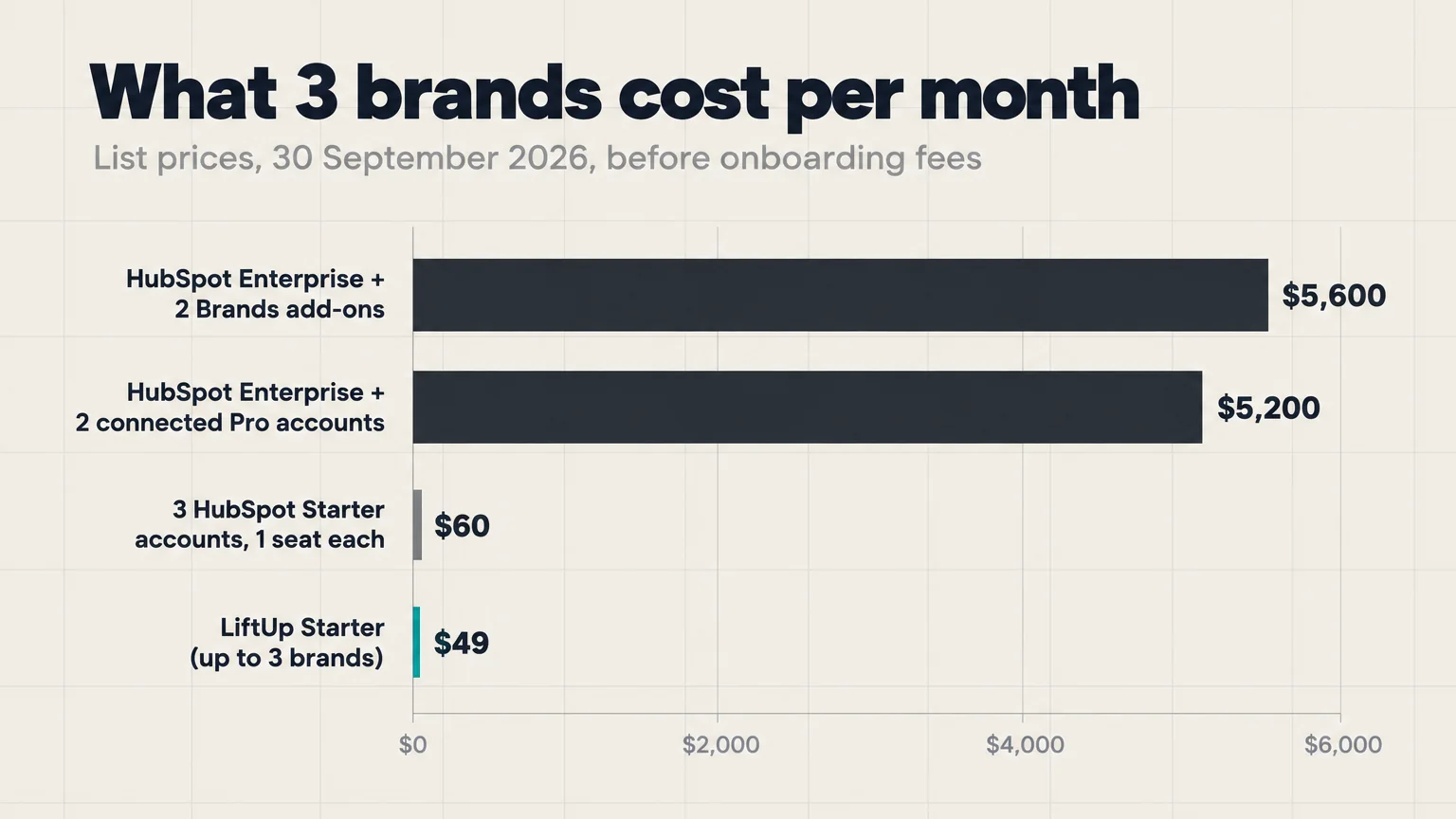
HubSpot’s multi-account management connects up to 30 accounts for shared reporting, mirrored data and copied assets, but one account must be on an Enterprise plan and the rest on Professional or Enterprise. For three brands, one Marketing Hub Enterprise account at $3,600 plus two Professional accounts at $800 each on annual billing come to $5,200 a month. That’s close to the Brands route, with $13,000 in onboarding fees instead of $7,000. The setup article still refers to beta terms, so check the current status with HubSpot before you plan around it.
A CRM that keeps each brand apart
The last route leaves HubSpot. Instead of tagging records, some CRMs treat brands as separate containers inside one account. Zoho CRM’s comparison page, checked on 30 September 2026, lets a super admin create up to five organizations on every edition. Family business groups in the Gulf weigh the same choice, and our Oman CRM checklist covers it. We compare the two in LiftUp vs Zoho CRM, and our CRM guide for a group of companies sets all three setups side by side.
LiftUp gives each brand its own product: a separate API key, lead inbox, lead forms, custom fields, blog and AI writing styles, plus webhooks per product on Growth. Starter covers three brands and five users for $49 a month, and Growth covers ten brands and 20 users for $149. Our multi-product setup page shows how the brands sit side by side. If your sites run on Next.js, our contact form guide shows how a site sends its form leads to the API with its product’s key.
Still, it’s a different kind of tool, not a cheaper version of Brands. LiftUp doesn’t send marketing newsletters or publish to social accounts. Everyone on your team can switch to every brand, because access is set by role, not by brand. One Google Analytics and Search Console connection serves the whole account, and white-label branding covers the whole account rather than each brand.
Decision table for HubSpot multiple brands
Monthly cost at list prices on 30 September 2026, before taxes and onboarding fees:
| Route | 2 brands | 3 brands | 5 brands | 10 brands |
|---|---|---|---|---|
| Marketing Hub Enterprise + Brands (5 seats) | $4,600 | $5,600 | $7,600 | $12,600 |
| One Enterprise account + Professional accounts, connected | $4,400 | $5,200 | $6,800 | $10,800 |
| Separate Starter accounts, one seat each | $40 | $60 | $100 | $200 |
| One account with a brand property | Your plan | Your plan | Your plan | Your plan |
| LiftUp (Starter up to 3 brands, Growth up to 10) | $49 | $49 | $149 | $149 |
Price alone won’t decide it, because the routes do different jobs:
- Enterprise with Brands fits when your brands share customers and one marketing team sends email for all of them. Per-brand unsubscribes are the feature you’re paying for.
- Separate accounts fit when brands need hard separation, their own bills, or might be sold one day. Connect them only if one of them already needs Enterprise.
- A brand property fits two or three brands run by one small team that can live with one logo and careful email lists.
- A product-scoped CRM fits when what each brand needs is its own lead inbox, forms and blog, not newsletters or social publishing.
Five questions before you buy HubSpot Brands
- Do your brands share customers? If they rarely do, one shared contact database gives you little and mixes records you’d rather keep apart.
- Does each brand send its own marketing email? Per-brand unsubscribes are the strongest reason to buy Brands. So without regular email, most of the value goes.
- Might a brand be sold or spun off? HubSpot’s chart puts legal boundaries between brands outside what Brands covers, and separating one shared account later takes real work.
- Who needs to see what? Brands doesn’t restrict users. If each brand’s team should see only its own leads, plan teams and access rules first, and remember that Super Admins see everything.
- Will you stay on Enterprise? Brands can’t be switched off and depends on Enterprise, so it ties your plan choice for as long as you use it.
Where LiftUp fits, and where it doesn’t
LiftUp is our product, so weigh this section accordingly. It suits founders and small agencies who run several sites or products, want one lead inbox per brand with its own forms and API key, and keep a blog on each site. Our LiftUp vs HubSpot comparison covers the rest of the feature list.
Who LiftUp isn’t for: teams that need to keep each brand’s staff out of the other brands’ data, because LiftUp has no per-brand user access. It’s also the wrong tool if your brands live on email newsletters, social publishing, calls, SMS or WhatsApp. LiftUp has none of those, while HubSpot does most of them well.
Next step
Before you talk to HubSpot sales, write down how many brands you run, how many share customers and who on your team needs to see each one. If the answer points to separate leads and a separate blog per brand, book a 30-minute LiftUp demo and bring your brand list, and we’ll show you how it maps to products.
Frequently asked questions
Can one HubSpot account run multiple brands?
Yes, in two ways. HubSpot's Brands add-on, available on Marketing Hub Enterprise, gives each brand its own brand kit, domain, email subscription types and reports. Without it, you can tag records with a Brand property and split lists, pipelines and teams by brand, but every brand shares one brand kit and one set of subscription types.
How much does the HubSpot Brands add-on cost?
HubSpot's product catalog lists it at $1,000 a month, checked on 30 September 2026. Each add-on adds one brand to the one your account already has, so three brands need two add-ons. It also requires Marketing Hub Enterprise, which starts at $3,600 a month billed annually, plus a one-time $7,000 onboarding fee.
Is HubSpot Brands the same as Business Units?
Yes. HubSpot renamed Business Units to Brands, and the old help links redirect to the new article. A few screens and steps still use the old name, such as the business unit filter on dashboards.
Can I restrict users to one brand in HubSpot?
Not through Brands, which has no permissions of its own. You can limit access with teams and HubSpot's access controls: contact records on any plan, pipelines from Professional, and marketing emails, workflows and forms on Enterprise. Super Admins can still see everything.
Should I use separate HubSpot accounts or the Brands add-on?
Choose separate accounts when brands need their own data, users and bills, or might be sold one day. Choose Brands when your brands share customers and one marketing team runs email for all of them. HubSpot's multi-account management can connect up to 30 accounts if one is on Enterprise and the rest are on Professional or Enterprise.
Can a contact unsubscribe from just one brand?
With the Brands add-on, yes: each brand has its own subscription types, so a contact can leave one brand's emails and stay on another's. Without it, subscription types belong to the whole account. With separate accounts, each account keeps its own unsubscribes, so an opt-out in one doesn't reach the other.
How many brands can one HubSpot account have?
Up to 100, by buying the Brands add-on once for each extra brand. If you run brands as separate accounts instead, multi-account management connects up to 30 of them.
Does LiftUp support multiple brands?
Yes. Each brand is a product with its own API key, lead inbox, lead forms, custom fields and blog. Starter covers three brands and five users for $49 a month, and Growth covers ten brands and 20 users for $149. LiftUp has no per-brand user access, so everyone on the team can switch to every brand, and it doesn't send newsletters or publish to social accounts.

Abidhusain Chidi
Founder & CEO, QalbIT Infotech
Abidhusain Chidi is the founder and CEO of QalbIT Infotech, a software agency in Ahmedabad building web and SaaS products since 2018. He's also CTO at Seekly, an Australian revenue intelligence platform, and is building LiftUp. He writes about CRM, SaaS operations, and shipping multiple products as a small team.
See it live
Watch LiftUp run your whole growth stack
One console for CRM, content, AI editorial and insights — book a 30-minute walkthrough tailored to your team.
Book a demo