Lead Scoring Model Example: A 0-100 B2B Template
Abidhusain Chidi12 min read
Two leads land in your inbox on the same morning. One is the VP of operations at a 120-person firm, who names a deadline and asks for a demo. The other is a student on a free email address asking for a template. A flat list treats them the same, and so does a tired sales team. This lead scoring model example puts a number on each, so the right one gets the first call.
Below is a copy-and-paste lead scoring model example that scores every lead from 0 to 100. It has 60 points for fit, 40 points for intent, a few penalties and a hard cap at 100. None of it needs page tracking or email opens, so a team with a website form and a CRM can use it today.
One caution: every number here is a starting value I chose, not an industry benchmark. Your own won and lost deals decide the final weights.
The lead scoring model example in one table
Fit asks “would we want this customer?” Intent asks “do they want us now?” Keeping them apart matters, because a perfect-fit company that is only browsing needs a different follow-up from a poor-fit one asking for a quote.
| Part | Signal | Points |
|---|---|---|
| Fit (60) | Company size | 0 to 20 |
| Fit (60) | Role | 0 to 20 |
| Fit (60) | Industry or use case | 0 to 20 |
| Intent (40) | What they asked for | 5 to 25 |
| Intent (40) | Message quality | 0 to 10 |
| Intent (40) | Source | 0 to 5 |
| Penalties | Free email, student, out of region | -10, -15, -20 |
| Rule | Floor at 0, cap at 100 | – |
Overall, that’s six positive signals and three penalties. It is deliberately small. One practitioner guide suggests starting with 8 to 12 criteria, because a bigger first model creates complexity nobody trusts, and I’d go lower still if your forms collect little data. If a field is blank, give it zero points. Otherwise you are scoring a guess.
Fit points in the lead scoring model example (0 to 60)
Fit points describe the company and the person. They rarely change, so score them once when the lead arrives. Before you score on them, make sure the company and job title fields are filled in consistently, which is what our CRM data cleanup checklist covers.
Company size (0 to 20)
Score against your ideal customer, not against “bigger is better”. Say your sweet spot is 50 to 249 employees; for solo consultants, flip the table.
- 50 to 249 employees: 20 points
- 10 to 49 or 250 to 999: 12 points
- Anything else: 4 points
- Unknown: 0 points
Role (0 to 20)
- Owner, founder, C-level or VP: 20 points
- Director or head of: 15 points
- Manager: 8 points
- Individual contributor: 4 points
- Student, intern or unknown: 0 points
However, seniority is only a guide. In a 10-person company the owner does the buying, and in a large one a manager may run the evaluation, so check this signal against your won deals first.
Industry or use case (0 to 20)
Core industry or a use case you handle well: 20 points. A neighboring one: 10. Anything else: 0. Of all six, this is the signal where your own history matters most. If 70% of your best customers are agencies, say so in the table.
Intent points in the lead scoring model example (0 to 40)
Intent points describe what the lead did, and they’re the ones that age. A form sent today means more than the same form from last quarter. That’s why the decay rule later in this guide applies only to these 40 points.
What they asked for (5 to 25)
- Demo, quote or pricing request: 25 points
- Question about the product or an integration: 15 points
- Guide download or newsletter signup: 5 points
This is the heaviest signal on purpose, because someone who asks for a quote has told you what they want, and no browsing pattern says it as clearly.
Message quality (0 to 10)
- Mentions a budget, deadline or timeline: 5 points
- Message longer than 200 characters: 3 points
- Names the tool they use now, or a specific problem: 2 points
Because length is a weak proxy for thought, this signal stays small.
Source (0 to 5)
Referral or customer introduction: 5 points. Search or direct visit: 3 points. Social or anything else: 1 point. Once you store the page each lead came from, you can test whether search leads earn their 3; our guide to which blog posts generate leads shows how to join GA4 and CRM data for that.
Why this model skips email opens
Many templates give a couple of points for opening an email, but that signal is unreliable now. When someone turns on Apple’s Mail Privacy Protection, it stops senders from seeing whether an email was opened. The protection doesn’t extend to links, though, so clicks and replies are still real signals. If you track them, add them as intent events.
Penalties in the lead scoring model example
Some leads should lose points, and a few should disappear from the ranking altogether.
- Free email address on a B2B offer: minus 10 points.
- Student or job seeker: minus 15 points.
- Outside the regions you serve: minus 20 points.
- Competitor, vendor pitch or obvious spam: don’t subtract, set the score to 0 and suppress it.
The last rule is the one people get wrong, because it feels too harsh. A competitor who fills in your demo form can have a perfect title and a long message, and a small minus would still leave them near the top. Instead, remove them. Finally, floor the score at 0, so penalties never produce a negative number.
Thresholds: where hot, warm and nurture start
I’d start with three bands:
- 70 to 100, hot: a person replies the same working day.
- 40 to 69, warm: a person replies, but a day or two is fine.
- 0 to 39, nurture: an automatic reply and a place in your newsletter list.
The 70 line has a reason you can check. A lead with full intent (40) needs at least 30 fit points to reach it. A perfect-fit lead (60) needs only 10 intent points. As a result, a lead that is strong on one half and nearly empty on the other stays warm. For example, a perfect fit who only downloads a guide scores 60 + 5 + 0 + 1 = 66, which is warm, not hot.
To move a line, first run last month’s leads through the sheet and count how many land in each band. If sales can only handle 15 hot leads a week and 40 arrive, raise the line. After that, give each band a deadline, which our lead response SLA guide sets by score.
Score decay for a lead scoring model, in one formula
A lead who asked for a quote five weeks ago and went silent isn’t the same as one who asked this morning. Decay handles that by shrinking the intent points as they age, while fit points stay put.
| Days since last intent event | Intent multiplier |
|---|---|
| 0 to 7 | 1.00 |
| 8 to 30 | 0.75 |
| 31 to 60 | 0.50 |
| 61 or more | 0 |
In Google Sheets or Excel, put the days since the last intent event in column D, fit in E, intent in F and the penalty points, as a positive number, in G. The final score formula is:
=MAX(0, MIN(100, E2 + F2 * IF(D2<=7, 1, IF(D2<=30, 0.75, IF(D2<=60, 0.5, 0))) - G2))Sam’s score over time
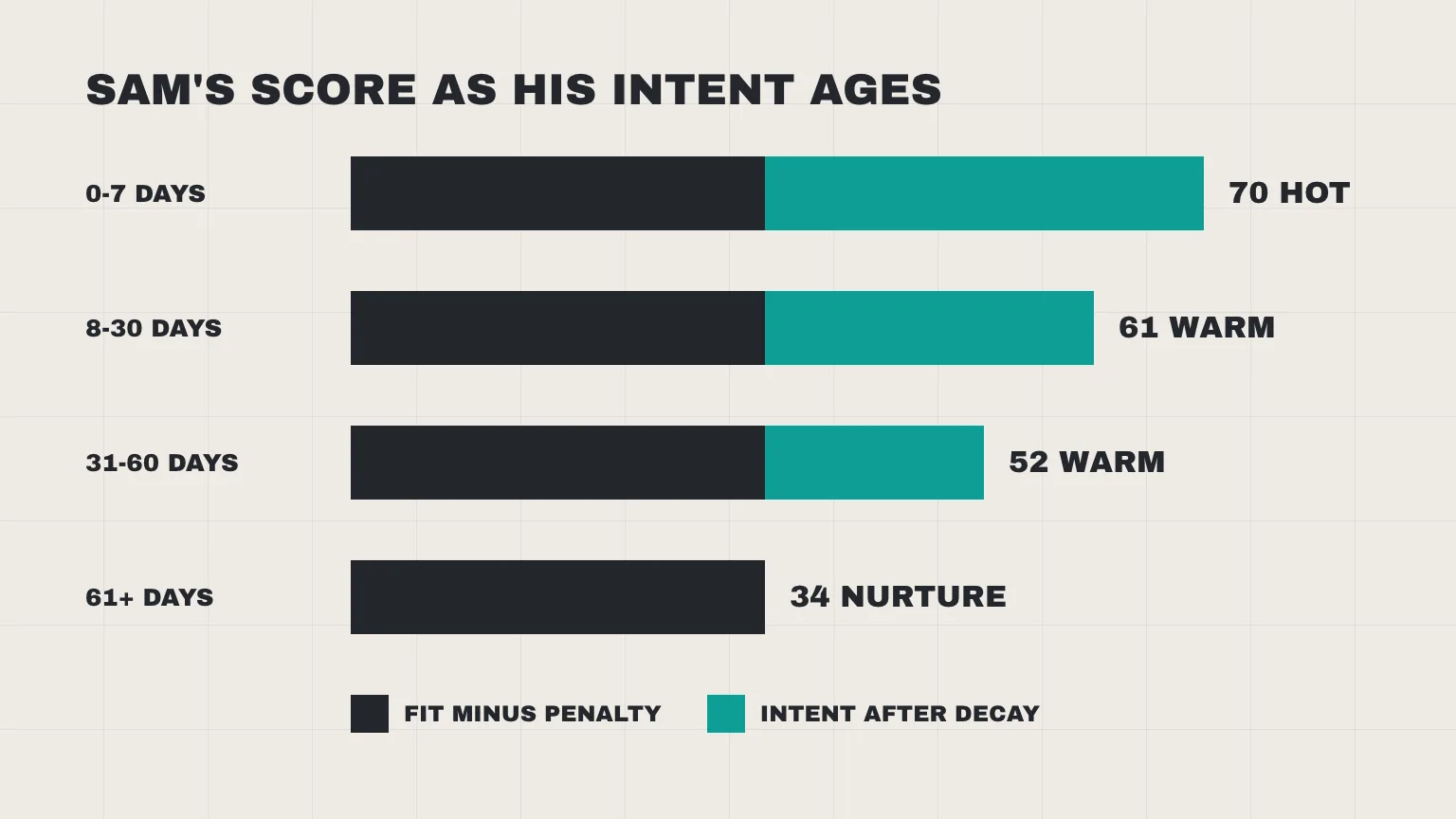
For example, take Sam, one of the leads scored below: 44 fit, 36 intent and a 10-point free-email penalty.
| Age of last intent event | Arithmetic | Score | Band |
|---|---|---|---|
| 0 to 7 days | 44 + 36 – 10 | 70 | Hot |
| 8 to 30 days | 44 + 27 – 10 | 61 | Warm |
| 31 to 60 days | 44 + 18 – 10 | 52 | Warm |
| 61 days or more | 44 + 0 – 10 | 34 | Nurture |
Meanwhile, any new intent event, such as a reply or a second form, restarts the clock. Recompute the multiplier from the newest event, not the first.
HubSpot’s built-in version works event by event. Its help page, checked 11 October 2026, lets you choose a one, three, six or twelve month interval, and each event’s points fade in a straight line. Mine is coarser, but it still fits in one cell.
Three leads scored with the lead scoring model example
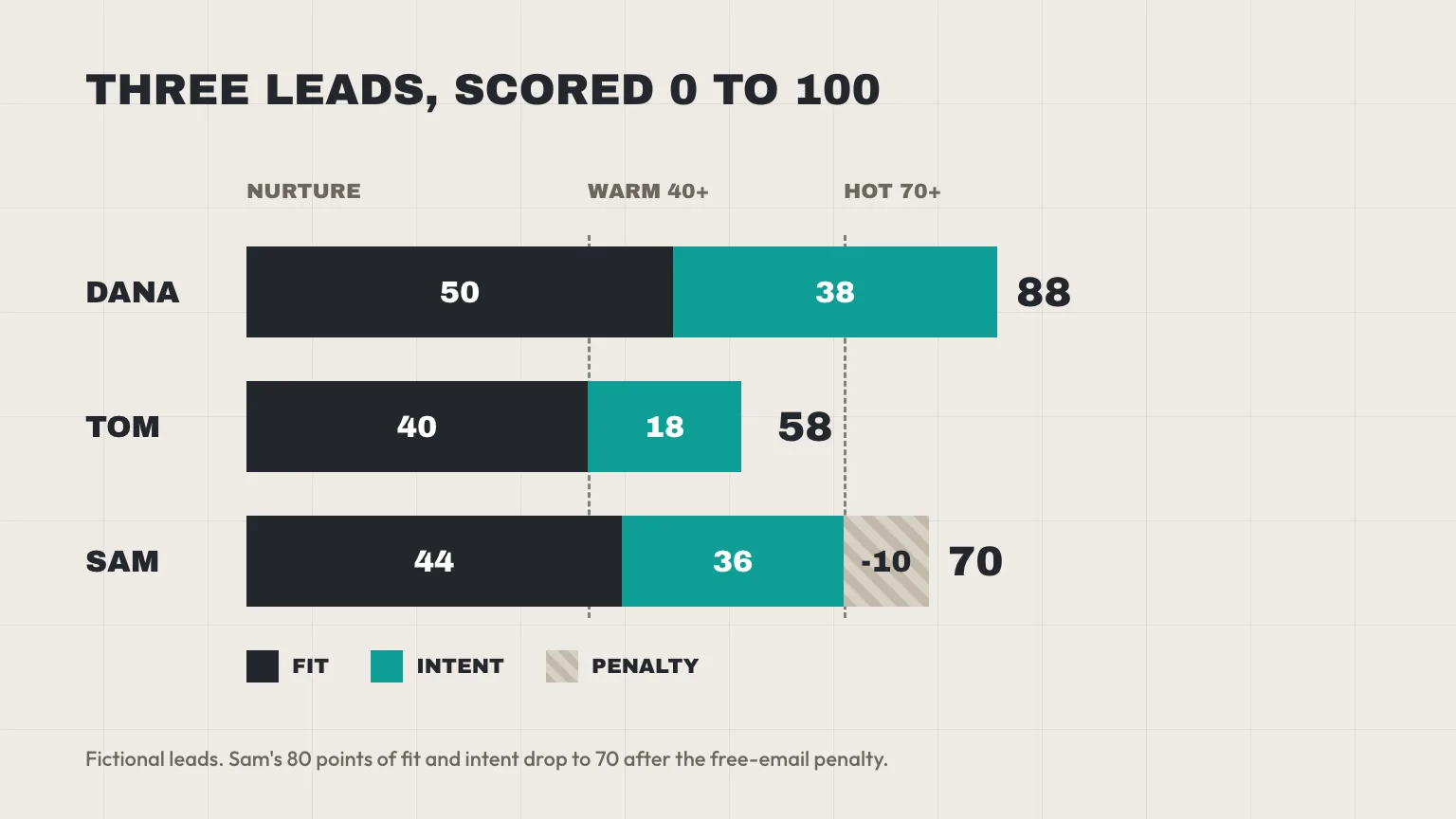
All three leads are fictional, and each line shows where the points came from.
Dana: VP of operations, 120-person logistics firm
She asks for a demo after a customer referred her. Her message runs 220 characters and mentions a January deadline. Logistics is a neighboring industry for us.
- Fit: size 20 + role 20 + industry 10 = 50
- Intent: demo request 25 + deadline 5 + length 3 + referral 5 = 38
- Penalties: none
- Score: 88, hot
Tom: marketing manager, 30-person company in our core industry
He finds you through search and sends a short question about an integration. But he gives no budget and no timeline.
- Fit: size 12 + role 8 + industry 20 = 40
- Intent: product question 15 + message 0 + search 3 = 18
- Penalties: none
- Score: 58, warm
Sam: owner of an 8-person agency, using a free email address
Like Tom, he finds you through search, but he asks for a quote in a long message that mentions a budget. Agencies are our core market.
- Fit: size 4 + role 20 + industry 20 = 44
- Intent: quote request 25 + budget 5 + length 3 + search 3 = 36
- Penalties: free email -10
- Score: 44 + 36 – 10 = 70, hot, only just
Sam is the interesting case, because the free-email penalty is the only thing keeping him from an 80. Still, small business owners often use free addresses. If your won deals show that many do, shrink the penalty. A student on a free address who asks for a template, by contrast, collects 10 points at most, loses 25 to the two penalties and hits the floor at 0.
Check your lead scoring model against 30 deals
Everything above is a hypothesis. Still, you can test it in an afternoon.
- Export your last 30 closed deals, won and lost, with the original lead details.
- Score each one with the sheet, as if it had just arrived.
- Average the scores for won deals and for lost deals. If the averages sit close together, the weights are wrong or a key field is missing.
- Find the score where most won deals sit above and most lost ones sit below. That’s your real hot line.
- Look for odd cases. A won deal that scored 25 shows which signal you underrated, and a lost deal that scored 90 shows which one fooled you.
With only a handful of deals, treat the answer as a hint and repeat the check every quarter. In between, ask sales each month whether the hot leads you send are worth the call.
What LiftUp scores automatically
We build LiftUp, and its scoring is simpler than the model above. It’s not an implementation of this template. Every new lead gets a 0 to 100 score from six rules, worked out once when the lead is created:
- Lead source: a referral scores 30, Google 25, LinkedIn 20, direct 15 and anything else 5.
- Source page: the page the form was on, such as 25 for a hire page, 20 for contact or services, 15 for case studies, 5 for a blog post and 10 for anything else.
- Lead type: contact 20, career 10, other 5.
- Human check: the reCAPTCHA v3 score times 10, so up to 10 points.
- Message: 5 points above 200 characters, 5 more above 500, and 3 if it contains a buying word such as budget, deadline or urgent.
- Company: 10 points if a company name is filled in or a company record is linked.
Weights, bands and deadlines
The default points can add up to 110, so the total is capped at 100. Each lead page shows the breakdown line by line, so a rep can see why a lead scored what it did. From Starter, you can re-weight each of the six from 0 to 300% or pick one of five presets, such as Referrals first or Strict on spam. The score then sets the reply deadline: 70 and up is 4 hours, 40 and up is 12 hours, and the rest is 24 hours.
These defaults are tuned to a services business. For example, take three contact-form leads. A referral from the contact page with a 0.9 human check, a 250-character message about its budget and a company name scores 97 (30 + 20 + 20 + 9 + 8 + 10). A short Google lead from a blog post, with the same human check and no company, scores 59. A short newsletter lead from a pricing page with a 0.3 human check scores 38.
What LiftUp does not score
LiftUp has no score decay, no re-scoring after creation, no negative scores, and no email-open or page-view signals. Its score also ignores company size, industry and seniority, even where a company record holds them, so the fit half of this template has no equivalent there. If your website sends leads through an API, our Next.js contact form to CRM guide shows how the score comes back in the response. The LiftUp CRM page has the rest.
How this lead scoring model maps to HubSpot
HubSpot’s help page, checked 11 October 2026, says its lead scoring tool needs a Professional or Enterprise plan of Marketing Hub or Sales Hub. Scores are built from groups of criteria, each with its own limit, and points can be positive or negative. HubSpot’s own example caps one group at 60 and another at 40, so the cap idea here isn’t unusual.
So you can rebuild the template there as a combined score: fit criteria in one group capped at 60, intent events in another capped at 40 and the penalties as negative points. HubSpot’s decay, which works on event groups, then replaces the sheet formula. Check its lead scoring help page for what your plan includes; this post doesn’t quote HubSpot prices. For the wider comparison, see LiftUp against HubSpot.
Who LiftUp isn’t for
If you want scores that move with page views, email engagement or predicted likelihood to buy, LiftUp isn’t the right tool, because it scores from the form and doesn’t track behavior. Also, at 6 to 10 users, a per-seat CRM can cost less than LiftUp’s flat plan, so price it both ways.
Next step
This week, copy the table into a sheet, score your last 30 deals and move the 70 line to where your won deals start. If you’d like to see how LiftUp scores your own leads and sets reply deadlines from the result, book a 30-minute LiftUp demo.
Frequently asked questions
What is a good lead score out of 100?
There's no universal number. Start with 70 for hot and 40 for warm, then score your last 30 won and lost deals and move the lines to where won deals separate from lost ones. Also check that your sales team can handle the number of hot leads the line produces.
How do you calculate a lead score?
Add fit points (company size, role, industry) and intent points (what the lead asked for, message quality, source), subtract any penalties, then floor the total at 0 and cap it at 100. Every line of the sum should be visible, so a rep can see why a lead scored what it did.
How many criteria should a lead scoring model have?
Fewer than you think. The template here uses six positive signals and three penalties. A small model is easier to explain, easier to fix and easier for sales to trust, and you can add signals once the first set proves itself on real deals.
Should a lead score decay over time?
Intent points should, because a request from last month is weaker than one from today. Fit points shouldn't, because the company and role haven't changed. A simple rule is to multiply intent by 1.00, 0.75, 0.50 and then 0 as the last activity gets older.
Can I score leads without marketing automation?
Yes. A website form, a sheet and a CRM are enough. Score on the fields people fill in, such as role, company size, request type and message, and skip signals that need page tracking or email opens.
Does lead scoring in HubSpot need a paid plan?
HubSpot's help page, checked 11 October 2026, says the lead scoring tool is available on Professional and Enterprise plans of Marketing Hub and Sales Hub. Confirm what your plan includes on that page before you build the model there.
Does LiftUp use this scoring template?
No. LiftUp scores each lead from 0 to 100 using six rules: source, source page, lead type, human check, message and company. It sets the score when the lead is created, and it has no decay or email-open signals.

Abidhusain Chidi
Founder & CEO, QalbIT Infotech
Abidhusain Chidi is the founder and CEO of QalbIT Infotech, a software agency in Ahmedabad building web and SaaS products since 2018. He's also CTO at Seekly, an Australian revenue intelligence platform, and is building LiftUp. He writes about CRM, SaaS operations, and shipping multiple products as a small team.
See it live
Watch LiftUp run your whole growth stack
One console for CRM, content, AI editorial and insights — book a 30-minute walkthrough tailored to your team.
Book a demo