Best CRM for Multiple Businesses: Choose a Setup
Abidhusain Chidi9 min read
Picture three small businesses, five people, and one owner who works in all three. Give each business its own CRM account and the team needs seven paid seats, not five, because you pay for the owner three times. That sum is the first thing to work out when you ask which CRM is best for multiple businesses, but none of the vendor pages we read did it.
This guide compares four ways to run one team across several businesses: tags, pipelines, separate accounts and product-scoped workspaces. I rate each one on cost, reporting, data separation and login overhead before naming any tool, and I checked every price on 11 October 2026.
We build LiftUp, which is one of the four setups, so I’ll say plainly what it shares across businesses and where a per-seat tool costs less.
Best CRM for multiple businesses: pick a setup first
Most comparison pages open with a list of tools. That’s backwards, because the setup decides your bill, your reports and who can see which customer. The same tool can be cheap in one setup and costly in another, so which CRM suits multiple businesses depends on the setup more than the brand. Here are the four side by side:
| Setup | Cost | Reporting | Data separation | Login overhead |
|---|---|---|---|---|
| 1. One pipeline, tags | Lowest: one account, one seat per person | Filter by tag; easy to combine | None: everyone sees every record | One login |
| 2. One account, a pipeline per business | Same as setup 1 | Per pipeline, plus a combined view | Soft: depends on pipeline permissions | One login |
| 3. A separate account per business | Highest: a seat for each person in each account | Separate; combining is manual | Strict: nothing is shared | One login per account, or an account switcher |
| 4. Product-scoped workspaces | Account price, often flat | Per product, one at a time in LiftUp | Data is scoped, but access is not | One login, a product switcher |
Setup 1: one pipeline and tags
This is the cheapest route. You keep one list of contacts, then add a tag or a “business” field to each and filter by it. It suits two businesses that sell to the same people, such as a design studio and a print shop owned by one founder.
The weak point is human, because one missed tag sends a lead to the wrong business. Less Annoying CRM’s help page on running several businesses lists the same chore for its pipeline route, since each contact needs the right pipeline attached, and it notes that custom field sections show to every user on the account. Unless your tool can hide a tag or group from some users, nothing stops a teammate from opening another business’s records.
Setup 2: one account, one pipeline per business
Each business gets its own pipeline with its own stages, while contacts stay in a single database. Reports run per pipeline, but a combined view is still one filter away. A customer who buys from two of your businesses stays one record, so this setup works well when the customer base overlaps.
Separation is uneven, though. Less Annoying CRM, for example, has a Teams feature that limits who sees a pipeline. Other tools keep pipeline permissions for higher plans, so check the tier on the plan page before you rely on it. Until you have those permissions, a pipeline is a label rather than a wall.
Setup 3: a separate account for each business
Separate accounts are the only setup that gives strict separation, since each one is its own CRM. Pipedrive’s support article on multiple company accounts says it shares no data between company accounts and bills each one separately, although one person can switch between them. Zoho’s help centre says much the same about its organisations: you buy licences for each one, and the feature doesn’t sync data between them.
You pay for that wall in time and money. Every account has its own settings, its own forms and its own invoice, so the reports for each business also live in different places. Less Annoying CRM puts it bluntly: you manage and pay for two accounts, and each one needs a different login email.
What a person in three businesses costs
Go back to the owner from the opening. The owner works in all three businesses, two people work only in business A, one only in B and one only in C. In one account that’s 5 seats, while three accounts need 3 + 2 + 2, which is 7. Here is what that costs at each vendor’s list price, checked 11 October 2026:
| Tool and plan | Per seat a month | One account (5 seats) | Three accounts (7 seats) |
|---|---|---|---|
| HubSpot Core Seat, Starter | $20 | $100 | $140 |
| Zoho CRM Standard, billed annually | $14 | $70 | $98 |
| Zoho CRM Standard, billed monthly | $20 | $100 | $140 |
| Less Annoying CRM | $15 | $75 | $105 |
| LiftUp Starter (flat, 5 users, 3 products) | n/a | $49 | not needed |
Sources: HubSpot’s product catalog, Zoho’s pricing page and Less Annoying CRM’s pricing page. These are seat prices only. Tiers differ in what they include, taxes and add-ons are extra, and Zoho shows different prices by region, so use the table to size the gap rather than as a quote. Separate accounts cost 40% more in every row here, because 7 seats is 40% more than 5.
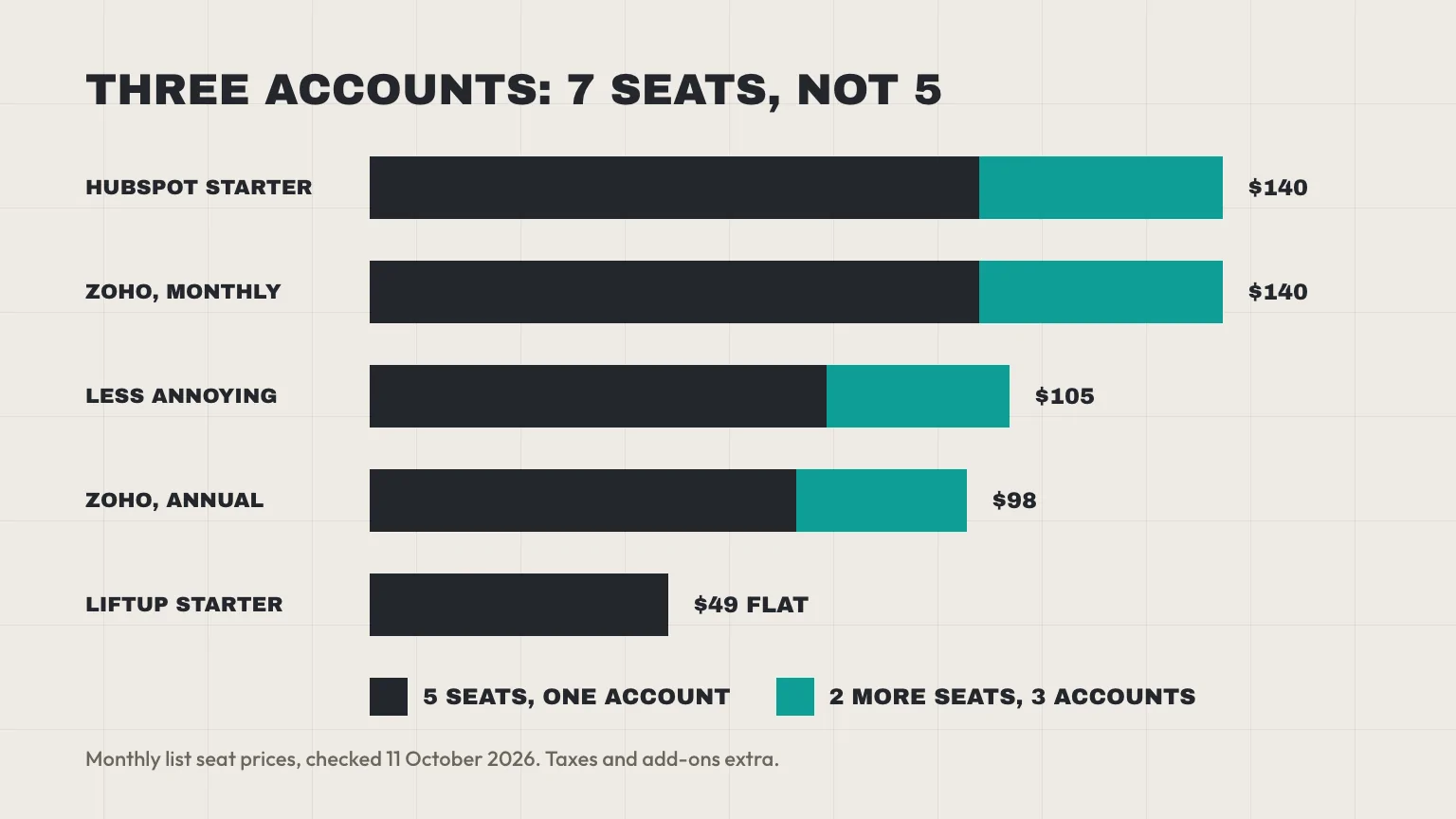
Per-seat tools still win at small sizes. At three seats, Zoho’s annual price is $42 and Less Annoying CRM’s is $45, both under LiftUp Starter’s $49, which only pulls ahead of those two from four seats. Starter stops at 5 users, so a sixth person means Growth. At $149, Growth beats Less Annoying CRM from 10 seats and Zoho’s annual price from 11, so a team of 6 to 10 people sits in LiftUp’s weakest price band, where a per-seat plan is often cheaper.
Setup 4: product workspaces in one CRM for multiple businesses
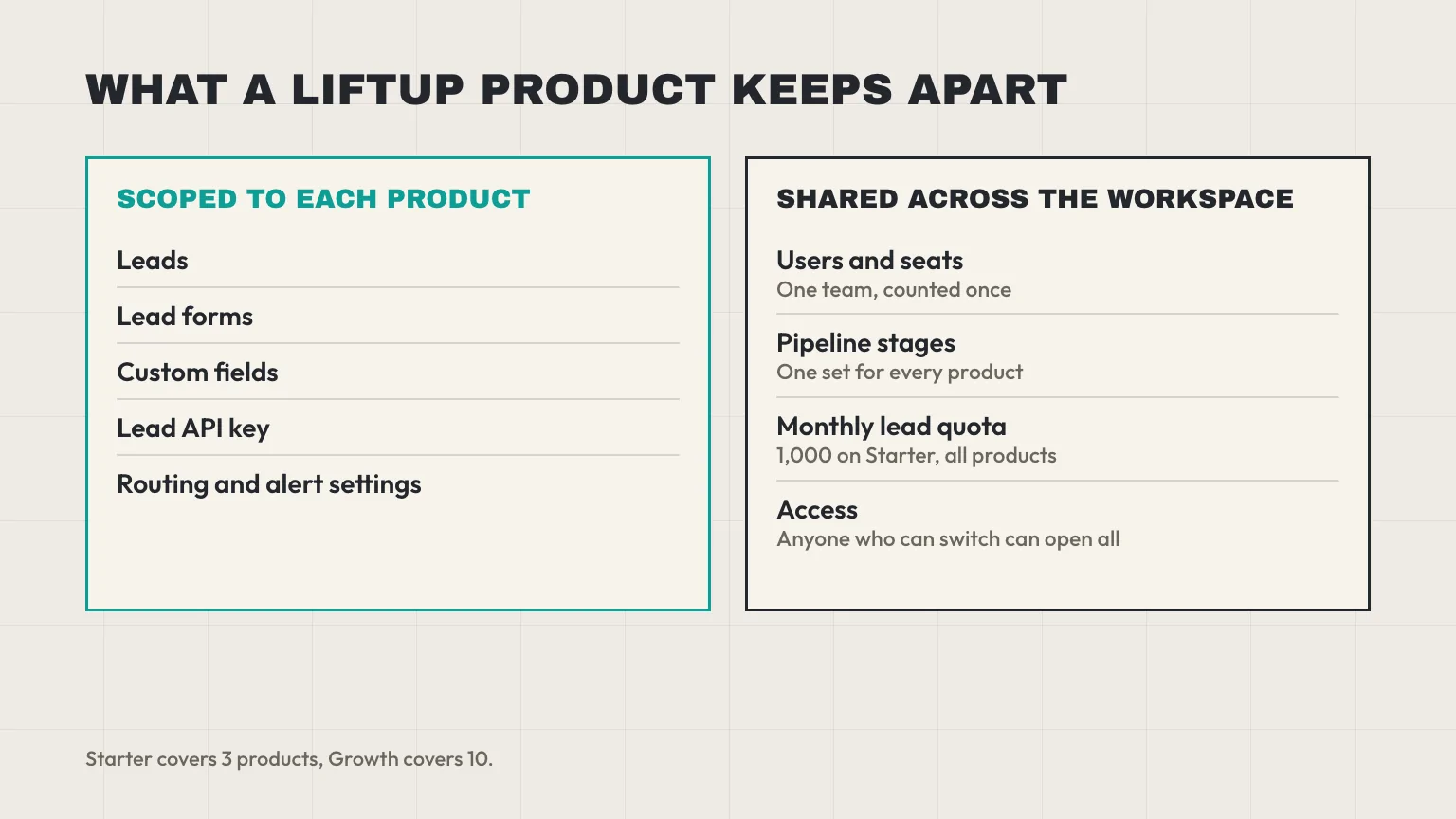
The fourth setup sits between the other three. You pay for one account and register each business as a product, which then holds its own data. In LiftUp, a product has its own leads, lead forms, custom fields and lead API key, plus its own routing and alert settings. When you pick another product from the workspace menu, the lead list and pipeline board switch with it.
LiftUp also shares some things on purpose, so the team stays small:
- Users and seats: one team across all products, counted once.
- Pipeline stages: one set for the whole workspace. A product can’t have stages of its own.
- The monthly lead quota: 1,000 on Starter, counted across every product.
- Plan limits: Starter covers 3 products and Growth covers 10. A fourth product on Starter is a $15-a-month add-on.
The shared-access limit
This is the part to read twice. In LiftUp, any member who can switch products can open every product. There’s no setting that limits a user to one business, nor a client-only login. If your bookkeeper in business A must never see business B’s leads, this setup won’t do it, while separate accounts will.
Two smaller limits also matter. The CRM report tabs count one product at a time, so a combined total means adding the numbers up yourself. And a CSV import skips any email that already exists in any product, so you can’t import a customer of two businesses into both. The multi-product page shows how the switcher works.
Which CRM for multiple businesses fits each setup
Once you’ve chosen a setup, the list of CRM tools for multiple businesses gets short. Here is what each vendor says about running more than one business, checked 11 October 2026.
HubSpot and Zoho
HubSpot offers two routes. Brands keeps one shared CRM and costs $1,000 a month as an add-on to Marketing Hub Enterprise, which starts at $3,600 a month. HubSpot’s Brands page lists separate bills and strict data separation as unavailable under Brands and available under multi-account management, which connects up to 30 accounts. We priced the options in HubSpot Multiple Brands: Do You Need Enterprise?, and our LiftUp vs HubSpot comparison covers the rest. Seats aren’t the whole HubSpot bill either, as our guide to HubSpot credits shows.
Zoho is the strongest answer for a small group, because it has a built-in route for this. Its edition comparison says a super admin can create up to 5 organisations, and a user can belong to up to 10, on every edition. As a result, separate accounts are easy to start. You still buy licences for each organisation, though, so the seat sum above applies.
Pipedrive, Close and Less Annoying CRM
Pipedrive bills each company account on its own, with no shared data. We couldn’t load its pricing page when we checked, so we’ve left its prices out. Close sells additional organisations at $50 each a month, and its Growth and Scale plans include one secondary organisation free. Less Annoying CRM charges $15 a user a month with unlimited pipelines, which suits setup 2.
How to pick a CRM for multiple businesses
Which CRM is best for multiple businesses like yours comes down to what they share, such as customers and staff, and whether anyone must stay out of a business’s data. Find your row:
| Your situation | Setup to start with | Why |
|---|---|---|
| 2 or 3 businesses, same customers, one team | Setup 2, pipelines | One customer record, one bill, simple reports |
| 2 or 3 businesses, different customers, one team that sees everything | Setup 4, product workspaces | Separate forms, fields and lead lists without extra seats |
| Separate legal entities, or staff who must not see each other’s data | Setup 3, separate accounts | The only strict wall; budget for the extra seats |
| 5 or more brands | Setup 4, or Zoho’s 5 organisations | Check the limit before you buy: LiftUp Growth has 10 products |
Groups of companies feel this choice most sharply, so we wrote a setup guide for a CRM for a group of companies. Agencies that run client brands can read the Muscat agency CRM guide. If the businesses are separate legal entities, ask your lawyer or accountant how contracts and privacy duties apply. This is general information, not legal or tax advice.
Who LiftUp isn’t for
LiftUp isn’t the right tool if each business needs its own staff locked out of the others, if your clients need their own logins, or if you need calling, WhatsApp or SMS. It isn’t built for resellers either, and a team of 6 to 10 people may pay less on a per-seat plan.
Next step
Write down how many businesses you run, how many people work in more than one, and whether anyone must stay out of a business’s data. Then put those numbers into the seat sum above. If the answer points to one team across a few businesses, book a 30-minute LiftUp demo and we’ll set up your products with you.
Frequently asked questions
Can I use one CRM for several different businesses?
Yes. You can tag contacts, run a pipeline per business, give each business its own account, or use a tool that scopes data by product. The first two are cheap but separate nothing, while separate accounts are strict and cost more.
Should I use one CRM account or separate accounts?
Use one account when the businesses share customers and the whole team may see everything. Use separate accounts when staff must not see another business's data, or when the businesses are separate legal entities. Ask your lawyer about contracts and privacy duties.
Do I pay for each business separately?
On per-seat plans you pay for every seat in every account, so a person who works in three businesses is billed three times. Pipedrive bills each company account separately, and Zoho licenses each organisation on its own. Flat-price tools charge once per account.
Does Zoho let one login run several companies?
Yes. Zoho's edition comparison says a super admin can create up to 5 organisations, and a user can belong to up to 10, on every edition. Licences are still bought for each organisation, and data isn't synced between them.
Can staff in one business see the other business's leads?
In a single account, usually yes unless the tool has per-pipeline permissions. In LiftUp, any member who can switch products can open every product, so it can't hide one business from a colleague. Separate accounts are the way to do that.
Is HubSpot Brands worth it for a small team?
Rarely. Brands is a $1,000-a-month add-on to Marketing Hub Enterprise, and HubSpot lists strict data separation as unavailable under Brands. Our HubSpot multiple brands guide prices the cheaper routes.

Abidhusain Chidi
Founder & CEO, QalbIT Infotech
Abidhusain Chidi is the founder and CEO of QalbIT Infotech, a software agency in Ahmedabad building web and SaaS products since 2018. He's also CTO at Seekly, an Australian revenue intelligence platform, and is building LiftUp. He writes about CRM, SaaS operations, and shipping multiple products as a small team.
See it live
Watch LiftUp run your whole growth stack
One console for CRM, content, AI editorial and insights — book a 30-minute walkthrough tailored to your team.
Book a demo