Train AI on Your Brand Voice: An Editor’s Checklist
Abidhusain Chidi12 min read
Ask an AI for a “friendly, professional, conversational” blog post and you get the same paragraph every other brand gets. That’s what happens when you try to train AI on brand voice with three adjectives and a hope. The fix is a process, and it starts with an editor’s job: deciding what the AI reads, what it’s told, and how you’ll know the draft sounds like you.
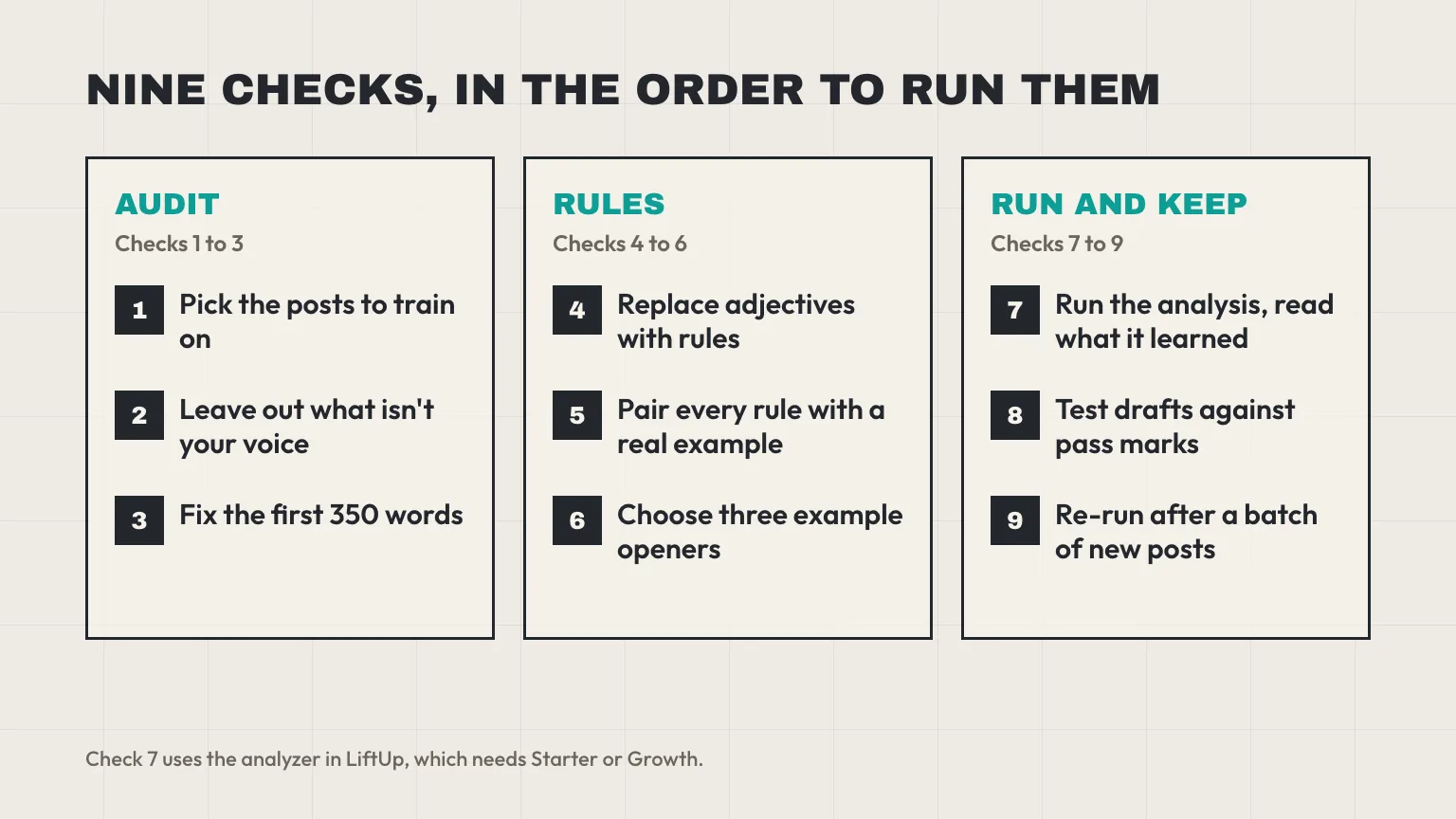
This checklist has nine checks, in the order we’d run them. It’s for the editor or founder at a small agency or startup who uses AI for first drafts and still signs off on every post. We build LiftUp, so the worked example is how its writing styles and brand analyzer behave, limits included. The rules and testing apply to a chat assistant too.
Train AI on brand voice without retraining a model
Nobody retrains a model here. You give it context: samples of your writing, a short set of rules, and a few examples to copy. The model reads that context with every request and nothing more, which is why the AI seems to “forget” your voice between sessions.
Separate two terms first. Mailchimp’s content style guide puts it simply: voice stays the same everywhere, while tone changes with the moment (checked 11 October 2026). A support reply and a launch announcement share a voice and differ in tone. The Nielsen Norman Group describes four dimensions: formal versus casual, serious versus funny, respectful versus irreverent, and matter-of-fact versus enthusiastic. We’ll use those four as a scoring grid later.
Google says generative AI is useful for research and for adding structure, but that it’s “critical to manually factcheck and review all AI-generated content” before you publish it (Google’s guidance, checked 11 October 2026). A good voice setup gives you a better first draft, and the editor stays.
Checks 1 to 3: Audit the archive before you train AI on brand voice
All eleven guides we read for this topic tell you to collect samples and paste them into a chat or a custom assistant. That assumes you choose the samples. Many CMS tools instead read your published archive on their own, so the useful question changes: what’s in the archive, and how much of each post does the tool actually read?
Check 1: Pick the posts to train AI on brand voice
Good training posts share four traits. They were edited by a person, they sound like your best writing, they were written in the current voice, and they belong to the brand you’re training for. Recent beats old.
Then add a result filter. If you can see which posts bring in leads, start there. We wrote a method for that in which blog posts generate leads, and the posts at the top of that table are the ones your buyers read before they got in touch. A post with many views and no leads may sound like the market, not like you.
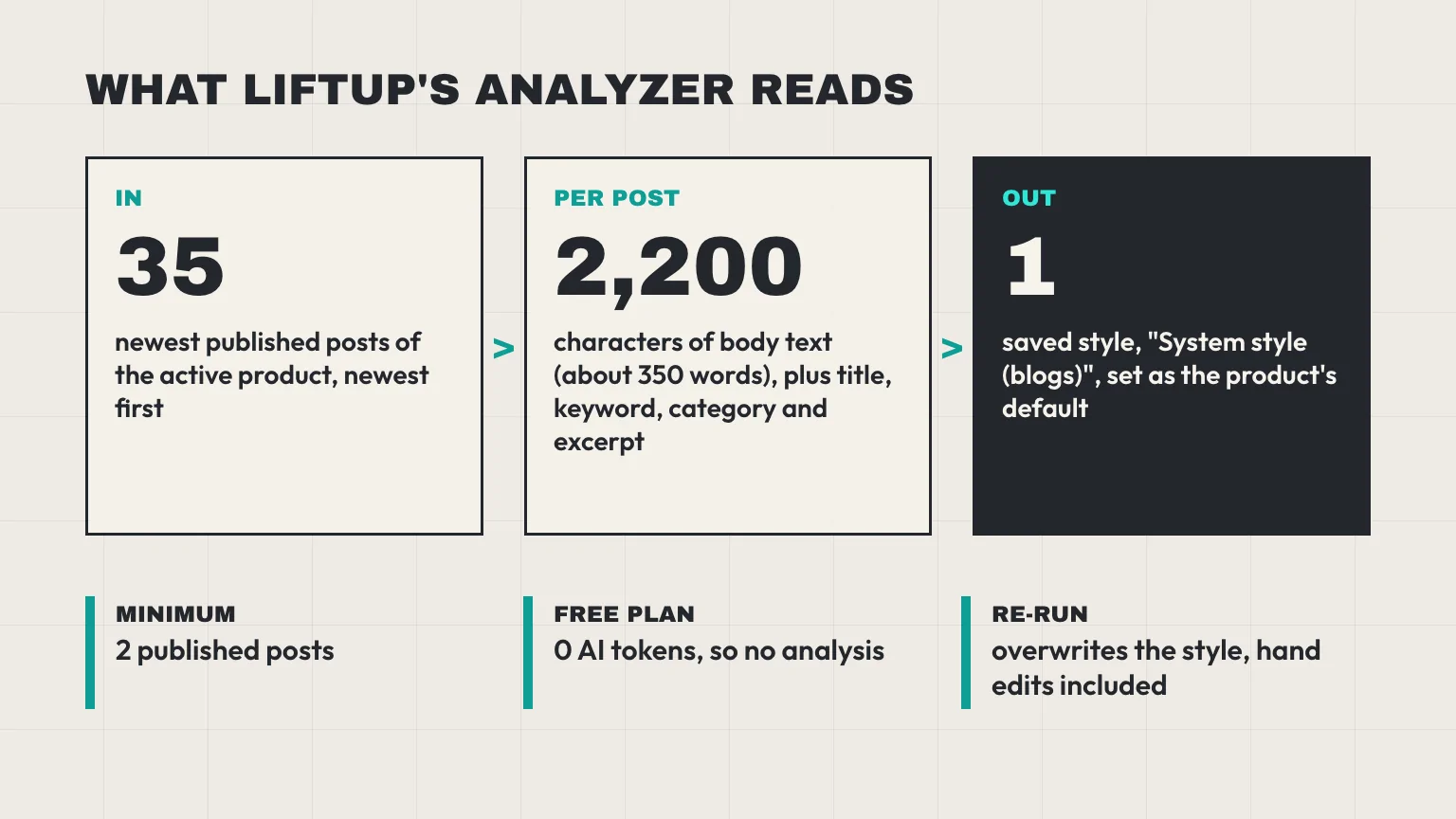
Our analyzer doesn’t let you hand-pick. It reads the 35 newest published posts of the active product, newest first, and it needs at least two. With a tool like ours, “picking” means shaping the archive: if you can, rewrite or retire what doesn’t fit before you run it. If you use a chat assistant, you choose the samples yourself, and a handful of strong ones does more than a dozen average ones. (That’s our view, not a standard. The guides we read range from three samples to “a few dozen”.)
Check 2: Leave out what isn’t your voice
Make a quick list of what’s in your archive that you wouldn’t want imitated. In our experience, these are the usual culprits:
- Unedited AI drafts. If the last ten posts were raw AI output, the tool learns the AI’s voice and hands it back to you. This is the garbage-in loop, and it’s the one mistake we’d check first.
- Guest posts and interviews. They carry someone else’s voice.
- Roundups, release notes, press releases and boilerplate. Their phrasing is flat on purpose.
- Old posts from a previous positioning, written for a different reader.
Write down each post you’d drop and why. You’ll need that list again at Check 9.
Check 3: Fix the first 350 words
This one comes straight from our code. LiftUp’s analyzer sends each post as its title, focus keyword, category, excerpt and a preview of the first 2,200 characters of the body, with the HTML tags stripped. That’s roughly 350 words, so a post’s opening is what the AI learns from. The rest of the post is never read.
Audit the openings rather than whole posts. Check the first paragraph and the excerpt of each training post for these problems:
- A standard intro box or author line that repeats in every post.
- A definition opener (“X is a type of Y”) when your best writing starts with a scene or a number.
- Excerpts that are leftover keyword strings. The analyzer reads excerpts too.
Checks 4 to 6: Write the rules, then show them
Samples aren’t enough. A short written layer gives the AI something firm to follow and gives you something to test against.
Check 4: Replace adjectives with rules
“Friendly” can’t be checked. “Uses you and we, never ‘the user'” can. Take each adjective in your brand brief and turn it into something a reviewer can count or spot. Place your brand on each NN/g line, then write one rule per dimension.
- Formal or casual: “Contractions are fine. No slang.”
- Serious or funny: “Humor only in the first paragraph, never in a warning.”
- Respectful or irreverent: “Never mock a competitor or a reader’s mistake.”
- Matter-of-fact or enthusiastic: “State the number, skip the exclamation mark.”
Add measurable rules of your own, like “no sentence over 30 words” or “none of these eight phrases”. Those targets are your call as an editor, not a product setting, so pick numbers you can check.
Check 5: Pair every rule with a real example
On a recent r/branding thread, a verbal-identity writer argued that plain do and don’t lists are too thin for AI. The best replies said to put the bad example next to the good one, and to add one line on why the good one works. We agree. A rule with an example gives the model something to copy, and a rule alone gives it room to interpret.
Use this template:
- Rule: one sentence, in the imperative.
- Good: a real line from one of your posts.
- Bad: the generic version an AI would write.
- Why: one short clause.
Here’s a made-up example for a finance blog: “Name the cost. Good: ‘Ten seats cost $480 a month.’ Bad: ‘Pricing can add up.’ Why: our readers budget in numbers.” In LiftUp’s writing styles, each do or don’t rule is cut at 500 characters and each box holds 2,000 in total, so keep every rule short enough to survive.
Check 6: Choose three example openers
Openings are where AI drafts sound most generic. Pick three first paragraphs from your best posts, each using a different technique, for instance a number, a short scene and a mistake. LiftUp passes only the first three example openers from a style to the writer, so more than three won’t help there.
There’s a catch in our own tool, and you should look for the equivalent in yours. The manual style form in LiftUp has fields for name, tone, audience, brand summary, do rules and don’t rules. It has no field for example openers or vocabulary notes. Only the analyzer fills those. Run the analysis even if you plan to write most rules by hand.
Check 7: Run the analysis and read what it learned
Now run the analyzer, the step where you train AI on brand voice from your own archive. On Free, it won’t work: Free has 0 AI tokens and no content AI, so corpus analysis needs Starter or Growth. The product minimum is two published posts. As advice from us, not a product rule, we’d wait until you have eight or more human-edited posts, since two posts is a sketch of a voice and not a pattern.
What comes back is a writing profile: a brand summary, tone, audience, voice traits, vocabulary notes, structure patterns, do and don’t rules, and example openers. It’s saved as a style named “System style (blogs)” and made the default for that product.
Then read it like a stranger. Does the brand summary describe your company, or any company? Does the tone line match your NN/g placement from Check 4? Edit what’s wrong, and add the examples the profile is missing.
Three behaviors that catch editors out
- A re-run overwrites. Running the analysis again replaces the “System style (blogs)” content, including your hand edits, and sets it as the default again. Keep your hand-written version as a separate style with its own name.
- The generated context still rides along. When the AI writes, it also gets the analyzer’s brand summary, tone, vocabulary and structure notes, even if you pick a different style. A style you write by hand adds to that context rather than replacing it. If the two disagree, the draft wobbles. After any edit, make sure the generated summary doesn’t contradict your rules.
- The AI has a base prompt too. The writer starts from instructions shared across workspaces, and your style is added on top. Don’t assume a draft comes purely from your voice. That’s why the next check exists.
Check 8: Test drafts against your style guide
When you train AI on brand voice, the test matters more than the training. Set the pass marks before you generate anything, then run this 15-minute test on the same brief every time. Pick a topic you know well, so you can spot invented details.
| Test | How to run it | Pass mark (set yours first) |
|---|---|---|
| Banned words | Search the draft for your banned list. | Zero hits. |
| Opener | Read the first paragraph next to your three example openers. | Same technique, no definition opener. |
| Tone grid | Score the draft 1 to 5 on each NN/g dimension. | Within one point of your target on every line. |
| Read aloud | Read one section out loud. | You don’t stumble or cringe. |
| Blind swap | Mix one AI paragraph into a human-written post and ask a colleague to spot it. | They guess wrong or can’t tell. |
| Facts | Check every number and name against a source. | No claim left unverified. |
The blind swap needs only a colleague with five minutes.
Also guard against volume. Google’s spam policies treat scaled content abuse, many pages generated mainly to manipulate rankings, as spam, however the pages are made (checked 11 October 2026). A tuned voice makes it tempting to publish ten drafts a week, but it only makes the first draft cheaper. Each post still needs something a reader can’t get elsewhere: your numbers, your examples, your opinion.
When a draft fails
Change one thing at a time, then rerun the same brief so the comparison is fair. Banned words showing up means each needs a bad example beside it. Generic openers call for a stronger example opener. For an off tone, reread your rules for contradictions before you blame the model.
Check 9: Keep AI on your brand voice as you grow
Voices drift as products change and new writers join, which is why maintenance belongs in the calendar.
- Re-run after a batch, not a post. Our advice: re-run the analysis after every ten or so new human-edited posts, and compare the new profile with the old one before you accept it.
- Read what the machine produced every quarter. One of the r/branding replies suggested a quarterly read of the AI’s real output, and it’s cheap insurance.
- Keep a change log. Date each edit to the rules and note why, so you can trace a bad draft to a change.
- Review before publishing. On Starter and Growth, posts move from Draft to In review to Published, so a second person can check voice and facts before anything goes live.
- Revisit the leave-out list from Check 2 each time.
This is the same logic as cleaning a CRM before you automate it. Bad inputs get faster and louder once a machine is involved. Our CRM data cleanup checklist applies it to leads.
One AI brand voice per product
Agencies and groups have several voices in one team, and single-brand guides skip that. In LiftUp, writing styles and the system style belong to a product, and each product has its own blog, so the analyzer reads only the posts of the product you’ve selected. Run it once per brand and pick the right style at the point of writing.
The risk is human: the system style becomes the default again after every re-run, and a writer switching between clients may not notice. Make the style choice an explicit step in your brief. If you run client work, our guide for digital marketing agencies in Muscat covers the agency side of running several clients, and our guide to HubSpot and multiple brands covers the account structure question on that platform.
What it costs and where it stops
LiftUp meters AI in tokens, counting both what’s sent and what comes back. Free has 0 AI tokens a month, Starter has 50,000 and Growth has 500,000. A full analysis sends up to 90,000 characters of your posts to the AI, which is a large share of Starter’s monthly allowance. We haven’t measured the exact cost, so check your own AI usage page after the first run. If you want to see how metering adds up on another platform, our explainer on HubSpot credits walks through a five-seat team.
If you work alone, a saved guide and a few examples in a chat assistant covers a lot. A CMS-based style earns its place when several people write in one workspace and you want the same style applied each time. Our AI writer page lists what’s included, and the HubSpot comparison covers how the two products differ overall.
Who LiftUp isn’t for: teams that need AI on the Free plan, teams that want a voice tool that learns from uploaded files rather than from posts published in LiftUp’s own blog, and anyone who needs a draft that uses nothing but their own voice with no shared base instructions. If one of those is you, a chat assistant with a good style guide and a strict editor is the better fit.
Next step
If you want to train AI on brand voice this week, start with the audit. List the posts you’d leave out, rewrite three openings, and write five rules with a good and a bad example each. Then generate one draft from a brief you know well and score it with the table above. If you’d like to see the analyzer read your own published posts and show you the profile it builds, book a 30-minute LiftUp demo.
Frequently asked questions
How many writing samples should I give the AI for my brand voice?
There's no standard. The guides we read range from three or five samples to a few dozen. We'd rather see eight or more strong, human-edited posts than a pile of average ones, and LiftUp's analyzer needs at least two published posts to run.
How do I test whether my AI brand voice setup works?
Set pass marks before you generate anything, then run the same brief each time. Count banned words, compare the opener with your examples, score the tone on the four NN/g dimensions and try a blind swap with a colleague. If a draft fails, change one thing and rerun.
Why does the AI lose my brand voice between chats?
A model doesn't remember between sessions. It only sees the context you send with each request. A saved style or a custom assistant stores your text and sends it again, so keep that text short, specific and up to date.
Should I include bad examples in my brand voice guide?
Yes. A rule with only the good version leaves the AI free to interpret it. Put the generic version you want to avoid next to the real line you want, and add a short reason why the good one works.
Does Google penalize AI-written content?
Not for being AI-written as such. Google's spam policy on scaled content abuse covers many pages made mainly to manipulate rankings, however they're created, and its generative AI guidance asks you to fact-check and review output before publishing. A tuned voice doesn't change either rule.
What does LiftUp's brand voice analysis read?
It reads the 35 newest published posts of the active product, and for each one the title, keyword, category, excerpt and the first 2,200 characters of the body. It needs at least two published posts. The result is saved as a style called System style (blogs).
Can the Free plan use LiftUp's brand voice analysis?
No. Free includes 0 AI tokens a month, so the analyzer and the AI writer need Starter or Growth. Starter has 50,000 AI tokens a month and Growth has 500,000.

Abidhusain Chidi
Founder & CEO, QalbIT Infotech
Abidhusain Chidi is the founder and CEO of QalbIT Infotech, a software agency in Ahmedabad building web and SaaS products since 2018. He's also CTO at Seekly, an Australian revenue intelligence platform, and is building LiftUp. He writes about CRM, SaaS operations, and shipping multiple products as a small team.
See it live
Watch LiftUp run your whole growth stack
One console for CRM, content, AI editorial and insights — book a 30-minute walkthrough tailored to your team.
Book a demo