Verify Webhook Signature in Next.js (HMAC)
Abidhusain Chidi12 min read
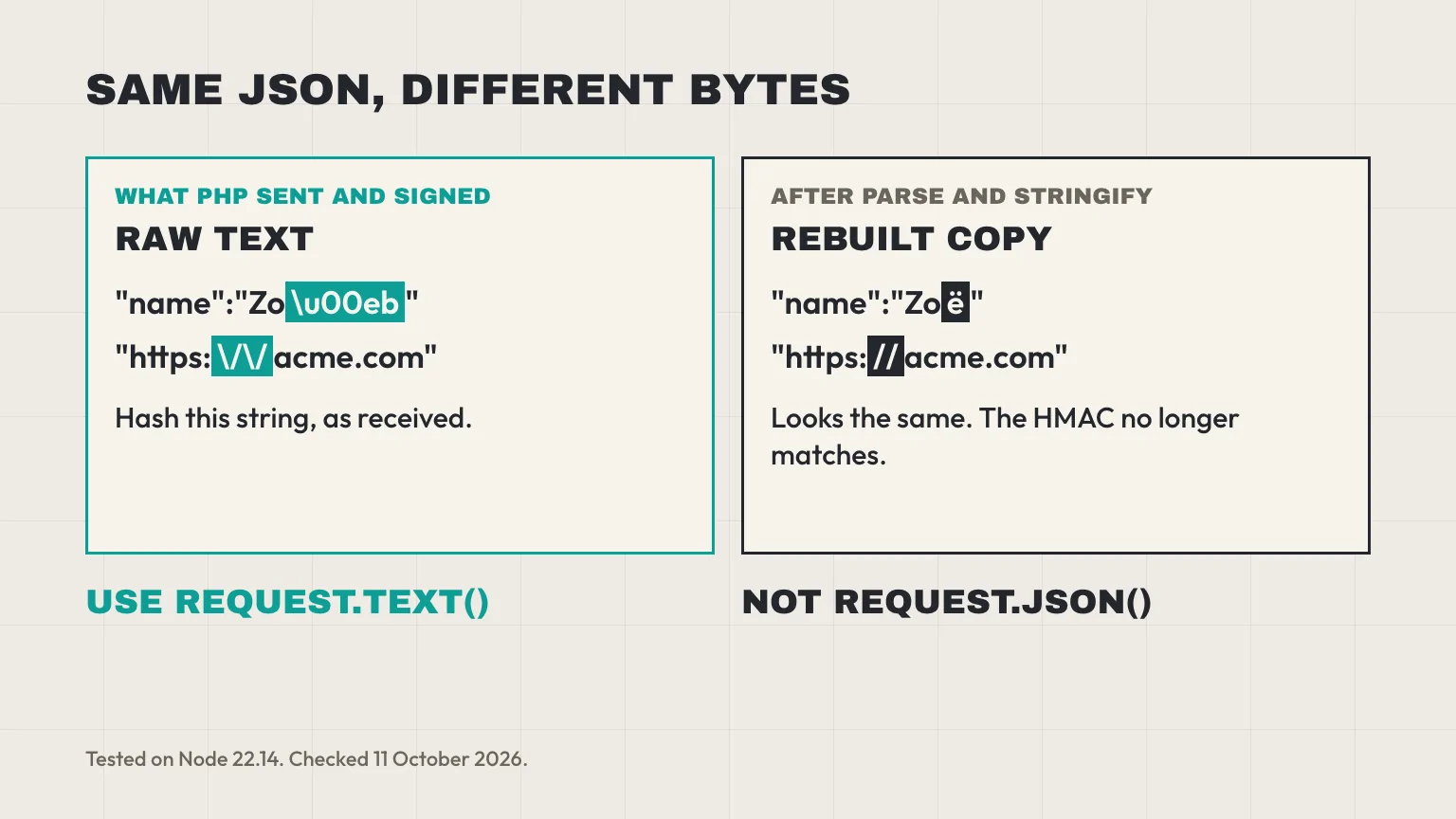
The secret is right, the endpoint is right, and every LiftUp webhook still fails its signature check. The cause is two characters. Our sender is PHP, and PHP writes https:\/\/acme.com with escaped slashes. Your handler parsed the JSON, turned it back into a string, and got https://acme.com. Different bytes, different HMAC. If you need to verify a webhook signature in Next.js, the rule that matters most is to hash the bytes you received, not a copy you rebuilt.
We build LiftUp, and we send these webhooks. This guide covers exactly what our sender signs, a verifier and App Router route handler we ran on Node 22.14 and Next.js 16.2.12, and the mistakes that break a check even when the secret is correct. The pattern carries over to any service that sends a bare hex HMAC of the body.
What it proves when you verify a webhook signature
An HMAC signature answers two questions. Did this request come from someone who holds the secret? And has the body changed since they signed it? If the HMAC you compute matches the header, both answers are yes.
It doesn’t answer two others. A valid signature says nothing about freshness, because an attacker who captures one real request can send it again later and it will still match. It also says nothing about duplicates, since senders retry. So a complete handler does three jobs: check the signature, check the age, then make sure the same event can’t be processed twice.
What LiftUp signs before you verify the webhook signature
Webhooks are a Growth plan feature. You add an endpoint in the cockpit (the name of LiftUp’s admin app, which is why the headers say Cockpit), pick a product and choose its events. Each endpoint belongs to one product, so a business with three brands can send each brand’s events to a different URL. The LiftUp developer page covers the lead API that feeds these events.
The headers and the signed body
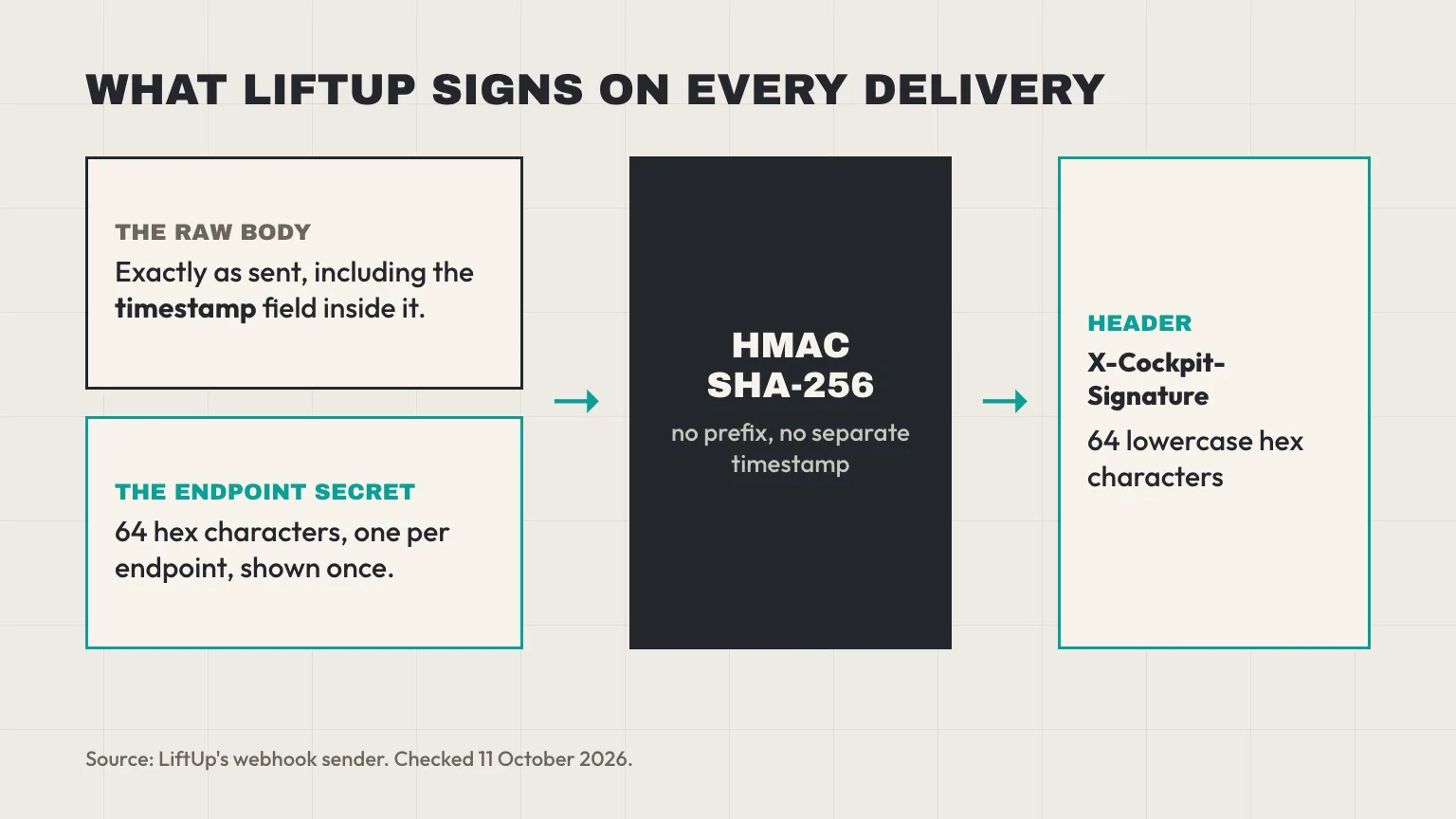
On our side, one queued job in our Laravel app does the whole send. It builds the body, signs it with PHP’s hash_hmac('sha256', $body, $secret) and sends a POST with three headers of its own:
| Header | Value |
|---|---|
Content-Type | application/json |
X-Cockpit-Event | The event name, such as lead.created |
X-Cockpit-Signature | HMAC-SHA256 of the raw body with the endpoint’s secret, as 64 lowercase hex characters, with no sha256= prefix |
The body is a small envelope that PHP’s json_encode builds with its default flags:
{"event":"lead.created","timestamp":"2026-10-11T10:00:00+00:00","data":{"id":4821,"name":"Zo\u00eb","source_page":"https:\/\/acme.com\/contact"}}Note the \u00eb and the \/. That’s how PHP encodes non-ASCII letters and slashes by default, and those exact bytes are what gets signed. The timestamp is set at the moment of sending, and because it sits inside the body, the signature covers it.
The events you can subscribe to are lead.created, lead.status_changed, lead.stage_changed, lead.workflow and post.published. The test button on the endpoint sends a sixth one, webhook.test. A lead.created payload includes the lead’s 0 to 100 score, so you can route hot leads on arrival, using bands like the ones in our lead scoring model example.
Retries, timeouts and success
- Success is any 2xx status. Any other status, a timeout or a refused connection counts as a failed try.
- Timeout: LiftUp waits up to 10 seconds for your answer.
- Retries: four tries in total. After a failure, the next try waits at least 30 seconds, then 2 minutes, then 10 minutes.
- Auto-disable: after 10 failed deliveries in a row (an event counts once, after its last try), the endpoint is switched off.
- Redirects: the sender follows up to 4, re-checking each hop, and keeps the POST body and headers.
Where the secret comes from
Each endpoint gets its own secret: 32 random bytes written as 64 hex characters. The cockpit shows it once, right after you create the endpoint, so copy it into your environment variables then. A secret can’t be rotated in place. To change one, create a new endpoint, move your variable over, then delete the old endpoint.
Verify the webhook signature in a Next.js route handler
Two files: a verifier you can unit test, and the route that calls it. They’re shown here exactly as we ran them.
The verifier: lib/verify-liftup.ts
import { createHmac, timingSafeEqual } from 'node:crypto';

const TOLERANCE_MS = 5 * 60 * 1000; // 5 minutes

export type LiftUpEvent = {
  event: string;
  timestamp: string;
  data: Record<string, unknown>;
};

type Result = { ok: true; event: LiftUpEvent } | { ok: false; reason: string };

export function verifyLiftUp(
  rawBody: string,
  signature: string | null,
  secret: string,
  now = Date.now(),
): Result {
  // 1. The header must be exactly 64 hex characters
  if (!signature || !/^[0-9a-f]{64}$/i.test(signature)) {
    return { ok: false, reason: 'bad-header' };
  }

  // 2. HMAC the exact bytes that arrived, then compare in constant time
  const computed = createHmac('sha256', secret).update(rawBody, 'utf8').digest();
  const received = Buffer.from(signature, 'hex');
  if (received.length !== computed.length || !timingSafeEqual(computed, received)) {
    return { ok: false, reason: 'bad-signature' };
  }

  // 3. Parse only after the signature passes
  let event: LiftUpEvent;
  try {
    event = JSON.parse(rawBody);
  } catch {
    return { ok: false, reason: 'bad-json' };
  }

  // 4. The timestamp sits inside the signed body, so it can't be swapped
  const sentAt = Date.parse(event.timestamp);
  if (!Number.isFinite(sentAt) || Math.abs(now - sentAt) > TOLERANCE_MS) {
    return { ok: false, reason: 'stale' };
  }

  return { ok: true, event };
}
The route: app/api/liftup/webhook/route.ts
import { verifyLiftUp } from '@/lib/verify-liftup';

export async function POST(request: Request) {
  const secret = process.env.LIFTUP_WEBHOOK_SECRET;
  if (!secret) return new Response('Webhook secret not configured', { status: 500 });

  const rawBody = await request.text(); // raw string, read once, never re-serialized
  const signature = request.headers.get('x-cockpit-signature');

  const result = verifyLiftUp(rawBody, signature, secret);
  if (!result.ok) {
    console.warn('LiftUp webhook rejected:', result.reason);
    return new Response('Invalid webhook', { status: 400 });
  }

  const { event, data } = result.event;
  // Keep this fast or hand it to a queue: LiftUp waits 10 seconds for a 2xx
  console.log('LiftUp webhook verified:', event, data.id);
  return new Response('ok', { status: 200 });
}

// node:crypto needs the Node.js runtime (the default, stated here on purpose)
export const runtime = 'nodejs';
We ran both files on a Next.js 16.2.12 dev server. With LIFTUP_WEBHOOK_SECRET set, a request signed by PHP’s hash_hmac got a 200. A wrong 64-character signature, a three-character one, a missing header and a body timestamped hours earlier each got a 400, and the log recorded the reason.
Why each line of the Next.js webhook signature check exists
request.text()first. In the App Router, a route handler gets a standard WebRequest, and the Next.js route handler docs show reading webhooks withrequest.text(). You don’t need the Pages Router’sbodyParsersetting. Read the body once: a second read throwsTypeError: Body is unusable.- The hex test. It rejects junk early and guarantees the decoded header is 32 bytes. Upper-case hex also passes, which does no harm.
- Bytes, not strings. We compare the raw digest with the decoded header. Comparing two hex strings works too, but bytes make the length check exact.
- Length check, then
timingSafeEqual. A plain===stops at the first differing character, which can leak timing. Node’scrypto.timingSafeEqualdoesn’t, but it throws if the two buffers differ in length. - Parse after the check. Nothing from an unverified body reaches your code.
runtime = 'nodejs'. Node is the default for route handlers anyway. Stating it documents the requirement, since the Edge runtime supports only a subset of Node’s APIs.- Fail closed on a missing secret. Our first draft used
process.env.LIFTUP_WEBHOOK_SECRET ?? ''. If the variable is missing in production, that still produces a valid-looking HMAC with an empty key, and anyone can forge one. A 500 is the honest answer.
When a webhook signature won’t verify in Next.js
When the secret is correct and Next.js still won’t verify the webhook signature, it’s usually one of these four. We reproduced each of them.
You hashed a rebuilt copy of the JSON
This is the trap from the top of the page. We ran the body above through JSON.stringify(JSON.parse(body)) in Node and got this:
{"event":"lead.created","timestamp":"2026-10-11T10:00:00+00:00","data":{"id":4821,"name":"Zoë","source_page":"https://acme.com/contact"}}To a person, it looks the same. To HMAC, it’s a different string, and the check failed. The same happens when a framework, a logging layer or await request.json() runs before you hash. Therefore read the raw text first and parse it only after the check.
timingSafeEqual threw instead of returning false
Many snippets, including the short one on our own webhook settings page, do this:
timingSafeEqual(Buffer.from(expected), Buffer.from(header ?? ''))On Node 22.14, a missing or short header throws ERR_CRYPTO_TIMING_SAFE_EQUAL_LENGTH. Real LiftUp deliveries always carry 64 hex characters, so you’ll only hit this with other traffic: a scanner, a curl test with a typo, a proxy that drops the header. Each one becomes a 500 and a stack trace instead of a quiet 400. The hex test and the length check in the verifier above prevent it, so copy that version.
A trailing slash or a Proxy got in the way
Next.js removes trailing slashes by default. In our test, a POST to /api/liftup/webhook/ got a 308 to /api/liftup/webhook. LiftUp’s sender follows that redirect with the same body and headers, and with the same client options we saw it arrive and verify. Other senders are stricter: Stripe’s docs count any 3xx as a failed delivery. So register the exact path your app serves.
Proxy is the bigger risk. Next.js 16 renamed middleware.ts to proxy.ts, and it runs on every route unless its matcher leaves a path out. If yours redirects signed-out visitors to a login page, the webhook follows the redirect and lands there instead. Your handler never runs. Exclude /api/liftup/webhook from the matcher and from any auth wrapper.
The secret belongs to another endpoint
Secrets are per endpoint, not per account. If you created a second endpoint for staging, or one per product, each has its own. Also check that the variable exists in the deployed environment, not just in .env.local. “Works locally, fails in production” is a common thread in the long-running Next.js GitHub discussion on Stripe webhooks (#48885), and the usual answer there is a production variable holding a different secret from the one the sender uses.
Replays and duplicates after the signature check
Because the timestamp is inside the signed body, an attacker can’t change it without breaking the HMAC. That makes the 5-minute window in the verifier meaningful. It’s the same default tolerance Stripe’s webhook docs describe for their libraries.
LiftUp builds the body at the moment of each try, so a retry 10 minutes later carries a fresh timestamp and still passes. The Replay button on a logged delivery works the same way. In other words, the window only rejects a request that was captured and sent again later, or a server whose clock is badly wrong.
Duplicates are a separate problem. If your handler takes longer than 10 seconds, LiftUp records a failure and tries again, though your code may already have finished. There’s no delivery ID in the headers or the envelope, and the envelope timestamp changes on every try, so build a key from data instead. Our suggestion:
| Event | Dedupe key |
|---|---|
lead.created | lead.created: + data.id |
lead.status_changed | event + data.id + data.changed_at |
lead.stage_changed | event + data.id + data.changed_at |
post.published | event + data.id + data.published_at |
Store the key with a unique constraint, and write it only after your work succeeds, so a deliberate replay after a failure still goes through. changed_at is precise to the second, so two moves of one lead within the same second would collapse into one. For lead.workflow, pick fields from the payload that identify one rule run. Duplicate deliveries are also different from duplicate leads in the CRM itself; our CRM data cleanup checklist handles those.
A common first use is posting high-score leads to a team channel, so someone replies inside the deadline set in our lead response SLA guide. Keep that work quick, or hand it to a queue, and return the 200 first.
Test your Next.js webhook signature check locally
Start next dev, then sign a body with OpenSSL and send it with curl. We checked that this OpenSSL digest matches PHP’s hash_hmac for the same string:
TS=$(date -u +%Y-%m-%dT%H:%M:%S+00:00)
BODY='{"event":"webhook.test","timestamp":"'"$TS"'","data":{"message":"hi"}}'
SIG=$(printf '%s' "$BODY" | openssl dgst -sha256 -hmac "$LIFTUP_WEBHOOK_SECRET" -hex | sed 's/^.* //')
curl -i -X POST http://localhost:3000/api/liftup/webhook \
  -H 'Content-Type: application/json' \
  -H "X-Cockpit-Signature: $SIG" \
  --data-raw "$BODY"
Expect a 200. Change one letter in BODY after signing and you should get a 400. To test your HMAC code on its own, GitHub publishes a test vector: the key It's a Secret to Everybody and the payload Hello, World! give a hex digest starting 757107ea, which our Node run reproduced.
Once the route is deployed, press the test button on the endpoint in the cockpit. It sends webhook.test, which is the reliable check, since leads sent with a sandbox API key skip webhooks entirely. If you also send leads in from your own site, our Next.js contact form to CRM guide covers that inbound half.
How Stripe, GitHub and HubSpot sign webhooks
If you handle webhooks from several tools, the differences matter more than the shared idea. Checked 11 October 2026 on each vendor’s docs:
| Sender | Signature header | What’s signed | Format |
|---|---|---|---|
| Stripe | Stripe-Signature (t=, v1=) | Timestamp, a dot, then the body | Hex |
| GitHub | X-Hub-Signature-256 | The body | Hex after sha256= |
| HubSpot (v3) | X-HubSpot-Signature-v3 | Method, URI, body and the request timestamp | Base64 |
| LiftUp | X-Cockpit-Signature | The body, which holds the timestamp | Bare hex |
HubSpot’s v3 check also rejects timestamps older than 5 minutes. Because it signs the full request URL, your handler has to rebuild that URL exactly. If you’re comparing the two CRMs on more than webhooks, our LiftUp vs HubSpot comparison covers plans and features.
Who LiftUp webhooks aren’t for
Webhooks need the Growth plan, $149 a month flat per organization, or ₹7,999 plus 18% GST. Free and Starter have none. If you need a delivery ID header, a signed timestamp header or in-place secret rotation from the sender, LiftUp doesn’t offer them today, and you’d add a queue or gateway in front.
Next step
To verify a LiftUp webhook signature in Next.js, copy the two files, set LIFTUP_WEBHOOK_SECRET, run the curl test, then press the test button once deployed. If you want to see the events, the delivery log and the Replay button on a real account first, book a 30-minute LiftUp demo and we’ll walk through it with your endpoint.
Frequently asked questions
How do I read a webhook's raw body with the Next.js App Router?
Call await request.text() before anything else reads the body. Each handler gets a standard Web Request object, so there's no bodyParser setting to turn off as in the Pages Router. Read it once, since a second read throws a TypeError.
Why does my webhook signature fail when the secret is correct?
Usually because the bytes you hashed differ from the bytes that were signed. Calling request.json() first, or running JSON.parse and JSON.stringify, rewrites escapes such as / and u00eb. A redirect to a login page from Proxy, or a secret from a different endpoint, are the other common causes.
Do I need timingSafeEqual to compare HMAC signatures?
Yes. A normal string comparison can stop at the first different character and leak timing. Node's crypto.timingSafeEqual avoids that, but it throws an error if one buffer is longer than the other, so check the header format and length first.
How do I stop replay attacks on a webhook endpoint?
Reject requests whose signed timestamp is too old; 5 minutes is Stripe's default tolerance. The timestamp must be covered by the signature, as LiftUp's is inside the body, or an attacker could simply change it.
How should I handle duplicate webhook deliveries?
Store a key for each processed event under a unique constraint and skip any event whose key already exists. With LiftUp there's no delivery ID, so build the key from data, for example the lead ID plus changed_at. Write the key after your work succeeds.
Which header carries LiftUp's webhook signature?
X-Cockpit-Signature, named after LiftUp's admin app. It holds the HMAC-SHA256 of the raw JSON body as 64 lowercase hex characters with no prefix, keyed with the endpoint's secret. X-Cockpit-Event carries the event name.
Which LiftUp plan includes webhooks?
Growth, at $149 a month flat per organization or ₹7,999 plus 18% GST. Free and Starter don't include webhooks. Each endpoint belongs to one product and gets its own signing secret.

Abidhusain Chidi
Founder & CEO, QalbIT Infotech
Abidhusain Chidi is the founder and CEO of QalbIT Infotech, a software agency in Ahmedabad building web and SaaS products since 2018. He's also CTO at Seekly, an Australian revenue intelligence platform, and is building LiftUp. He writes about CRM, SaaS operations, and shipping multiple products as a small team.
See it live
Watch LiftUp run your whole growth stack
One console for CRM, content, AI editorial and insights — book a 30-minute walkthrough tailored to your team.
Book a demo