CRM for Digital Marketing Agency Owners in Muscat
Abidhusain Chidi12 min read
It’s Sunday morning in Muscat and a client is on the phone. The enquiry form on his website has gone quiet, he says, and he wants to know if you broke it. To prove that twelve enquiries did arrive last week, you open three inboxes, a shared spreadsheet and a Slack channel, and on the way you find two that nobody answered. With a proper CRM for digital marketing agency work, that call takes thirty seconds.
This is a setup guide for Omani agencies that run lead capture on their clients’ websites. It gives each client its own LiftUp product, costs the plan in rials against per-seat tools, and lists what the setup can’t do. Every vendor price was checked on 11 October 2026.
We build LiftUp, so we have a stake in the answer. Where a cheaper or broader tool fits better, we say so.
The two jobs of a CRM for digital marketing agency teams
Search for this topic and most results are roundups of tools for the agency’s own sales: prospects, proposals, retainers. That’s job one, and plenty of tools do it well.
Job two is different. Each client’s website sends enquiries, somebody has to reply, and the client wants proof that the campaign produced something. Those people aren’t your prospects, though. They belong to your client, and mixing the two lists is how an agency loses an account.
LiftUp does job two. It doesn’t send proposals, invoice clients or manage project delivery, so if job one is all you need, a per-seat tool will do, and the cost tables below show where that works out cheaper and where it doesn’t.
Three ways to set up CRM for digital marketing agency clients
There are three common ways to hold many clients’ leads, and each trades cost against separation.
| Setup | How it works | Weak point |
|---|---|---|
| One pipeline with a client field | Every lead goes into one list, tagged with the client’s name | Everyone sees everything, and a typo files a lead under the wrong client |
| One account, a space per client | Each client gets its own leads, forms and key inside one login | Some settings are still shared across clients (see below) |
| One account per client | A separate login and bill for each client | More logins, more invoices, and no single view of all clients |
LiftUp’s products are the middle route. Zoho has its own version: its edition comparison lets a super admin create up to 5 organisations on every edition, which is the nearest per-seat equivalent but stops at five clients. On HubSpot, separate brands are a paid add-on, and we priced it in our HubSpot multiple brands guide.
Two questions pick the route. First, do your clients’ own staff need to log in and see only their leads? If so, LiftUp isn’t the right tool, because anyone who can switch products can open every client’s leads. Second, do you need SMS, WhatsApp or calls inside the CRM? If so, look at GoHighLevel, which we price below.
If both answers are no, one product per client is the setup this guide covers.
What a CRM for digital marketing agency work costs in OMR
The Central Bank of Oman fixes the rial at 1 OMR = 2.6008 US dollars, so OMR = USD divided by 2.6008. Every figure below is converted that way and rounded to two decimals. They exclude VAT and card fees, so your real bill will differ a little.
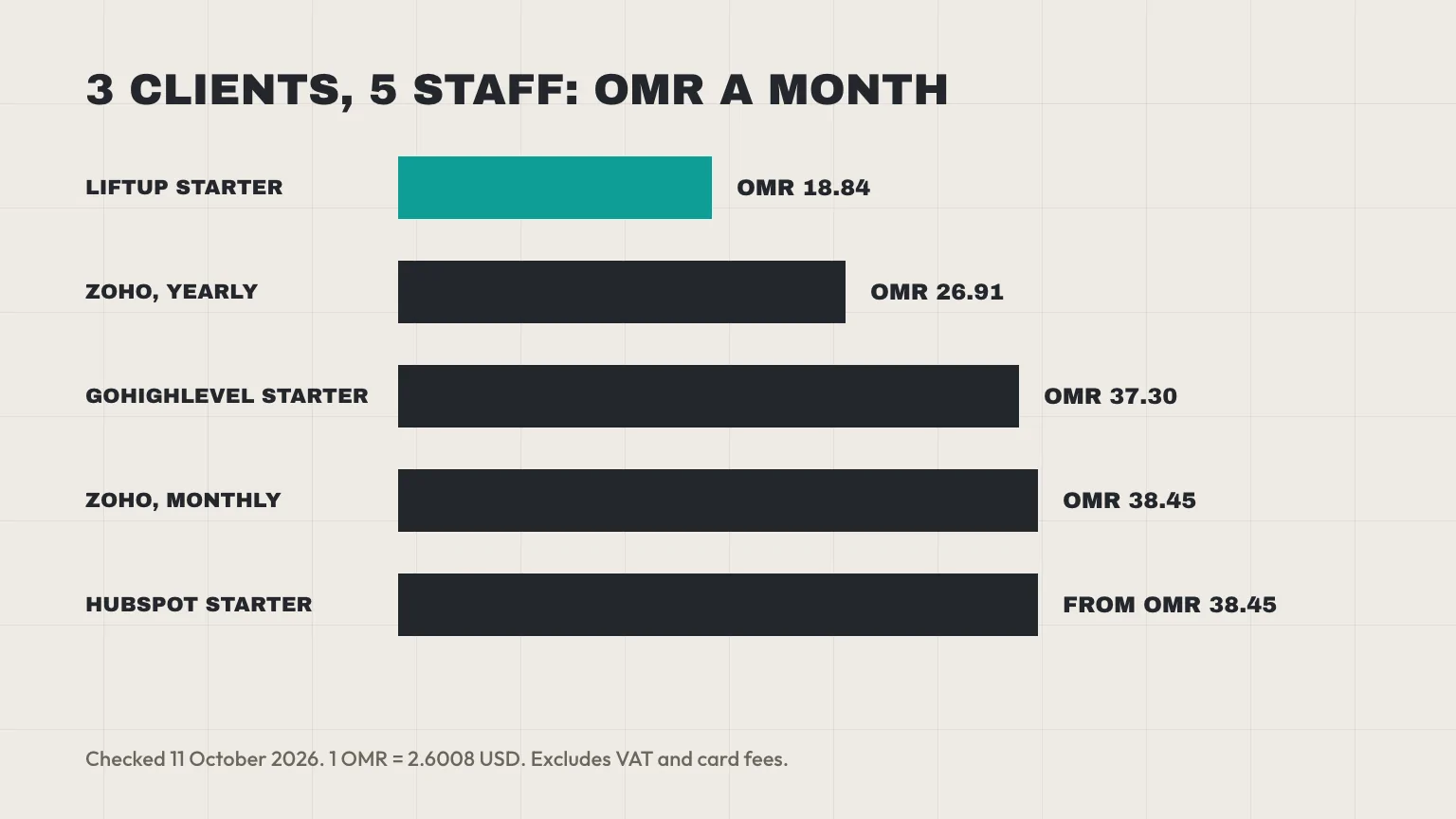
Costs for a small digital marketing agency: three clients, five staff
| Tool and plan | USD a month | OMR a month | What you get | What’s missing |
|---|---|---|---|---|
| LiftUp Starter | $49 | 18.84 | 3 products, 5 users, 1,000 leads a month | SMS, WhatsApp, calling |
| GoHighLevel Starter | $97 | 37.30 | 3 sub-accounts, unlimited users | Phone, SMS, email and AI usage billed on top |
| Zoho CRM Standard, billed yearly | $70 | 26.91 | 5 users at $14 each | Reply deadlines; per-client orgs stop at 5 |
| Zoho CRM Standard, billed monthly | $100 | 38.45 | 5 users at $20 each | Same |
| HubSpot Sales Hub Starter | from $100 | from 38.45 | 5 seats from $20 each | Reply deadlines; brands need Enterprise |
At this size LiftUp is the cheapest row, and Zoho on a yearly plan costs about OMR 8 more. Zoho could give each of three clients its own organisation, but that is three separate setups to run. With LiftUp, each client’s leads, forms and key sit in their own product under one login, and every lead carries a reply deadline.
Costs for a bigger digital marketing agency: eight clients, eight staff
| Tool and plan | USD a month | OMR a month | What you get |
|---|---|---|---|
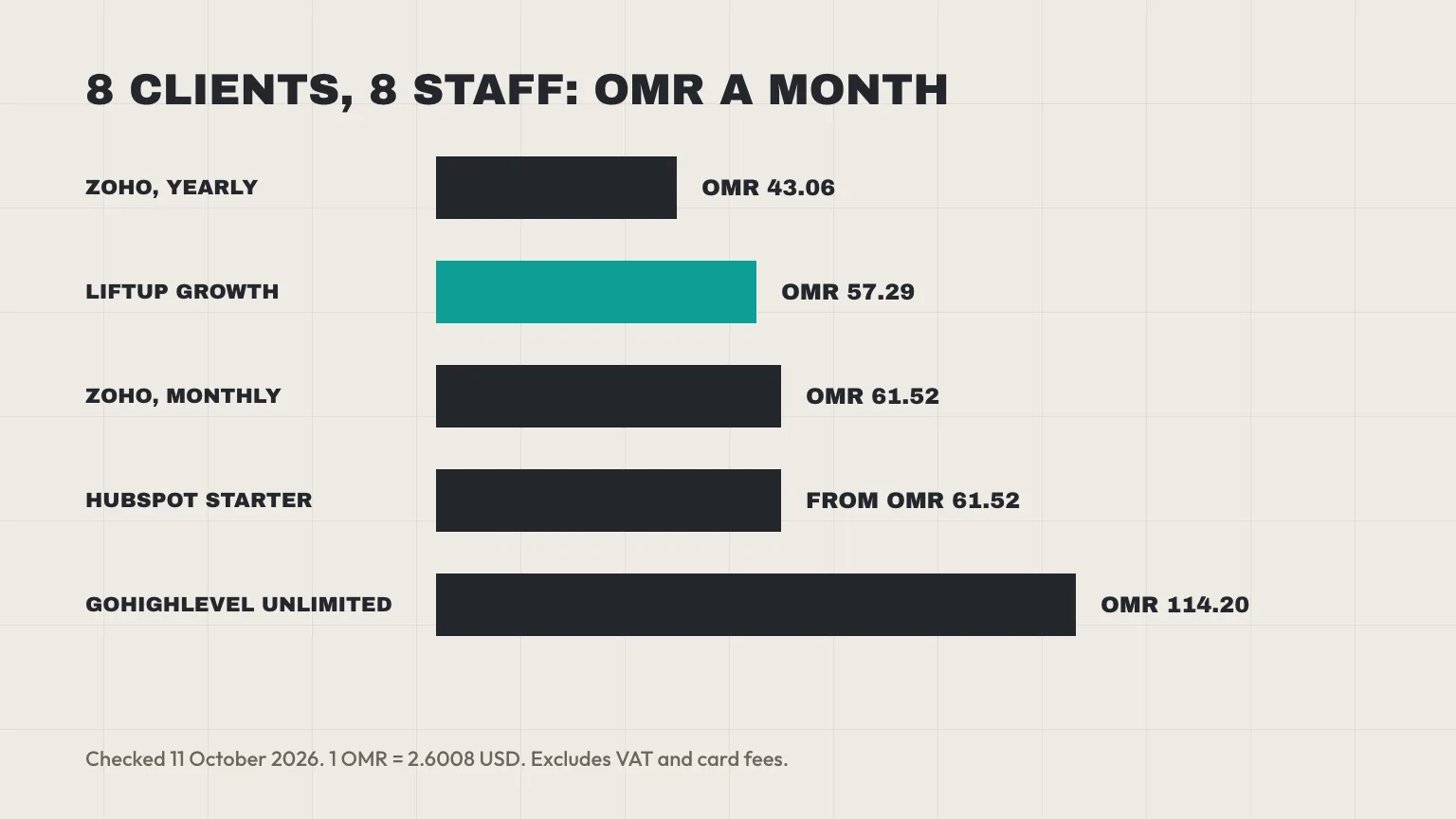
| LiftUp Growth | $149 | 57.29 | 10 products, 20 users, 10,000 leads a month |
| GoHighLevel Unlimited | $297 | 114.20 | Unlimited sub-accounts and users |
| Zoho CRM Standard, billed yearly | $112 | 43.06 | 8 users at $14 each |
| Zoho CRM Standard, billed monthly | $160 | 61.52 | 8 users at $20 each |
| HubSpot Sales Hub Starter | from $160 | from 61.52 | 8 seats from $20 each |
Here, though, per-seat pricing wins on raw cost. Zoho’s yearly plan is about OMR 14 cheaper than LiftUp Growth, because 6 to 10 users is where a flat plan is weakest. Still, Zoho’s cap of five organisations would stop you giving eight clients one each, so you’d be back to a client field in one list.
GoHighLevel is the real agency rival, and its pricing page lists Starter at $97, Unlimited at $297 and Agency Pro at $497, with unlimited users on all three. It has SMS, calls and funnels, while LiftUp has none of them. Usage is the catch, because phone, SMS, email and AI are billed separately. Our LiftUp and GoHighLevel comparison sets the two out feature by feature.
HubSpot prices Sales Hub Starter from $20 per seat a month in its product catalog. It doesn’t say whether that figure assumes annual billing, so treat the HubSpot rows as a floor.
VAT on a dollar bill
LiftUp bills in US dollars, so your bank converts a rial card’s charge at its own rate. Oman’s default VAT rate is 5%, and the Tax Authority’s e-commerce guide describes a reverse charge for a VAT-registered business that buys a service from a supplier abroad. For a fully taxable business it is therefore mostly a reporting step, with no net tax to pay.
This is general information, not legal or tax advice, so ask your accountant how a dollar-billed subscription is treated in your books.
Set up CRM for digital marketing agency clients, one product each
In LiftUp, a product is one client’s website. Leads, blog posts, forms and the API key belong to a product, and a switcher in the top bar decides which one you’re looking at. Starter includes 3 products and Growth 10. If you need more, each extra product costs $15 a month (OMR 5.77).
Create a product per client
Name each product after the client, then set it up before you hand over the website. First create the product, then copy its key, and note which form belongs on which page. If a client leaves, the other products carry on untouched.
Connect each client’s form
Each client’s site posts a new enquiry to one endpoint with that product’s key in an Authorization: Bearer or X-Api-Key header. The key ties the lead to the right product, so a form can’t file a lead under another client by mistake. LiftUp stores keys as hashes, and rotating one key leaves the others alone.
The response carries the lead’s score from 0 to 100 and its reply deadline. You can also pass lead_source and source_page to record where the enquiry came from. Our guide to a Next.js contact form that posts to a CRM shows the request and a route handler, and the same pattern works for WordPress, or for any site that can send a POST.
Custom fields and routing per client
A dental clinic asks for the treatment, while a property firm asks for the budget. Custom fields belong to one product, so each client gets the questions it needs without cluttering the others. Workflow rules are tied to one product as well and never fire for another client’s leads.
Lead routing works differently. Routing rules are set once for the whole workspace and switched on per product, but each rule can name a product. So a rule that sends enquiries with “villa” in the topic to one salesperson should name the property client, or it will catch matching enquiries from every client.
Alerts, deadlines and analytics per client
Each product can have its own Slack incoming-webhook URL, so a client’s new leads land in a channel you name after them. The reply deadline depends on the score: 4 hours at 70 or above, 12 hours at 40 or above, and 24 hours below that. The clock stops once someone emails the lead or moves it out of New. Our lead response SLA guide explains how to set the bands; SLA here simply means your promise on reply time.
Deadlines count plain hours from the moment the lead arrives. We haven’t confirmed any pause for Friday or Saturday, so a Thursday evening enquiry can fall due on the weekend. Either put someone on a weekend rota or tell clients how the clock runs.
On Starter and above, each product can also link its own Google Analytics 4 property and Search Console site. Keep each client’s property in the client’s own Google account where you can, so they keep their data if they leave. Then, to see which pages produce leads, follow our GA4 and CRM method.
What stays shared across your clients
Products separate the data, but they don’t separate everything. An agency owner should know where the walls end.
| Separate for each client | Shared across all clients |
|---|---|
| Leads and the lead list | Your team and their roles |
| Embed forms and the API key | Pipeline stages |
| Custom fields | The monthly lead allowance |
| Workflow rules | Lead routing rules and the duplicate check on CSV import |
| Blog posts | Your login and workspace |
| Slack alert URL, GA4 and Search Console link | Branding on booking pages and emails |
People and stages
Anyone whose role can switch products can open every client’s leads, because LiftUp has no setting that limits one person to one product. You can restrict a sales role to the leads assigned to them, but that follows the assignment, not the client. Pipeline stages are workspace-wide too, so name them generically, such as New, Contacted, Qualified and Won, rather than after one client’s sales process. For the longer reasoning on shared versus separate, see our guide for groups of companies in Oman.
The lead allowance
This one catches agencies out, because the monthly allowance is counted across the whole account, not per product. Starter includes 1,000 leads a month across all three clients. If one client’s ad campaign sends 800 enquiries, your other two clients have 200 between them. Once the allowance is full, LiftUp refuses new leads from every client until the month turns or you upgrade.
So estimate each client’s monthly volume before you promise a number. Growth raises the allowance to 10,000 a month, but one large campaign can still use a big share of it.
Import, login and branding
A CSV import skips any row whose email already exists anywhere in the account. If someone enquired with two of your clients, the second client’s import will skip them, because the lead already sits in the first client’s product. Each login also belongs to one workspace, and an email address can belong to only one.
Branding is set once per workspace, not per product. Booking pages carry a “Powered by LiftUp” mark, and emails to meeting guests go out under your workspace’s name, which is your agency’s rather than your client’s. There’s no client portal and no client-only login.
Who LiftUp isn’t for: digital marketing agency needs it can’t meet
LiftUp isn’t for an agency that needs any of these inside the CRM:
- A WhatsApp inbox, SMS or calling, because LiftUp has none of them.
- Logins where each client sees only its own leads.
- Proposals, invoicing or project management for your own work.
- An interface in Arabic, since LiftUp is in English.
The WhatsApp gap matters in Muscat, where plenty of your clients’ customers would rather answer on WhatsApp than by email. If that’s most of the work, pair LiftUp with a WhatsApp tool, or pick a platform that includes one. LiftUp is the lead inbox, the score and the deadline, while the conversation happens elsewhere.
A one-week CRM rollout for your digital marketing agency
Sunday is Oman’s first working day, so the week runs Sunday to Thursday.
- Sunday: list your clients and their monthly enquiry counts, then check the total against the plan’s lead allowance.
- Monday: create a product for each client, then name your pipeline stages.
- Tuesday: add each client’s custom fields and a Slack URL, and copy each key into a password manager.
- Wednesday: point the forms at the API and send a test lead from each site, then check that it lands in the right product with a score and a deadline.
- Thursday: import old leads from a spreadsheet, and agree who watches which channel. After that, tell each client where its enquiries now go.
Run the old inbox alongside for a week. Then retire it, but only after the test leads and the first real ones match.
The monthly client report in three numbers
Clients rarely want a dashboard. What they want to know is whether the campaign worked, and three numbers answer that:
- Leads: how many enquiries arrived this month.
- Reply speed: how fast the first reply went out. The lead list shows the average hours to first reply over the last 30 days, and each lead is marked met or late against its deadline.
- Top source: which page or campaign sent the most, using the source you recorded at intake.
At month end, switch to the client’s product and export its leads to CSV or XLSX, which works on any plan and covers only that product. The created date, source and page columns give you the first and third numbers. The export doesn’t carry the deadline result, though, so take reply speed from the lead list. Your own team can also open Insights across all products at once.
Next step
Before you choose a CRM for digital marketing agency clients, bring your client list and each site’s monthly enquiry count, and check them against the Starter and Growth allowances. If the split into products fits, read our multi-product page, then book a 30-minute LiftUp demo and we’ll set up your first client’s product with you.
Frequently asked questions
Which CRM suits an agency in Muscat best?
It depends on the job. For your own prospects and retainers, a per-seat tool such as Zoho or HubSpot often fits, and at 6 to 10 users it can cost less. For capturing and tracking enquiries from each client's website, a CRM with one space per client, such as LiftUp, keeps the leads apart.
Can one CRM account hold several agency clients?
Yes, if the tool separates clients inside one account. In LiftUp each client is a product with its own leads, forms, custom fields and API key. Staff, pipeline stages and the monthly lead allowance are shared across all of them.
Can I show a client only their own leads?
Not in LiftUp. It has no client logins, and anyone whose role can switch products can open every product. Send clients an export or a report from their product instead.
Does LiftUp work with WhatsApp, SMS or calls?
No. LiftUp has no WhatsApp inbox, SMS or calling. If your clients' customers mostly reply on WhatsApp, pair it with a WhatsApp tool or choose a platform that includes one, such as GoHighLevel.
What does an agency CRM cost in Omani rials?
At the fixed peg of 2.6008 dollars to the rial, checked on 11 October 2026, LiftUp Starter ($49) is OMR 18.84 a month and Growth ($149) is OMR 57.29. GoHighLevel Starter ($97) is OMR 37.30, and eight Zoho Standard seats billed yearly ($112) are OMR 43.06.
Does an Omani agency pay VAT on a dollar-billed CRM?
Oman's default VAT rate is 5%, and the Tax Authority's e-commerce guide describes a reverse charge when a VAT-registered business buys a service from a supplier abroad. Treatment depends on your registration, so ask your accountant. This is general information, not tax advice.
What happens when one client uses up the lead allowance?
The allowance is counted across the whole account. When it is full, LiftUp refuses new leads from every client until the month turns or you upgrade. Check each client's expected volume before you pick Starter or Growth.

Abidhusain Chidi
Founder & CEO, QalbIT Infotech
Abidhusain Chidi is the founder and CEO of QalbIT Infotech, a software agency in Ahmedabad building web and SaaS products since 2018. He's also CTO at Seekly, an Australian revenue intelligence platform, and is building LiftUp. He writes about CRM, SaaS operations, and shipping multiple products as a small team.
See it live
Watch LiftUp run your whole growth stack
One console for CRM, content, AI editorial and insights — book a 30-minute walkthrough tailored to your team.
Book a demo